Wiki
Teaching
Existing English translations were reused. 3 current source blocks remain in Simplified Chinese, without triggering paid translation.
Only the most commonly used methods for implementing a certain writing style are covered; some very obscure methods are not discussed in this article, as they are basically all implemented by another commonly used writing style.
1.Title
1.1.Usage
# 一级标题
## 二级标题
### 三级标题
#### 四级标题
##### 五级标题
###### 六级标题
1.2.Important Notes:
1.2.1.Title formatting
Spaces between symbols and text: There must be a space between the # symbol and the title text. This is a standard Markdown syntax requirement.
# 正确写法
#错误写法1.2.2.Nested Structure of Headings
The hierarchy of headings should follow a logical order and should not skip levels. A good heading structure is like a book's table of contents:
Recommended hierarchy:
# 主题:人工智能概述

## 第一部分:基础概念
### 什么是人工智能
### 发展历史
#### 早期发展(1950-1980)
#### 现代发展(1980至今)

## 第二部分:应用领域
### 自然语言处理
### 计算机视觉
### 机器学习
#### 监督学习
#### 无监督学习
#### 强化学习
Incorrect structures to avoid:
# 主标题
### 直接跳到三级标题(不推荐)
## 然后才是二级标题1.2.3.Best practices for title numbering
Automatic numbering vs manual numbering:
Many Markdown processors and editors support automatic generation of heading numbers, so manual numbering is usually unnecessary in the source text:
# 引言
## 背景
## 目标
# 方法论
## 数据收集
## 分析方法
Title anchor:
Most Markdown processors automatically create anchors for headings to facilitate in-page navigation:
[跳转到方法论部分](#方法论)Suggested title length:
- Keep titles concise and clear, generally no more than 10 Chinese characters or 20 English characters
- Use descriptive words and avoid vague titles such as "Other" or "Miscellaneous"
- A colon may be used to separate the topic and subtopic
2.Text format
2.1.newline usage
Markdown paragraphs have no special formatting; just write the text directly,For a line break within a paragraph, use two or more spaces or press Enter (commonly used).

2.2.Font Usage
Text emphasis is an important technique in writing, and Markdown provides a concise way to achieve bold and italic effects.
Markdown can use the following font styles: bold and italic.
**Bold syntax:** Use two asterisks ** (commonly used) or two underscores __ to surround the text:
这是**粗体文字**使用星号**Italic syntax:** Surround the text with a single asterisk * (commonly used) or a single underscore _:
这是*斜体文字*使用星号**Bold-italic combination:** Use three asterisks *** (commonly used) or three underscores ___.
***粗斜体文本***
3.List
3.1.unordered list
Unordered lists use an asterisk (*), plus sign (+), or **minus sign (-)** as the list marker. After these markers, add a space, and then fill in the content:
* 第一项
* 第二项
* 第三项

+ 第一项
+ 第二项
+ 第三项


- 第一项
- 第二项
- 第三项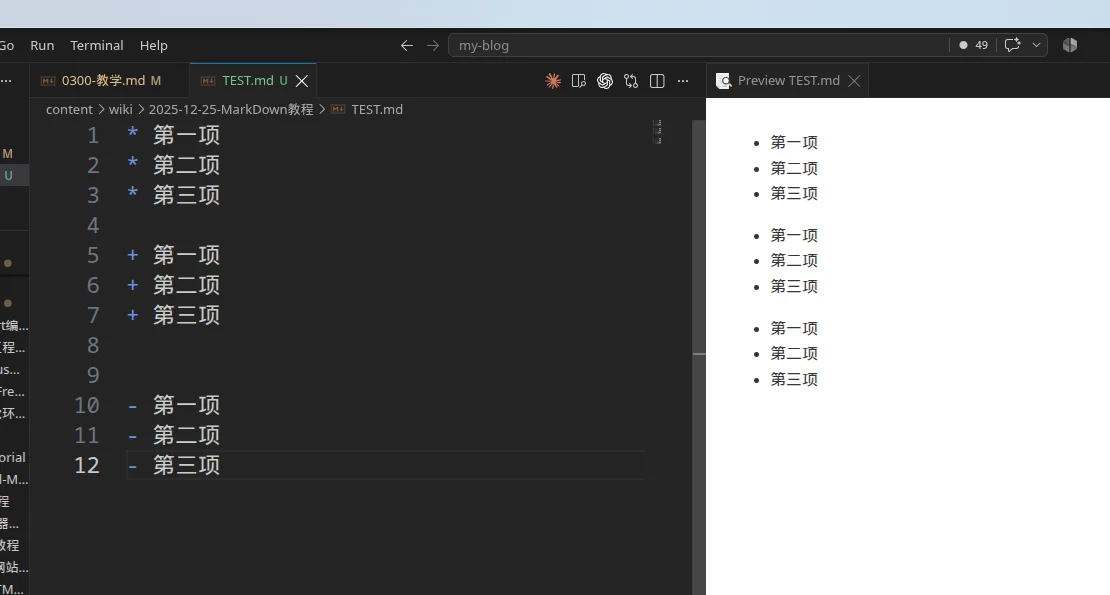
Selection recommendations:
- It is recommended to use the minus sign - uniformly, as it is visually clearer.
- Maintain a consistent marking style within the same document.
- There must be a space after the marking symbol.
3.2.Ordered list
3.2.1.Usage
An ordered list is used to present steps or items that require a specific order. An ordered list usesa number followed by a . periodto indicate it, such as:
1. 第一项
2. 第二项
3. 第三项
3.2.2.Precautions
The numbers need not be consecutive:
Markdown automatically corrects the number order:
1. 第一项
3. 第二项(实际显示为2)
7. 第三项(实际显示为3)
Starting from the specified number: (but it must be consecutive)
5. 第五项
6. 第六项
7. 第七项
3.3.List nesting
Nested rules:
- Sublists should be indented by 2-4 spaces (4 is recommended, i.e., 1
TAB). - Keep the indentation length consistent.
- Unlimited nesting levels are possible, but in practice it is recommended not to exceed 3 levels.
3.3.1.List Nesting Techniques
Lists can be nested to create multi-level structures:
Nested unordered lists:
- 水果
  - 苹果
    - 红苹果
    - 绿苹果
  - 香蕉
  - 橙子
- 蔬菜
  - 胡萝卜
  - 白菜
Ordered list nesting:
1. 准备阶段
   1. 收集资料
   2. 制定计划
2. 执行阶段
   1. 开始实施
   2. 监控进度
3. 总结阶段
Mixed nesting:
1. 主要任务
   - 子任务A
   - 子任务B
     1. 详细步骤1
     2. 详细步骤2
   - 子任务C
2. 次要任务
For mixed nested lists, simply add two or **four spaces (one tab)** before the options in the sublist.
3.4.Task list (checkbox list)
任务列表是 GitHub 风格 Markdown 的扩展功能,现在被广泛支持:
Basic syntax:
- [ ] 未完成的任务
- [x] 已完成的任务
- [ ] 另一个未完成的任务-,[,]and后面的文字there isa space.

Practical application example:
## 项目待办清单

### 设计阶段
- [x] 需求分析
- [x] 原型设计
- [ ] UI 设计

### 开发阶段
- [ ] 前端开发
  - [x] 页面布局
  - [ ] 交互功能
  - [ ] 响应式适配
- [ ] 后端开发
  - [ ] 数据库设计
  - [ ] API 开发
  - [ ] 性能优化

### 测试阶段
- [ ] 单元测试
- [ ] 集成测试
- [ ] 用户验收测试
Usage Tips:
- 方括号内的空格和 x 很重要:[ ] 和 [x]
- 可以与嵌套列表结合使用
- 在项目管理、学习计划、生活清单中特别有用
- 某些编辑器支持点击复选框来切换状态
3.5.Advanced List Techniques
A list item contains multiple paragraphs:
1. 第一项

   这是第一项的详细说明,需要与列表项对齐缩进。

   还可以包含第二段内容。

2. 第二项

   > 可以在列表项中使用引用
Line break in list items:
- 这是一个很长的列表项,
  需要换行显示,注意第二行需要与第一行对齐
- 另一个列表项
By mastering these basic syntax rules, you are already able to create Markdown documents with clear structure and standardized formatting. These syntax rules are the most commonly used in everyday writing, and mastering them proficiently will greatly improve your document writing efficiency.
4.Blockquote
Blockquotes are used to highlight important information, quote others' viewpoints, or create visual hierarchy.
4.1.Use of a single-level reference
Basic syntax:
To create a Markdown blockquote, use the > symbol at the beginning of a paragraph, followed immediately bya spacesymbol:
> 区块引用1
> 区块引用2
Blockquote:
> 这是引用的第一行。
> 这是引用的第二行。
>
> 这是引用的第二段。
Simplified notation (not recommended):
Use > only on the first line; the remaining lines will automatically be included in the quote:
> 这是一个长引用,
包含多行内容,
只需要在第一行使用 > 符号。
4.2.Multi-level nested quotation
In addition, blocks can be nested. A single > symbol is the outermost level, two > symbols indicate the first level of nesting, and so on:
> 最外层
> > 第一层嵌套
> > > 第二层嵌套
Practical application example:
> **用户反馈**:这个功能很有用!
>
> > **开发团队回复**:感谢您的反馈,我们会继续优化。
> >
> > > **项目经理补充**:预计下个版本会有更多改进。
4.3.Other elements within the blockquote
4.3.1.Use a list in a block
An example of using a list in a block is as follows:
> 区块中使用列表
> 1. 第一项
> 2. 第二项
> - 第一项
> - 第二项
> - 第三项
4.3.2.Use blocks in lists
If you want to put a block inside a list item, you need to add a four-space indentation before the >.
An example of using blocks in a list is as follows:
- 第一项
    > 区块引用1
    > 区块引用2
- 第二项
4.3.3.Other elements
Quoted blocks can contain almost all other Markdown elements.
Include title:
> ## 重要提醒
>
> 请在操作前仔细阅读文档,避免数据丢失。
Includes code:
> 要运行这个脚本,请使用以下命令:
>
> ```bash
> npm install
> npm start
> ```
>
> 执行后会在 `http://localhost:3000` 看到结果。
Includes links and images:
> 📚 **推荐阅读**
>
> 详细信息请参考 [官方文档](https://example.com)
>
> 
4.4.Best practices for citations
Quotation of famous sayings and aphorisms
> "在软件开发中,最昂贵的错误就是构建正确的系统错误的方式,或者构建错误的系统正确的方式。"
>
> — Barry Boehm,软件工程专家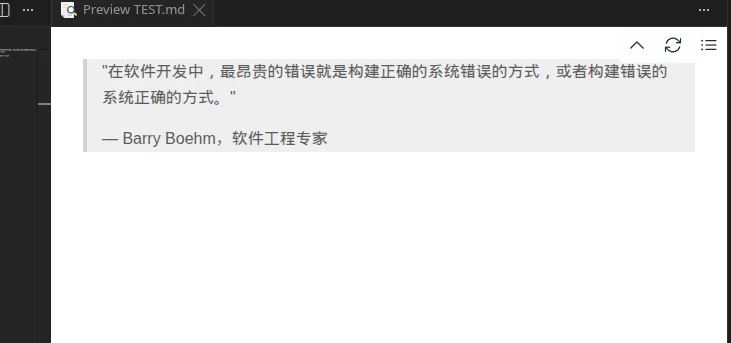
Important Information Notice
> ✅ **成功**
>
> 配置已保存并生效。系统将在下次重启时应用新设置。


> ⚠️ **警告**
>
> 此操作不可逆转,请确保已备份重要数据。


> ❌ **错误**
>
> 连接数据库失败,请检查网络连接或联系系统管理员。


> ℹ️ **提示**
>
> 首次使用需要进行账户验证,验证邮件已发送到您的邮箱。
References in the document structure
Section summary:
# 第一章:项目概述

> **本章要点**
>
> - 了解项目背景和目标
> - 掌握核心功能特性
> - 熟悉技术架构设计
Version Update Notes:
## v2.1.0 更新内容

> **重大变更**
>
> ⚠️ API 接口路径已调整,旧版本客户端需要更新
>
> 详见 [迁移指南](./migration-guide.md)
5.Code
Markdown provides multiple ways to display code, from simple inline code to complex code blocks, meeting code display needs in different scenarios.
5.1.Inline code
If it is a function or code fragment within a paragraph, it can be wrapped in backticks (`), for example:
C++23打印使用`std::print()` 函数
Common usage examples:
- Function name: use
console.log()to output information - Variable name: assign the value to
userNamevariable - Command line: run
npm installto install dependencies - Keyboard key: press
Ctrl+Cto copy the content - File name: edit
index.htmlfile

Special character escaping
When a backtick or other special character needs to be displayed in inline code, escaping is required.
-
Method to display backticks:
Usedouble backticksto enclosea single backtick:
``使用 `反引号` 包围代码``
-
Handling other special characters:
- HTML tags: element
- Mathematical symbols: calculate x + y = z
- Special symbols: use to represent a space
5.2.code block
5.2.1.Indented code block (rarely used)
Code blocks use 4 spaces or one tab (Tab key).
Syntax format:
正常文本段落

    这是缩进式代码块
    每行前面有四个空格
    保持代码的原始格式

继续正常文本
    #include <print>

    int main(int argc,char ** argv)
    {
        (void)argc;
        (void)argv;

        std::print("Hello World!\n");
        std::println("Hello World!");
        return 0;
    }
5.2.2.Triple backtick code block (commonly used)
You can also wrap a section of code with ``` and specify a language (or leave it unspecified):
5.2.2.1.Do not specify language
Multi-line code content can contain blank lines preserve original indentation

Notes:
- Indented code blocks need blank lines before and after to separate them
- All code lines must maintain consistent indentation
- Syntax highlighting is not supported
- When used in a list, 8 spaces of indentation are required
5.2.2.2.Language identification and syntax highlighting
Adding a language identifier after the triple backticks enables syntax highlighting.
For exampleC++:
#include <print>

int main(int argc,char ** argv)
{
    (void)argc;
    (void)argv;

    std::print("Hello World!\n");
    std::println("Hello World!");
    return 0;
}
Common programming languages
| Language / Type | Recommended identifier | Common identifier / Alias | Example |
|---|---|---|---|
| C | c |
C |
```c |
| C++ | cpp |
c++, cc, cxx |
```cpp |
| C# | csharp |
cs, c# |
```csharp |
| Objective-C | objective-c |
objc |
```objective-c |
| Java | java |
— | ```java |
| Kotlin | kotlin |
kt |
```kotlin |
| Python | python |
py |
```python |
| JavaScript | javascript |
js |
```javascript |
| TypeScript | typescript |
ts |
```typescript |
| JSX | jsx |
— | ```jsx |
| TSX | tsx |
— | ```tsx |
| Go | go |
golang |
```go |
| Rust | rust |
rs |
```rust |
| Swift | swift |
— | ```swift |
| Dart | dart |
— | ```dart |
| PHP | php |
— | ```php |
| Ruby | ruby |
rb |
```ruby |
| Lua | lua |
— | ```lua |
| Perl | perl |
pl |
```perl |
| Scala | scala |
— | ```scala |
| Groovy | groovy |
— | ```groovy |
| Haskell | haskell |
hs |
```haskell |
| Elixir | elixir |
ex |
```elixir |
| Erlang | erlang |
erl |
```erlang |
| Julia | julia |
jl |
```julia |
| R | r |
— | ```r |
| MATLAB | matlab |
— | ```matlab |
| Fortran | fortran |
f90, f95 |
```fortran |
| Assembly | asm |
assembly |
```asm |
| x86 Assembly | x86asm |
x86 |
```x86asm |
| WebAssembly | wasm |
wat |
```wasm |
| Solidity | solidity |
sol |
```solidity |
| Verilog | verilog |
v |
```verilog |
| SystemVerilog | systemverilog |
sv |
```systemverilog |
| VHDL | vhdl |
— | ```vhdl |
Web / Data Formats
| Language / Type | Recommended identifier | Common identifiers / aliases | Example |
|---|---|---|---|
| HTML | html |
— | ```html |
| CSS | css |
— | ```css |
| SCSS | scss |
— | ```scss |
| Sass | sass |
— | ```sass |
| Less | less |
— | ```less |
| Vue | vue |
— | ```vue |
| Svelte | svelte |
— | ```svelte |
| JSON | json |
— | ```json |
| JSON5 | json5 |
— | ```json5 |
| YAML | yaml |
yml |
```yaml |
| XML | xml |
— | ```xml |
| TOML | toml |
— | ```toml |
| INI | ini |
— | ```ini |
| CSV | csv |
— | ```csv |
| GraphQL | graphql |
gql |
```graphql |
| Protocol Buffers | protobuf |
proto |
```protobuf |
| Markdown | markdown |
md |
```markdown |
| reStructuredText | rst |
— | ```rst |
| LaTeX | latex |
tex |
```latex |
| SVG | svg |
xml |
```svg |
Shell / Command line
| Language / Type | Recommended identifier | Common identifier / Alias | Example |
|---|---|---|---|
| Bash | bash |
sh, shell |
```bash |
| POSIX Shell | sh |
shell |
```sh |
| Zsh | zsh |
— | ```zsh |
| Fish | fish |
— | ```fish |
| PowerShell | powershell |
ps1 |
```powershell |
| Windows Batch | batch |
bat, cmd |
```batch |
| Console / Terminal session | console |
shell-session |
```console |
| Plain text | text |
plaintext, txt |
```text |
Build / DevOps / Configuration
| Language / Type | Recommended identifier | Common identifiers / aliases | Examples |
|---|---|---|---|
| CMake | cmake |
— | ```cmake |
| Makefile | makefile |
make |
```makefile |
| Dockerfile | dockerfile |
docker |
```dockerfile |
| Nginx | nginx |
— | ```nginx |
| Apache | apache |
apacheconf |
```apache |
| Git Config | gitconfig |
— | ```gitconfig |
| Git Ignore | gitignore |
— | ```gitignore |
| Diff | diff |
patch |
```diff |
| Terraform | terraform |
tf, hcl |
```terraform |
| HCL | hcl |
— | ```hcl |
| Ansible | yaml |
yml, ansible |
```yaml |
| GitHub Actions | yaml |
yml |
```yaml |
| Kubernetes | yaml |
yml |
```yaml |
| ROS 2 parameters | yaml |
yml |
```yaml |
| ROS Launch XML | xml |
— | ```xml |
| ROS Launch Python | python |
py |
```python |
Database / Query Language
| Language / Type | Recommended identifier | Common identifiers / aliases | Example |
|---|---|---|---|
| SQL | sql |
— | ```sql |
| MySQL | sql |
mysql |
```sql |
| PostgreSQL | sql |
postgresql, pgsql |
```sql |
| SQLite | sql |
sqlite |
```sql |
| PL/SQL | plsql |
— | ```plsql |
| T-SQL | tsql |
— | ```tsql |
| Cypher | cypher |
— | ```cypher |
| MongoDB Shell | javascript |
js |
```javascript |
Commonly used in robotics / embedded systems
| Language / Type | Recommended identifier | Common identifier / alias | Example |
|---|---|---|---|
| STM32 C | c |
— | ```c |
| STM32 C++ | cpp |
c++, cxx |
```cpp |
| ROS 2 C++ | cpp |
c++, cxx |
```cpp |
| ROS 2 Python | python |
py |
```python |
| CMakeLists.txt | cmake |
— | ```cmake |
| package.xml | xml |
— | ```xml |
| ROS 2 parameter file | yaml |
yml |
```yaml |
| URDF | xml |
— | ```xml |
| Xacro | xml |
xacro |
```xml |
| SDF | xml |
sdf |
```xml |
| Gazebo World | xml |
— | ```xml |
| Linux command | bash |
sh, shell |
```bash |
| Terminal command + output | console |
shell-session |
```console |
| Dockerfile | dockerfile |
docker |
```dockerfile |
| Docker Compose | yaml |
yml |
```yaml |
| JSON | json |
— | ```json |
| TOML | toml |
— | ```toml |
| INI / Conf | ini |
— | ```ini |
| Makefile | makefile |
make |
```makefile |
| Git Diff | diff |
patch |
```diff |
| Log / plain output | text |
plaintext, txt |
```text |
5.2.2.3.Advanced Features of Code Blocks
Line number display
Some Markdown renderers support displaying line numbers, achieved through specific syntax or configuration.
Syntax examples (partially supported):
function fibonacci(n) {
    if (n <= 1) return n;
    return fibonacci(n - 1) + fibonacci(n - 2);
}

console.log(fibonacci(10));
Or use:
const numbers = [1, 2, 3, 4, 5];
const doubled = numbers.map(x => x * 2);
const sum = doubled.reduce((a, b) => a + b, 0);
console.log(`总和: ${sum}`);
Code difference comparison
Mainstream approach:
function calculateTotal(items) {
-   let total = 0;
+   let total = 0.0;

    for (let item of items) {
-       total += item.price;
+       total += parseFloat(item.price);
    }

+   // 保留两位小数
+   total = Math.round(total * 100) / 100;
    return total;
}
Git-style diff display:
@@ -1,5 +1,8 @@
 function greetUser(name) {
-    console.log("Hello " + name);
+    if (!name) {
+        throw new Error("Name is required");
+    }
+    console.log(`Hello, ${name}!`);
 }
Language-specific differences comparison:
// 之前的代码
const oldFunction = () => {
    var x = 10;  // ❌ 使用 var
    console.log("Value: " + x);  // ❌ 字符串拼接
}

// 改进后的代码
const newFunction = () => {
    const x = 10;  // ✅ 使用 const
    console.log(`Value: ${x}`);  // ✅ 模板字符串
}
6.Link
Links are key elements that make Markdown documents interactive.
Mastering link syntax enables you to create content-rich, easy-to-navigate documents.
The method of use for the link is as follows:
[链接名称](链接地址)
[链接文字](链接地址 "可选的标题")
Or:
<链接地址>For example, a simple link:
这是一个链接 [个人网站](https://www.tungchiahui.cn)Use the link address directly:
<https://www.tungchiahui.com>
Set optional title:
这是一个链接 [个人网站](https://tungchiahui.com)
欢迎访问 [GitHub](https://github.com) 官网
这是 [百度搜索](https://baidu.com "百度一下,你就知道")
Role of the link title:
- Show tooltip information when the mouse hovers over a link
- Helps with search engine optimization and accessibility
- The title text can be placed within double quotes, single quotes, or parentheses
邮箱与电话链接:
markdown联系我:[发送邮件](mailto:tungchiahui@gmail.com)
电话联系:[拨打电话](tel:+86-188-8888-8888)
Automatic link recognition
Modern Markdown parsers typically support automatic recognition of URLs and email addresses:
URL auto-detection:
markdown直接输入网址:https://www.tungchiahui.com
用尖括号包围:<https://www.tungchiahui.com>
Automatic email recognition (but it is still recommended to add the emailmailto:):
markdown联系邮箱:tungchiahui@gmail.com
或者:<tungchiahui@gmail.com>
Note:
- The automatic recognition feature depends on the specific Markdown parser
- To ensure compatibility, it is recommended to use the standard link syntax
- Certain special characters may affect automatic recognition
Use of anchor links (common)
Anchor links are used to jump within the same document and are especially suitable for navigating long documents:
Jump to title:
## 目录
- [第一章:介绍](#第一章介绍)
- [第二章:安装](#第二章安装)
- [第三章:使用方法](#第三章使用方法)

# 第一章:介绍
这里是介绍内容...

# 第二章:安装
这里是安装说明...

# 第三章:使用方法
这里是使用说明...
Anchor rules:
- Headings automatically generate anchors
- Anchor names are usually the lowercase form of the heading
- Spaces are replaced with hyphens
- Remove special characters
Manually create an anchor point:
<a id="custom-anchor"></a>
## 自定义锚点位置

[跳转到自定义位置](#custom-anchor)
Return link at the top of the page:
[回到顶部](#)
7.Image
7.1.Usage
Images make documents more vivid and easier to understand.
Markdown's image syntax is concise and flexible.
The Markdown image syntax format is as follows:

- An exclamation mark ! at the beginning
- Followed by a pair of square brackets containing the alternative text for the image
- Followed by a pair of ordinary parentheses containing the image URL, and finally you can also enclose and add optional 'title' attribute text with quotation marks.
Relative path example:


Absolute path example:

Path usage recommendations:
- It is recommended to use relative paths to facilitate project portability.
- It is recommended to create a dedicated image folder (such as images/, assets/).
- Use meaningful file names to facilitate management.
- Note the differences in path separators across different operating systems.
Directly reference an online image:


Network Image Precautions:
- Ensure the stability and accessibility of image URLs
- Pay attention to image copyright issues
- Consider loading speed and network conditions
- It is recommended to back up important images locally
7.2.The Importance of Image alt Text
Alt text (alternative text) provides alternative information when an image cannot be displayed, and is also important for accessibility and SEO:
Good alt text example:


Alt text to avoid:
 // 太简单,没有描述性
 // 完全没有 alt 文本
 // 不描述图片内容alt text best practices:
- Concise but descriptive
- Describe the main content and purpose of the image
- Avoid redundant words such as "image" and "photo"
- For decorative images, empty alt text may be used
- Consider the context and provide meaningful information
7.3.Image size control (HTML method)
Standard Markdown does not support directly controlling image dimensions, but HTML tags can be used.
Use the HTML img tag:
<img src="image.jpg" alt="描述文字" width="300" height="200">
<img src="image.jpg" alt="描述文字" width="50%">
<img src="image.jpg" alt="描述文字" style="width: 300px; height: auto;">
Markdown still has no way to specify the height and width of an image. If you need to, you can use a regular tag.
<img src="https://cdn.tungchiahui.cn/tungwebsite/assets/images/logo.png" width="50%">
Responsive images:
<img src="image.jpg" alt="描述文字" style="max-width: 100%; height: auto;">Image alignment:
<!-- 居中对齐 -->
<div align="center">
  <img src="image.jpg" alt="居中图片" width="400">
</div>

<!-- 左对齐(默认) -->
<img src="image.jpg" alt="左对齐图片" style="float: left; margin-right: 20px;">

<!-- 右对齐 -->
<img src="image.jpg" alt="右对齐图片" style="float: right; margin-left: 20px;">7.4.Image centering and alignment (HTML method)
Method 1: HTML + CSS
<div style="text-align: center;">
  <img src="image.jpg" alt="居中图片" style="max-width: 100%;">
</div>
Method 2: Use HTML alignment attributes
<p align="center">
  <img src="image.jpg" alt="居中图片" width="400">
</p>
Method 3: Create an Image Gallery
<div style="display: flex; justify-content: space-around; flex-wrap: wrap;">
  <img src="image1.jpg" alt="图片1" style="width: 30%; margin: 10px;">
  <img src="image2.jpg" alt="图片2" style="width: 30%; margin: 10px;">
  <img src="image3.jpg" alt="图片3" style="width: 30%; margin: 10px;">
</div>
Performance optimization suggestions:
- Optimize image size and format (WebP > PNG > JPEG)
- Use appropriate image dimensions to avoid scaling large images on web pages
- Consider using image compression tools
- Prepare images in different sizes for different devices
7.5.Advanced usage of links and images
Image link combination Use an image as the clickable element of a link.
Basic syntax:
[](链接URL)Practical example:
[](https://github.com/username/project)
[](https://tungchiahui.cn "点击访问官网")Common application scenarios:
<!-- 项目徽章 -->
[](https://travis-ci.org/user/repo)
[](https://opensource.org/licenses/MIT)
<!-- 应用商店下载 -->
[](https://apps.apple.com/app/your-app)
[](https://play.google.com/store/apps/details?id=com.yourapp)8.Table
Tables and references are important content organization tools in Markdown.
Tables can clearly present structured data, while quotations are used to highlight important information or cite others' viewpoints.
In Markdown, to create a table, use | to separate different cells, and use - to separate the header row from the other rows.
8.1.Usage
The syntax format is as follows:
|  表头   | 表头  |
|  ----  | ----  |
| 单元格  | 单元格 |
| 单元格  | 单元格 |
The result of the above code is shown as follows:
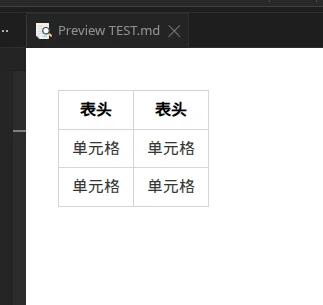
Grammar points:
- There must be a separator line between the header and data rows.
- The separator line requires at least three hyphens ---.
- The vertical bars | at both ends are optional, but it is recommended to keep them for readability.
- Strict alignment is not required, but it looks better when aligned.
Alignment
We can set the alignment of the table:
---:Set the content and title bar to be right-aligned.:---Set the content and title bar to be left-aligned.:---:Set the content and title bar to be center-aligned.
| 左对齐 | 右对齐 | 居中对齐 |
| :-----| ----: | :----: |
| 单元格 | 单元格 | 单元格 |
| 单元格 | 单元格 | 单元格 |8.2.Techniques for Handling Complex Tables
Cell content formatting
Most Markdown syntax can be used within table cells:
| 功能 | 描述 | 状态 |
|------|------|:----:|
| **用户登录** | 支持邮箱和手机号登录 | ✅ |
| *密码重置* | 通过邮箱重置密码 | ⚠️ |
| `API接口` | RESTful API 设计 | ✅ |
| [文档链接](https://example.com) | 查看详细文档 | 📖 |
Process long text
When the cell content is long, you can use the following techniques:
Line break handling:
| 项目 | 详细说明 |
|------|----------|
| 需求分析 | 1. 收集用户需求<br>2. 分析业务场景<br>3. 确定功能范围 |
| 技术选型 | 前端:React + TypeScript<br>后端:Node.js + Express<br>数据库:MongoDB |
Abbreviations and Links:
| 技术栈 | 说明 | 官网 |
|--------|------|------|
| React | 用户界面库 | [链接](https://reactjs.org) |
| Vue.js | 渐进式框架 | [链接](https://vuejs.org) |
| Angular | 完整的框架 | [链接](https://angular.io) |
Special characters in the table
Certain characters have special meanings in tables and need to be escaped:
| 字符 | 转义方法 | 示例 |
|------|----------|------|
| 竖线 | `\|` | 显示 \| 符号 |
| 反斜杠 | `\\` | 显示 \\ 符号 |
| HTML | 直接使用 | <code><div></code> |
Table Formatting Suggestions
Use Emoji and Symbols
| 状态 | 图标 | 说明 |
|:----:|:----:|------|
| 完成 | ✅ | 任务已完成 |
| 进行中 | 🔄 | 正在处理 |
| 待处理 | ⏳ | 等待开始 |
| 错误 | ❌ | 出现问题 |
| 警告 | ⚠️ | 需要注意 |9.Separator
Dividing lines are used to visually separate different parts of a document, creating a clear content hierarchy.
9.1.Three ways to write a horizontal rule
Markdown supports three ways to create a horizontal rule:
- Usingat least three hyphens (commonly used):
---- Use at least three asterisks:
***- Use at least three underscores:
___
More symbols may be used, but three is the minimum requirement: Effect of spaces: spaces may be present between symbols.
- - - - -