Wiki
Linux Environment Setup (Legacy)
Existing English translations were reused. 3 current source blocks remain in Simplified Chinese, without triggering paid translation.
(本教程为2024年1月创建的,可能与以后的版本有些出入)
1.Software to prepare
-
Latest version of CubeMX
-
Latest version of VScode
-
vcpkg package management tool
-
pyOcd (installation tutorial below)
-
ST-Link driver (installation tutorial below)
2.vcpkg installation and environment configuration
- Download dependency packages
sudo apt-get update
sudo apt-get upgrade
sudo apt-get install build-essential tar curl zip unzip
sudo apt-get install default-jre- Clone the vcpkg repository
https://github.com/microsoft/vcpkg/tree/master
git clone https://github.com/microsoft/vcpkg.git- Generate vcpkg program
cd vcpkg
sudo chmod a+x ./bootstrap-vcpkg.sh
sudo ./bootstrap-vcpkg.sh- Configure environment
vim ~/.bashrc
这个 VCPKG_HOME是vcpkg的目录
#配置vcpkg环境
export VCPKG_HOME=/home/tungchiahui/user/applications/vcpkg  #目录需要改为你的vcpkg的目录
export PATH=$VCPKG_HOME:$PATH
source ~/.bashrc
vcpkg --version
If the prompt shown in the figure appears, the installation is successful!

3.MDK5 project generation and ARMCLANG (AC6) compiler configuration
3.1.Build Generation and Compiler Configuration
-
Method 1: The compiler configuration tutorial needs to be performed on Windows. On Linux, it is currently difficult to modify compiler options. You can refer to the "Generate Project and Configure Default Compiler" section in the Windows tutorial below. (Essentially, this changes the compiler from the default AC5 to AC6.)
-
Method 2: Clone an already generated template (currently, templates are available for only a few commonly used models).
Repository link:
https://github.com/TungChiahuiMCURepos/CubeMX_CMake_Template
git clone https://github.com/TungChiahuiMCURepos/CubeMX_CMake_Template.git

3.2.Project configuration (such as initializing a GPIO port and creating a task to toggle its level)
First, copy a project template.

Rename project

Open CubeMX (and click File->Load Project at the top, or directly click the icon shown in the figure below)

Find the project, load it, and configure the project properly.


Open a terminal under the folder MDK-ARM
cd MDK-ARM
code .4.Install and activate the MDK6 plugin
Download the ARM Keil Studio Pack

Activate MDK6 plugin


5.Initial conversion of the MDK5 project and downloading dependency packages

In the bottom right corner, install all these packs that need to be installed; if any prompts appear asking for permission, allow them all.
When installing packs, it is necessary to ensure a good network environment (a network environment with magic is required),
This phase lasts 5–20 minutes, so please wait patiently. (It depends on your airport speed.)
(These operations are required only on the first run.)

This investigation can be skipped.

As shown in the figure, this indicates a successful installation.

If the environment below has already been configured, right-click uvprojx and select Convert


If the environment is not configured properly, right-click this file and select active environment (in the figure, because my environment is already configured, it shows deactive).
Then execute the Convert from the previous step.

As shown in the figure, initialization has succeeded.

6.Compile
Click the build button; if the file size remains the same, the compilation was successful.
If compilation fails, check whether an extra dot has been configured in the project file list. (See adding source files in the advanced tutorial below for the solution.)


7.How do I configure debuggers such as ST-Link on Linux?
7.1.Install pyOCD (Linux)
https://github.com/pyocd/pyOCD
First open the terminal and enter (if you are using a Debian-based system, such as Ubuntu, please refer to the tutorial below)
sudo apt install python3-pip
python3 -mpip install -U pyocd

# 如果上面的不行,则输入下方的
pip3 install -U pyocd
If it still does not work, and the prompt indicates
error: externally-managed-environment

× This environment is externally managed
╰─> To install Python packages system-wide, try apt install
    python3-xyz, where xyz is the package you are trying to
    install.
then use (Debian-based systems)
sudo apt install python3-pyocdOr directly clone the repository
git clone https://github.com/pyocd/pyOCD.git
cd pyOCD
pip3 install .
This way, pyOCD can also be installed.
Next, we need to install drivers for debuggers such as ST-Link.
pyOCD Debugger Driver Installation Official Tutorial:
https://github.com/pyocd/pyOCD/tree/main/udev
You still need to use the files in the pyOCD repository.
If you haven't cloned the repository, please clone it as soon as possible.
In the repository directory, enter the following command
cd udev
sudo cp *.rules /etc/udev/rules.d
#重启udev
sudo udevadm control --reload
sudo udevadm trigger
This way, ST-Link can be detected normally.

If it is not detected, please unplug and replug ST-Link, then click Add Device to add the device.

7.2.Test connection device
Just plug in a debugger, for example, here I plug in one connected tostm32f103c8t6ofST-link:
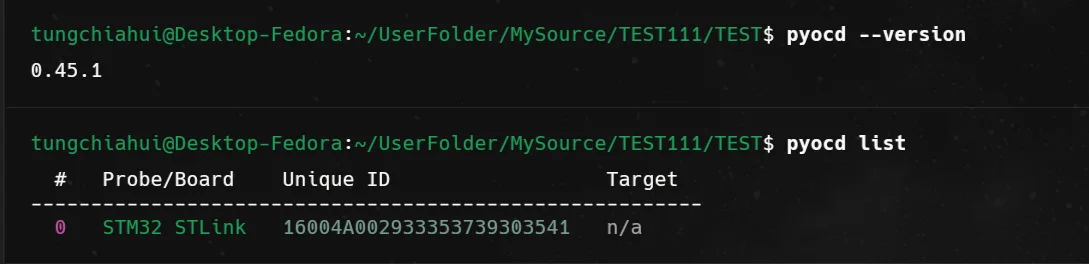
pyocd --version

pyocd list
If it is recognized normally as shown in the figure below, it means it was successful.
Further, testing can continue
pyocd list --targets | grep -i stm32f103

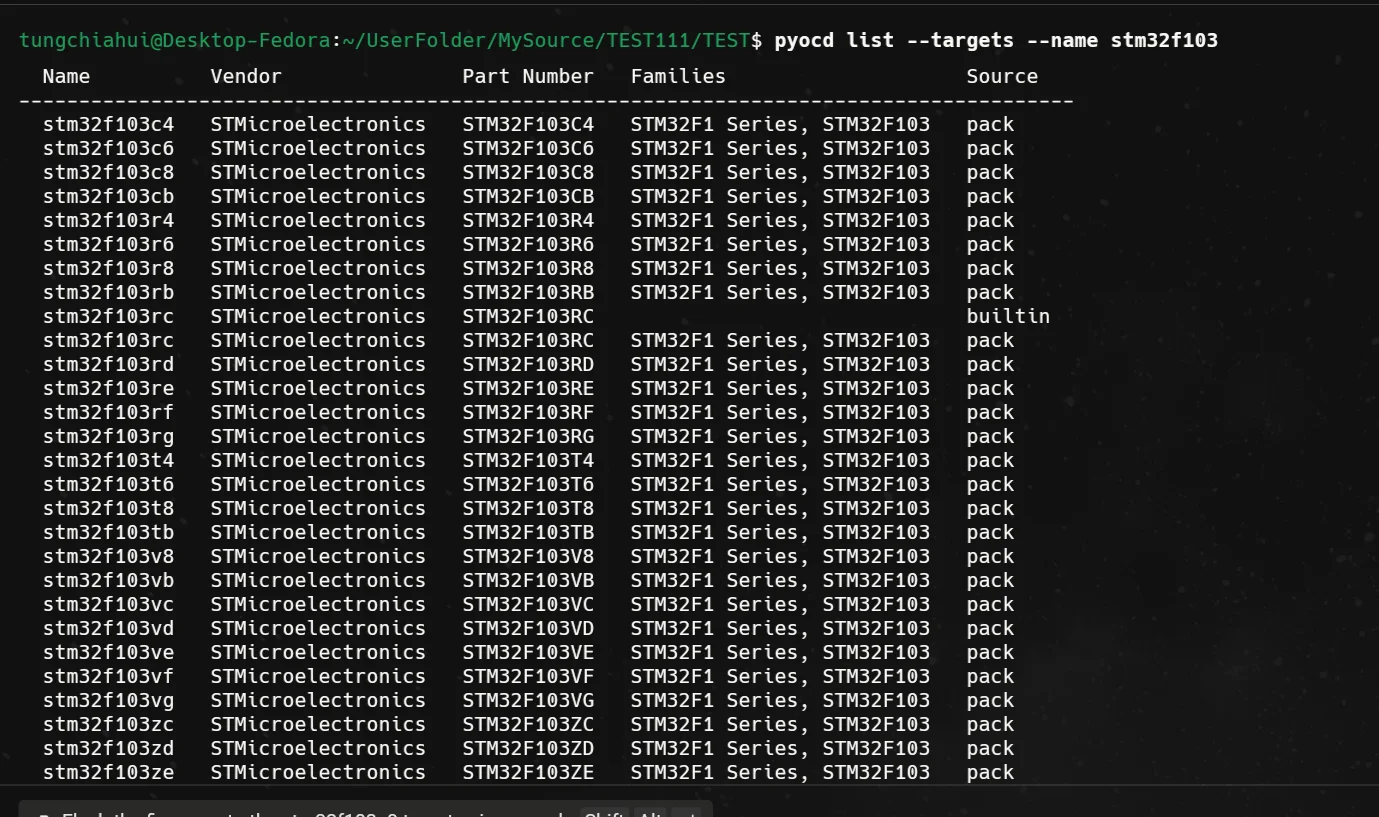
pyocd list --targets --name stm32f103
It was discovered to bestm32f103rc, and then try to connect to the device:
pyocd commander -t stm32f103rcIf successful, it usually enters the pyOCD commander:
Then you can enter: status and exit: exit
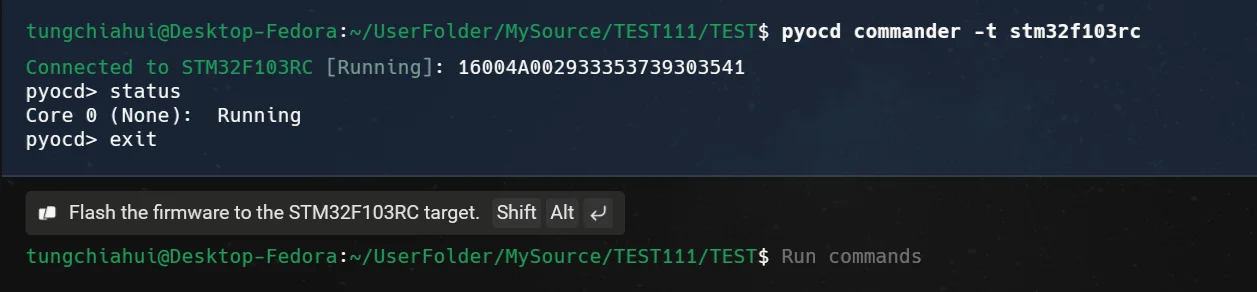
The fact that status returns Running shows that it is not merely "only enumerated the USB", but has actually connected to the target MCU.
Succeeded.
But you will notice, we clearly insertedstm32f103c8 , why is it recognized asstm32f103rc?
pyOCD 当前内置目标里确实有 stm32f103rc,但没有内置 stm32f103c8;
pyOCD 官方也说明 target 类型决定 Flash 算法、内存映射等信息,所以正式下载程序时最好不要长期拿 RC 冒充 C8。
更规范的做法是给 pyOCD 安装 STM32F103C8 对应的 CMSIS-Pack:
First check whether there is:
pyocd pack find stm32f103c8When you run this for the first time, it will download the index first, so just wait a moment (a special network environment is required).

After finding it, it shows that it is not installed:

Reinstall:
pyocd pack install stm32f103c8
Check again:
pyocd list --targets --name stm32f103It can be seen that a bunch of devices are already supported.
pyocd commander -t stm32f103c8If successful, it usually enters the pyOCD commander:
Then you can enter: status and exit: exit

7.3.Update ST-Link latest driver (Linux)
https://www.st.com/en/development-tools/stsw-link007.html#get-software
This content cannot be displayed outside of Feishu Docs at this time

Extract the downloaded file.

sudo apt install ./st-stlink-udev-rules-1.0.3-2-linux-all.debRestart VSCode to apply the changes.
(There are other related tutorial operations below, please scroll down)