Wiki
robot_description(機械人模型與關節定義)
本文由簡體中文內容確定性轉換,並受版本化術語表保護。
1.robot_description(機械人模型與關節定義)
本功能包複製於 pb2025_robot_description。為便於複用,將功能包目錄命名為 robot_description,並將 package.xml 的 <name>、CMakeLists.txt 的 project() 和 launch 中的包查找名稱同步改為 robot_description。
以下源碼路徑均相對於導航工作區 /home/tungchiahui/UserFolder/MySource/ysu2026_rm_sentry/ysu2026_rm_sentry_nav。
將複製後的 src/robot_description/resource/xmacro/pb2025_sentry_robot.sdf.xmacro 重命名為 reality_robot.sdf.xmacro,保留 simulation_robot.sdf.xmacro,刪掉本包中不再使用的 pb2025_infantry_robot.sdf.xmacro。上游 pb2025_robot_description 包保留作為參考。
之前本地包名為 ysu2026_robot_description,實車入口文件為 ysu2026_sentry_robot.sdf.xmacro;現在分別改為 robot_description 和 reality_robot.sdf.xmacro。當前相關目錄如下:
src/
├── robot_description/
│   ├── package.xml
│   ├── CMakeLists.txt
│   ├── README.md
│   ├── dependencies.repos
│   ├── launch/robot_description_launch.py
│   ├── params/robot_description.yaml
│   ├── env-hooks/gazebo.dsv.in
│   ├── rviz/visualize_robot.rviz
│   └── resource/
│       ├── xmacro/
│       │   ├── reality_robot.sdf.xmacro
│       │   └── simulation_robot.sdf.xmacro
│       └── models/
│           ├── mid360/
│           ├── industrial_camera/
│           └── rplidar_a2/
└── rmoss_gz_resources/
    └── resource/models/ysu2026_sentry_robot/
        ├── ysu2026_sentry_robot.def.xmacro
        ├── model.sdf.xmacro
        ├── model.config
        └── model.sdf
robot_description 是通用的描述加載與 TF 發佈功能包;reality_robot 和 simulation_robot 分別是實車、仿真描述入口。底層 ysu2026_sentry_robot.def.xmacro 定義當前車型的底盤、輪子、雲台和裝甲板結構,保留車型名稱。兩份入口仍通過 include 和宏調用使用它。
入口名稱通用化後,當前機械尺寸、雷達安裝位置和關節狀態來源仍是當前機械人的配置。換車時可以更換入口中的模型 include、宏調用與安裝參數,也可以用 robot_xmacro_file 指定其他描述文件、用 params_file 指定對應節點配置。
1.1.擴展知識點
1.1.1.xmacro(機械人模型宏文件)
- 變量基本完全對應
xacro
<xacro:property name="wheel_radius" value="0.076"/>

<cylinder radius="${wheel_radius}" length="0.03"/>
xmacro
<xmacro_define_value name="wheel_radius" value="0.076"/>

<cylinder>
    <radius>${wheel_radius}</radius>
    <length>0.03</length>
</cylinder>- 宏定義也幾乎一一對應
xacro
<xacro:macro name="wheel" params="name radius width">
    <link name="${name}">
        ...
    </link>
</xacro:macro>
調用:
<xacro:wheel
    name="front_left_wheel"
    radius="0.076"
    width="0.03"
/>
xmacro
<xmacro_define_block
    name="wheel"
    params="name radius width">

    <link name="${name}">
        ...
    </link>

</xmacro_define_block>
調用:
<xmacro_block
    name="wheel"
    name_arg="front_left_wheel"
    radius="0.076"
    width="0.03"
/>- include
xacro
<xacro:include filename="wheel.xacro"/>xmacro
<xmacro_include uri="file://wheel.sdf.xmacro"/>在當前項目中還可以看到:
<xmacro_include
    uri="model://rm25_example_robot/rm25_example_robot.def.xmacro"
/>這裏的model://是 sdformat_tools 針對 Gazebo / SDF 做的 URI 解析支持。
- ${} 表達式
xmacro 和 xacro 都支持類似:
${radius}以及數學表達式:
${2 * radius}例如:
<ixx>${m*(y*y+z*z)/12}</ixx>所以可以在宏參數中進行簡單數學運算。
- 條件
xacro
<xacro:if value="${use_lidar}">
    ...
</xacro:if>
xmacro
xmacro 中通常可以通過宏調用的 condition 控制:
<xmacro_block
    name="lidar"
    condition="${use_lidar}"
    ...
/>
條件為真時展開這個宏,條件為假時不展開。
- .def.xmacro
例如:
rm25_example_robot.def.xmacro這裏的.def並不是 xmacro 的特殊語法,只是一種文件命名習慣。
通常表示:這個文件主要負責定義宏。
類似:
xxx.def.xmacro
    ↓
定义机器人结构、link、joint 等宏
然後:
simulation_robot.sdf.xmacro
    ↓
include 前面的 def.xmacro
    ↓
调用其中定义的宏
    ↓
生成完整 SDF
例如以後可以寫:
ysu2026_sentry_robot.def.xmacro裏面定義:
<xmacro_define_block
    name="ysu2026_sentry_robot"
    params="chassis_height gimbal_yaw_height">

    ...

</xmacro_define_block>
然後在:
simulation_robot.sdf.xmacro中引入並調用:
<xmacro_include
    uri="model://ysu2026_sentry_robot/ysu2026_sentry_robot.def.xmacro"
/>

<xmacro_block
    name="ysu2026_sentry_robot"
    chassis_height="${chassis_height}"
    gimbal_yaw_height="${gimbal_yaw_height}"
/>
記憶:
xmacro_define_value
    ≈ xacro:property

xmacro_define_block
    ≈ xacro:macro

xmacro_block
    ≈ 调用 xacro macro

xmacro_include
    ≈ xacro:include

${...}
≈ ${...}1.2.總體框架
1.2.1.xmacro介紹(機械人模型宏文件)
這個xmacro是本項目裏自定義的一種格式,為了實現:
                  ┌→ SDF → Gazebo
.sdf.xmacro ──────┤
                  └→ SDF → URDF → robot_state_publisher
而之前學過的xacro+urdf,這個項目主要是xmacro+sdf。(對比着理解)
然後我們之前接觸的都是
robot.urdf.xacro
      ↓
    xacro
      ↓
robot_description
      ↓
robot_state_publisher
      ↓
TF
而這個項目是:
simulation_robot.sdf.xmacro
          ↓
      xmacro4sdf
          ↓
         SDF
       ↙     ↘
   Gazebo    sdf2urdf
                 ↓
               URDF
                 ↓
      robot_state_publisher
                 ↓
TF| 功能 | xacro | xmacro |
|---|---|---|
| 定義變量 | <xacro:property name="r" value="0.1"/> |
<xmacro_define_value name="r" value="0.1"/> |
| 使用變量 | ${r} |
${r} |
| 數學表達式 | ${2 * r} |
${2 * r} |
| 定義宏 | <xacro:macro name="wheel" params="r w"> |
<xmacro_define_block name="wheel" params="r w"> |
| 調用宏 | <xacro:wheel r="..." w="..."/> |
<xmacro_block name="wheel" r="..." w="..."/> |
| include | <xacro:include filename="xxx.xacro"/> |
<xmacro_include uri="file://xxx.xmacro"/> |
| 條件 | <xacro:if value="${...}">...</xacro:if> |
主要通過 <xmacro_block ... condition="${...}"/> |
| namespace | xmlns:xacro=... |
不需要 |
| 參數默認值等高級功能 | 較豐富 | 簡化很多 |
1.2.2.如何先建立自己的功能包和模型包
這個sdf.xmacro會被依賴去發佈仿真裏的模型和實物的tf關係。
這裏是include了下面這個文件,所以要找這個文件。
<xmacro_include uri="model://rm25_example_robot/rm25_example_robot.def.xmacro" />他在/src/rmoss_gz_resources/resource/models/rm25_example_robot裏,
你複製下這個大文件夾,並重命名為ysu2026_sentry_robot,裏面的xmacro也命名為ysu2026_sentry_robot.def.xmacro。
這個文件裏面需要修改的是:
<!--macro defination: rm25_example_robot-->
<xmacro_define_block
    name="rm25_example_robot"
    params="sticker_type chassis_height gimbal_pitch_height gimbal_yaw_height">
把這裏的name改成
<!--macro definition: ysu2026_sentry_robot-->
<xmacro_define_block
    name="ysu2026_sentry_robot"
params="sticker_type chassis_height gimbal_pitch_height gimbal_yaw_height">接下來去修改同目錄的model.sdf.xmacro:
    <!--include defination-->
    <xmacro_include uri="model://rm25_example_robot/rm25_example_robot.def.xmacro" />

    <!--rm25_example_robot model-->
    <model name="rm25_example_robot">
        <pose>0 0 0.15 0 0 0</pose>
<xmacro_block name="rm25_example_robot" sticker_type="${global_armor_sticker_type}" chassis_height="${chassis_height}" gimbal_yaw_height="${gimbal_yaw_height}" gimbal_pitch_height="${gimbal_pitch_height}"/>把上面rm25_example_robot全部改成ysu2026_sentry_robot。
    <!--include defination-->
    <xmacro_include uri="model://ysu2026_sentry_robot/ysu2026_sentry_robot.def.xmacro" />

    <!--ysu2026_sentry_robot model-->
    <model name="ysu2026_sentry_robot">
        <pose>0 0 0.15 0 0 0</pose>
<xmacro_block name="ysu2026_sentry_robot" sticker_type="${global_armor_sticker_type}" chassis_height="${chassis_height}" gimbal_yaw_height="${gimbal_yaw_height}" gimbal_pitch_height="${gimbal_pitch_height}"/>接下來去修改同目錄的model.config:
<?xml version="1.0"?>
<model>
  <name>rmua19_standard_robot</name>
  <version>1.0</version>
  <sdf version="1.7">model.sdf</sdf>

  <author>
    <name>Lihan Chen</name>
    <email>lihanchen2004@163.com</email>
  </author>

  <description>
    The Basic Version of Standard Robot for RoboMaster University Series.
  </description>
</model>
修改成:
<?xml version="1.0"?>
<model>
  <name>ysu2026_sentry_robot</name>
  <version>1.0</version>
  <sdf version="1.7">model.sdf</sdf>

  <author>
    <name>Tung Chia-hui</name>
    <email>tungchiahui@gmail.com</email>
  </author>

  <description>
    Yanshan University RoboMaster 2026 Sentry Robot.
  </description>
</model>這裏的model.sdf不需要手動改,這玩意是自動生成的:
model.sdf.xmacro
      ↓
xmacro4sdf
      ↓
model.sdf你可以看看model.sdf開頭,明確説了這件事,而且不建議你直接修改:
<!-- =================================================================================== -->
<!-- |    This document was autogenerated by xmacro4sdf from model.sdf.xmacro          | -->
<!-- |    EDITING THIS FILE BY HAND IS NOT RECOMMENDED                                 | -->
<!-- =================================================================================== -->
所以以後真正維護的是:
关于模型:
ysu2026_sentry_robot.def.xmacro
model.sdf.xmacro

关于(这个不改问题也不大):
model.config回到/src/robot_description/resource/xmacro/reality_robot.sdf.xmacro:
    <!--include defination-->
    <xmacro_include uri="model://rm25_example_robot/rm25_example_robot.def.xmacro" />

    <!--pb2025_sentry_robot model-->
    <model name="pb2025_sentry_robot">

        <pose>0 0 0.15 0 0 0</pose>
        <xmacro_block name="rm25_example_robot" sticker_type="${global_armor_sticker_type}" chassis_height="${chassis_height}" gimbal_yaw_height="${gimbal_yaw_height}" gimbal_pitch_height="${gimbal_pitch_height}"/>
這裏分開修改:include 的目錄和 .def.xmacro 文件改為 ysu2026_sentry_robot,xmacro_block 調用的宏名也改為 ysu2026_sentry_robot;入口中的頂層 <model name> 改為 reality_robot。
頂層模型名錶示當前描述入口,宏名錶示被展開的具體機械結構,兩者不必相同:
    <!--include defination-->
    <xmacro_include uri="model://ysu2026_sentry_robot/ysu2026_sentry_robot.def.xmacro" />

    <!--reality_robot model-->
    <model name="reality_robot">

        <pose>0 0 0.15 0 0 0</pose>
<xmacro_block name="ysu2026_sentry_robot" sticker_type="${global_armor_sticker_type}" chassis_height="${chassis_height}" gimbal_yaw_height="${gimbal_yaw_height}" gimbal_pitch_height="${gimbal_pitch_height}"/>至此上面這些在reality環境下已經正常了,但simulation還不行,打開同目錄下的simulation_robot.sdf.xmacro:
    <!--include defination-->
    <xmacro_include uri="model://rm25_example_robot/rm25_example_robot.def.xmacro" />

    <!--simulation_robot model-->
    <model name="simulation_robot">

        <pose>0 0 0.15 0 0 0</pose>
        <xmacro_block name="rm25_example_robot" sticker_type="${global_armor_sticker_type}" chassis_height="${chassis_height}" gimbal_yaw_height="${gimbal_yaw_height}" gimbal_pitch_height="${gimbal_pitch_height}"/>
改成:
    <!--include defination-->
    <xmacro_include uri="model://ysu2026_sentry_robot/ysu2026_sentry_robot.def.xmacro" />

    <!--simulation_robot model-->
    <model name="simulation_robot">

        <pose>0 0 0.15 0 0 0</pose>
        <xmacro_block name="ysu2026_sentry_robot" sticker_type="${global_armor_sticker_type}" chassis_height="${chassis_height}" gimbal_yaw_height="${gimbal_yaw_height}" gimbal_pitch_height="${gimbal_pitch_height}"/>
至此,你就修改完了。
grep -R "rm25_example_robot" src/robot_description src/rmoss_gz_resources/resource/models/ysu2026_sentry_robot

grep -R "pb2025_sentry_robot" src/robot_description src/rmoss_gz_resources/resource/models/ysu2026_sentry_robot
下面是當時使用舊包名 ysu2026_robot_description 的終端記錄,保留原始輸出;現在複查時使用上面的 src/robot_description 路徑:
root@Desktop-Fedora:/home/tungchiahui/UserFolder/MySource/ysu2026_rm_sentry$ grep -R "rm25_example_robot" src/ysu2026_robot_description src/rmoss_gz_resources/resource/models/ysu2026_sentry_robot
src/rmoss_gz_resources/resource/models/ysu2026_sentry_robot/model.sdf:  <!--rm25_example_robot model-->
src/rmoss_gz_resources/resource/models/ysu2026_sentry_robot/model.sdf:  <model name="rm25_example_robot">
root@Desktop-Fedora:/home/tungchiahui/UserFolder/MySource/ysu2026_rm_sentry$ grep -R "pb2025_sentry_robot" src/ysu2026_robot_description src/rmoss_gz_resources/resource/models/ysu2026_sentry_robot
當時只有 model.sdf 裏還有舊模型名殘留,下面記錄生成文件的更新步驟:
找到這個腳本:/src/rmoss_gz_resources/update_model.sh
#!/bin/bash
path=`pwd`
for dir in $path/models/*; do
    echo "parse "$dir
    cd $dir
    tempfile=`mktemp temp.XXXXXX`
    xmacro4sdf model.sdf.xmacro > $tempfile
    lines_num=`cat $tempfile | wc -l`
    if (($lines_num > 3 )) ;then
        cat $tempfile > model.sdf
    else
        cat $tempfile
    fi
    rm -f temp.*
done
修改為:
#!/bin/bash

SCRIPT_DIR="$(cd "$(dirname "${BASH_SOURCE[0]}")" && pwd)"
MODEL_DIR="$SCRIPT_DIR/resource/models"

# 让 xmacro4sdf 能解析 model://xxx/...
export IGN_GAZEBO_RESOURCE_PATH="$MODEL_DIR:${IGN_GAZEBO_RESOURCE_PATH:-}"
export GAZEBO_MODEL_PATH="$MODEL_DIR:${GAZEBO_MODEL_PATH:-}"

for dir in "$MODEL_DIR"/*; do
    [ -d "$dir" ] || continue
    [ -f "$dir/model.sdf.xmacro" ] || continue

    echo "parse $dir"

    cd "$dir" || exit 1

    tempfile=$(mktemp temp.XXXXXX)

    if xmacro4sdf model.sdf.xmacro > "$tempfile"; then
        lines_num=$(wc -l < "$tempfile")

        if (( lines_num > 3 )); then
            cat "$tempfile" > model.sdf
            echo "generated: $dir/model.sdf"
        else
            echo "ERROR: generated content too short"
            cat "$tempfile"
        fi
    else
        echo "ERROR: xmacro4sdf failed: $dir"
    fi

    rm -f "$tempfile"
done
執行:
chmod +x ./src/rmoss_gz_resources/update_model.sh
./src/rmoss_gz_resources/update_model.sh
生成完後,返回ws目錄:
grep -R "rm25_example_robot" src/robot_description src/rmoss_gz_resources/resource/models/ysu2026_sentry_robot會發現也沒有輸出了。
1.2.3.修改機械人參數
主要是機械人的底盤長寬、輪距/軸距、輪徑、雲台高度、Mid360 安裝位置:
1. 底盘长宽高 / collision
2. 四个轮子的位置
3. 轮子半径
4. chassis_height
5. gimbal_yaw_height
6. gimbal_pitch_height
7. Mid360 的 parent 和 pose
首先你得知道ROS默認規定的方向:
+x:车头方向
+y:车体左侧
+z:竖直向上
+roll:绕x轴逆时针
+pitch:绕y轴逆时针
+yaw:绕z轴逆时针角度正方向則統一遵守右手定则:
如果你站在每根軸的正方向一端,朝原點看,那麼正旋轉看起來都是逆時針。
所以對於機械人座標系,可以更直觀地記:
- +yaw:車頭向左轉。
- +pitch:車頭向下壓。
- +roll:左側抬高、右側降低。
而且北極熊現在的模型裏,base_footprint 在地面,chassis 原點基本位於四個輪子的輪軸中心高度。
| 參數 | 你實際應該量什麼 | 當前代碼含義 |
|---|---|---|
| 底盤長度 | 車體剛性主體前沿到後沿,沿 X | geometry_box x=... |
| 底盤寬度 | 車體剛性主體左沿到右沿,沿 Y | geometry_box y=... |
| 底盤高度 | 剛性主體底面到頂面,沿 Z | geometry_box z=... |
| 軸距 | 前輪軸心到後輪軸心的 X 向距離 | x_front - x_rear |
| 輪距 | 左輪中心面到右輪中心面的 Y 向距離 | y_left - y_right |
| 輪徑 | 輪子外圓直徑 | 當前 2 × 0.0758 |
chassis_height |
地面 → chassis 座標系原點 |
當前 0.076 m |
gimbal_yaw_height |
chassis 原點 → 雲台 yaw 旋轉軸原點 |
當前 0.1376 m |
gimbal_pitch_height |
yaw 軸原點 → pitch 軸原點 | 當前 0.16 m |
Mid360 pose |
parent 座標系原點 → front_mid360 原點 |
當前相對 chassis |
- ysu2026_sentry_robot.def.xmacro ← 機械人“本體結構”的唯一真源
- reality_robot.sdf.xmacro ← 實車入口:傳感器安裝、實車專用高度/姿態
- simulation_robot.sdf.xmacro ← 仿真入口:仿真傳感器和 Gazebo 插件
- model.sdf.xmacro ← rmoss_gz_resources 裏的 standalone Gazebo 模型入口
改“機械人本體長什麼樣” → 改 ysu2026_sentry_robot.def.xmacro。 改“實車傳感器裝在哪裏、實車採用哪些參數” → 改 reality_robot.sdf.xmacro。 改“Gazebo 裏怎麼跑” → 改 simulation_robot.sdf.xmacro。 model.sdf.xmacro 只是 rmoss_gz_resources 裏的完整 Gazebo model 入口,不是你實車 TF 的主入口。(所以這個model.sdf.xmacro其實沒那麼重要,但順手改了也行。)
找到/src/rmoss_gz_resources/resource/models/ysu2026_sentry_robot:
主要修改下面幾個:
- 底盤長度和底盤寬度(隻影響Gazebo)
底盤長寬和軸距/輪距不是一個東西
比如現在北極熊:
        <!--chassis-->
        <link name="chassis">
            <inertial>
                <pose>0 0 0.055 0 0 0</pose>
                <xmacro_block name="inertia_box" m="15.0" x="0.36" y="0.24" z="0.13"/>
這些參數主要是用於Gazebo。
底盘 collision:
底盘刚体的质量 m = 15.0 kg
长度 x = 0.36
宽度 y = 0.24
高度 z = 0.13
經測量車長X=525mm
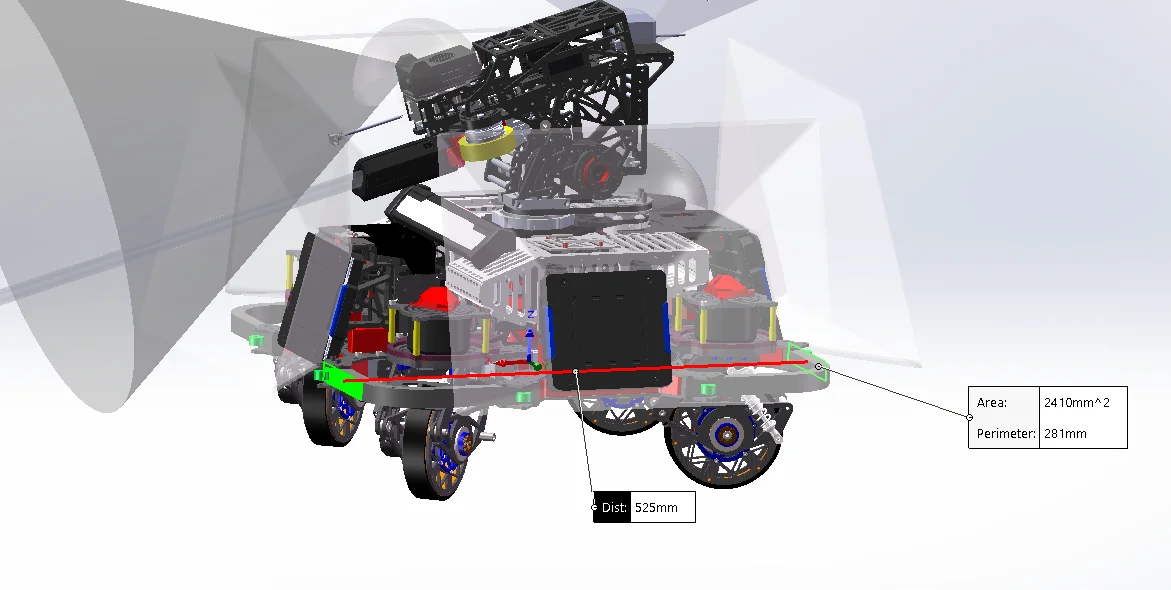
經測量車寬Y=525mm
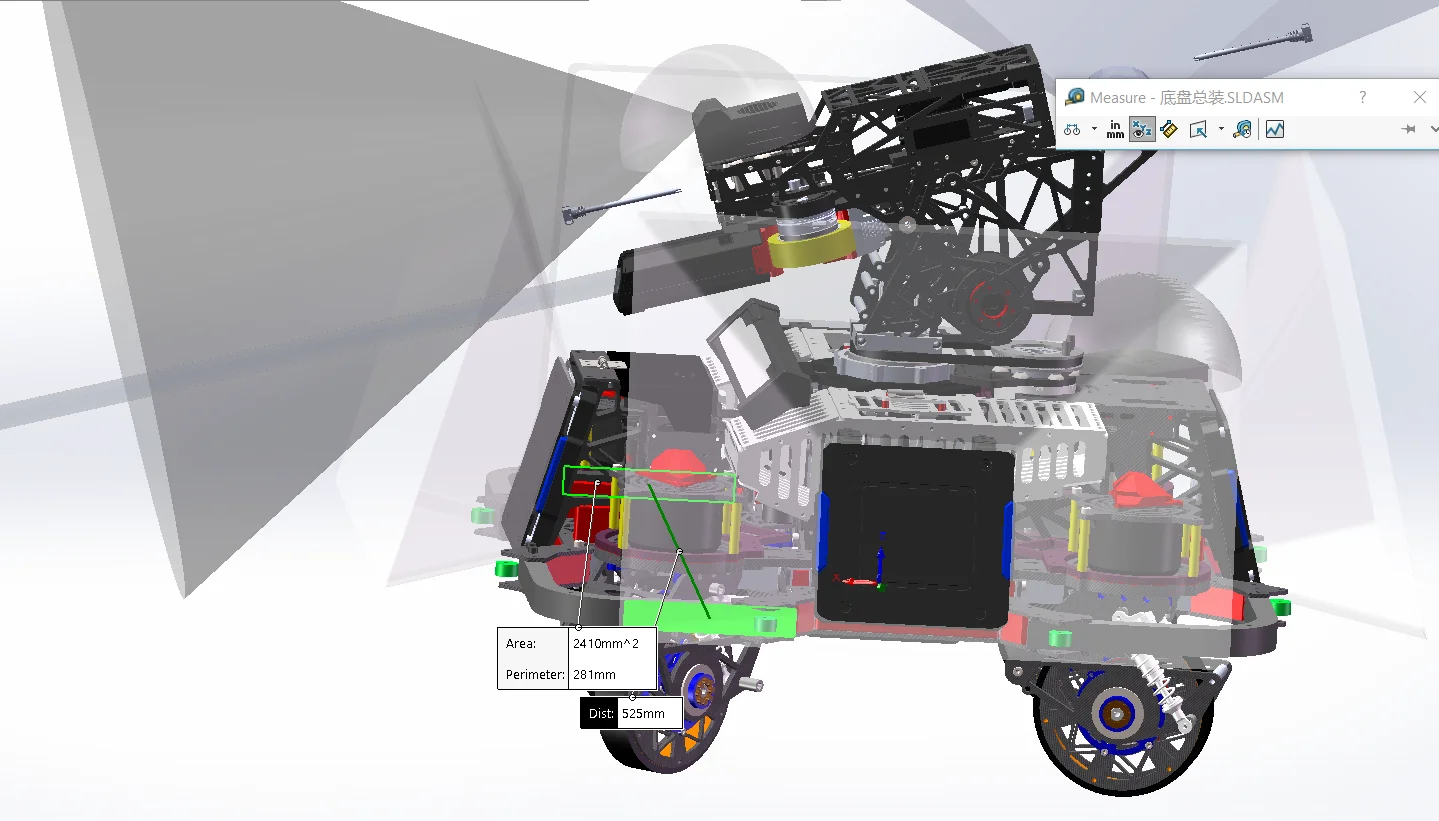
經測量車高度Z=20mm
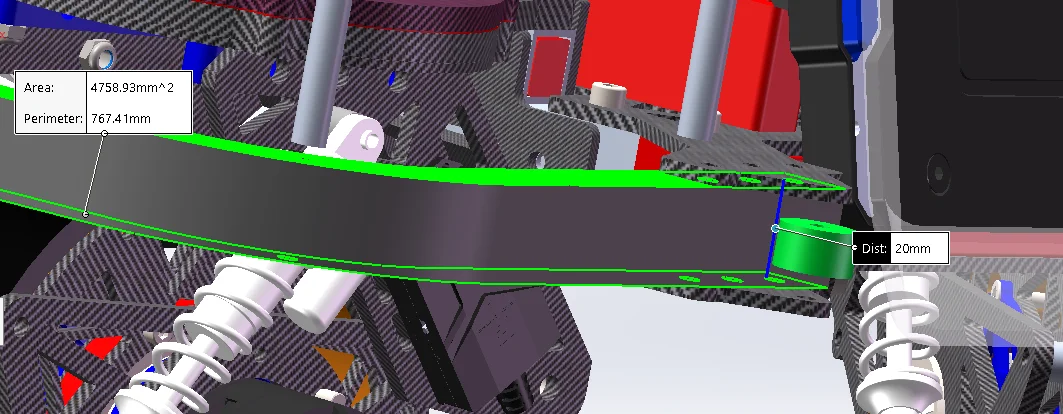
注意,這裏的<pose>0 0 0.055 0 0 0</pose>裏的0.055不是底盤高度。
實際上是chassis 座標原點 → 底盤質心 COM 的 Z 偏移。
北極熊這套規定chassis z=0 等于 轮轴中心平面。
所以如果機械人實際重量都在頂上,質心大概在高出輪軸中心平面 xxx mm的地方,那就填 <pose>0 0 xxx 0 0 0</pose>。
這東西隻影響Gazebo,放心大膽填就完了,沒必要很精細。
基於上面的數據,我修改成了
        <!--chassis-->
        <link name="chassis">
            <inertial>
                <pose>0 0 0.055 0 0 0</pose>
                <xmacro_block name="inertia_box" m="15.0" x="0.525" y="0.525" z="0.20"/>
</inertial>| 參數 | 實車 TF | Gazebo |
|---|---|---|
Mid360 <sensor><pose>0.03 |
❌ | ✅ |
| wheel collision radius | 基本 ❌ | ✅ |
| chassis collision | ❌ | ✅ |
chassis_height |
✅ | ✅ |
gimbal_yaw_height |
✅ | ✅ |
gimbal_pitch_height |
✅ | ✅ |
Mid360 <xmacro_block pose=...> |
✅ | ✅ |
下面還有一堆北極熊原來的:
<collision name="chassis_base_collision">
<collision name="chassis_projectile_container_collision">
<collision name="chassis_fornt_wheel_holder_collision">
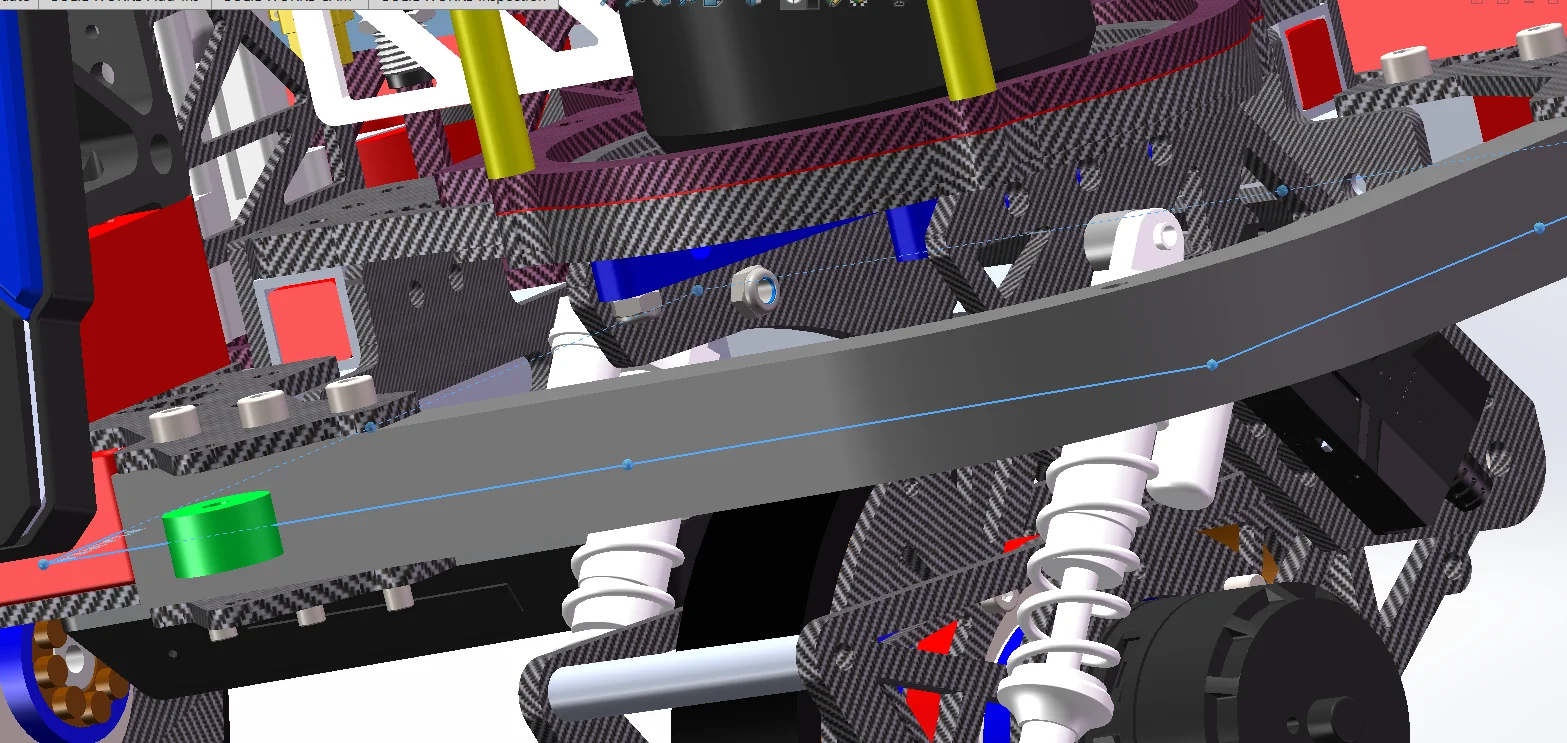
<collision name="chassis_rear_wheel_holder_collision">這裏的pose z是底盤剛體的中心面的中心點在chassis 0點的什麼位置,可以由SW測量得知,是65.46mm
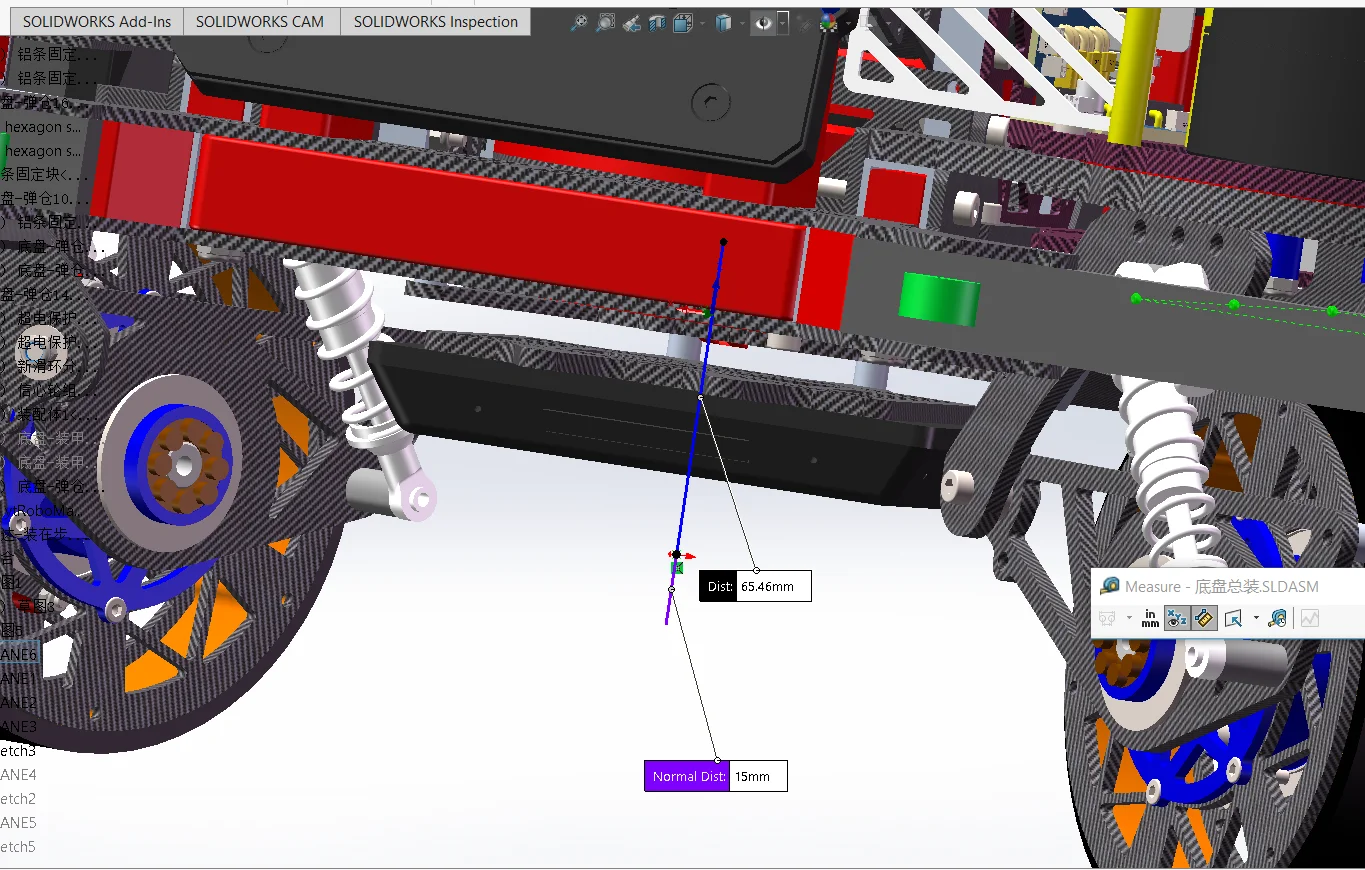
可以修改成:
            <collision name="chassis_base_collision">
                <pose>0 0 0.06546 0 0 0</pose>
                <xmacro_block name="geometry_box" x="0.525" y="0.525" z="0.20"/>
</collision>而下面這仨可以全註釋掉,因為咱們舵輪底盤的碰撞區域就是近似一個正方形,用chassis_base_collision足夠了。
<collision name="chassis_projectile_container_collision">
<collision name="chassis_fornt_wheel_holder_collision">
<collision name="chassis_rear_wheel_holder_collision">
<!-- <collision name="chassis_projectile_container_collision">
<pose>-0.122 0 0.177 0 0 0</pose>
<xmacro_block name="geometry_box" x="0.1" y="0.18" z="0.146"/>
</collision>
<collision name="chassis_fornt_wheel_holder_collision">
<pose>0.208 0 0 0 0 0</pose>
<xmacro_block name="geometry_box" x="0.055" y="0.367" z="0.055"/>
</collision>
<collision name="chassis_rear_wheel_holder_collision">
<pose>-0.208 0 0 0 0 0</pose>
<xmacro_block name="geometry_box" x="0.055" y="0.367" z="0.055"/>
</collision> -->- 底盤高度
這個參數如其字面意思一樣,就是底盤的厚度,也就是底盤的上頂面到下底面的距離。
- 軸距和輪距也要量“輪中心”,不是底盤外殼
北極熊的是:
        <!--front_left wheel link and joint-->
        <xmacro_block name="chassis_wheel_l" prefix="front_left" parent="chassis" pose="0.207 0.194 0 0 0 0"/>
        <!--front_right wheel link and joint-->
        <xmacro_block name="chassis_wheel_r" prefix="front_right" parent="chassis" pose="0.207 -0.194 0 0 0 0"/>
        <!--rear_left wheel link and joint-->
        <xmacro_block name="chassis_wheel_r" prefix="rear_left" parent="chassis" pose="-0.207 0.194 0 0 0 0"/>
        <!--rear_right wheel link and joint-->
        <xmacro_block name="chassis_wheel_l" prefix="rear_right" parent="chassis" pose="-0.207 -0.194 0 0 0 0"/>
FL: 0.207 0.194
FR: 0.207 -0.194
RL: -0.207 0.194
RR: -0.207 -0.194那麼軸距是 = 0.207 - (-0.207) = 0.414 m
那麼輪距是 = 0.194 - (-0.194) = 0.388 m
示意圖:
                 +X 前

       FL ●────────────● FR
          │            │
          │            │
          │            │
          │            │
       RL ●────────────● RR

          ←  轮距  →

前后两个轮轴中心的距离
        = 轴距
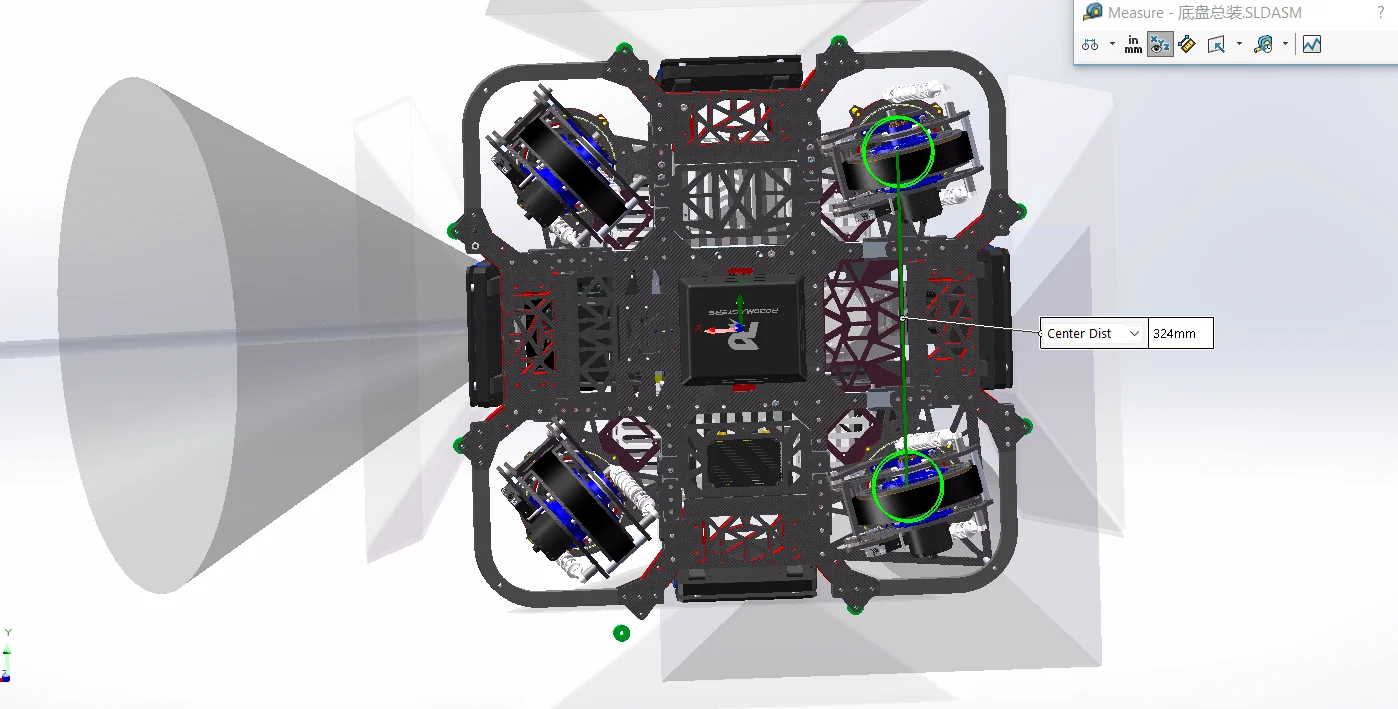
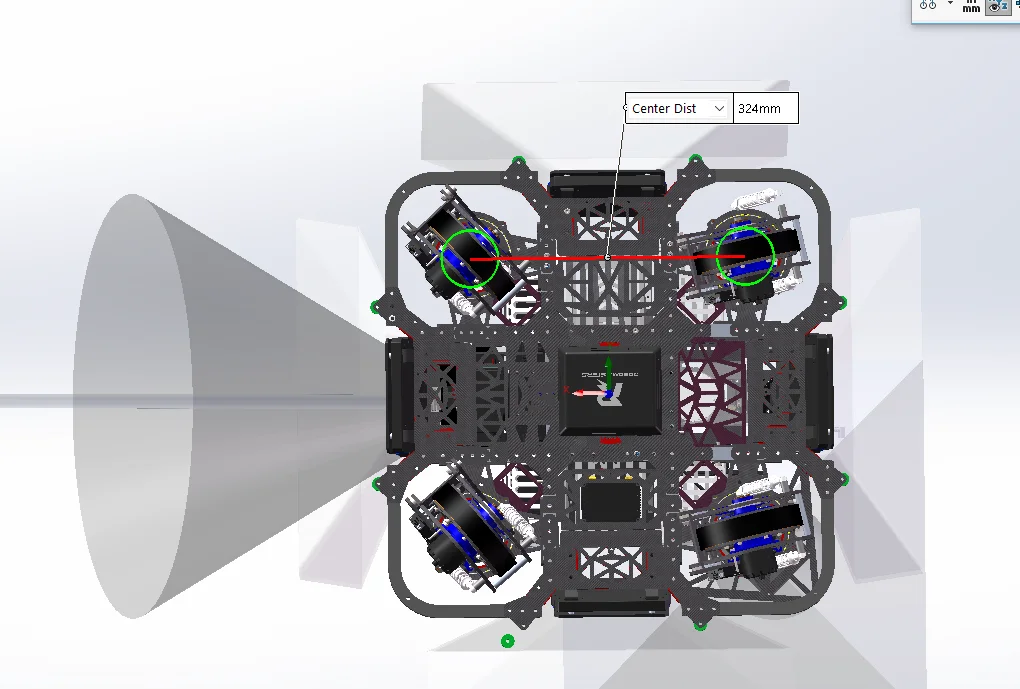
所以要測量的數據是: 前左輪中心 到 後左輪中心:X 方向距離 左輪中心面 到 右輪中心面:Y 方向距離 不是量輪胎最外側。
如下圖顯示輪距為324mm
如下圖顯示軸距也是324mm
324/2=162
所以是
FL:  0.162   0.162
FR:  0.162  -0.162
RL: -0.162   0.162
RR: -0.162  -0.162
<!--front_left wheel link and joint-->
<xmacro_block name="chassis_wheel_l" prefix="front_left" parent="chassis" pose="0.162 0.162 0 0 0 0"/>
<!--front_right wheel link and joint-->
<xmacro_block name="chassis_wheel_r" prefix="front_right" parent="chassis" pose="0.162 -0.162 0 0 0 0"/>
<!--rear_left wheel link and joint-->
<xmacro_block name="chassis_wheel_r" prefix="rear_left" parent="chassis" pose="-0.162 0.162 0 0 0 0"/>
<!--rear_right wheel link and joint-->
<xmacro_block name="chassis_wheel_l" prefix="rear_right" parent="chassis" pose="-0.162 -0.162 0 0 0 0"/>- 輪徑
打開/src/robot_description/resource/xmacro/reality_robot.sdf.xmacro:
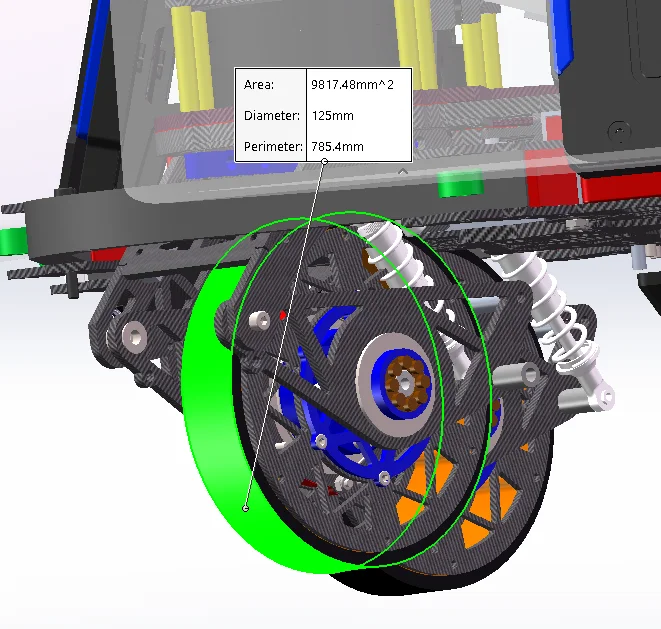
這是輪子的直徑,不是半徑,注意下。
如下圖輪子直徑是125mm
- 底盤距離水平地面的高度chassis_height:
    <!-- 底盘距离水平地面的高度 -->
    <xmacro_define_value name="chassis_height" value="0.077" />
    <!-- gimbal_yaw 相对于底盘的 z 轴安装偏移 -->
    <xmacro_define_value name="gimbal_yaw_height" value="0.026" />
    <!-- gimbal_pitch 相对于 gimbal_yaw 的高度差 -->
<xmacro_define_value name="gimbal_pitch_height" value="0.355" />這裏的幾個參數,這裏的chassis_height所描述的是:
<joint name="base_to_chassis" type="fixed">
    <pose>0 0 ${chassis_height} 0 0 0</pose>
    <parent>base_footprint</parent>
    <child>chassis</child>
</joint>
由於四個輪子的 joint 都是:
parent="chassis"
pose="... ... 0 0 0 0"
所以結構其實是:
          chassis 原点
               ●──────── 底盘原点(北极熊这套规定为轮轴中心平面的中心点)
               │
               │ chassis_height
               │
地面 ──────────●──────────
          base_footprint
實際上北極熊這套認為規定chassis 座標系的 z=0 就是 四個車輪輪軸中心所在的水平面
我們遵循北極熊的規定
base_footprint:地面 chassis:輪軸中心平面
實際上這個chassis確實不用是真的底盤,可以是空氣,在底盤下方和底盤上方都可以。
所以此時,底盤高度就是輪子半徑,也就是上面測量的輪子直徑除以2。
此時,在底面上建一個參考基準面,再距離這個參考基準面上方距離輪子半徑距離處再建一個平行的基準面。
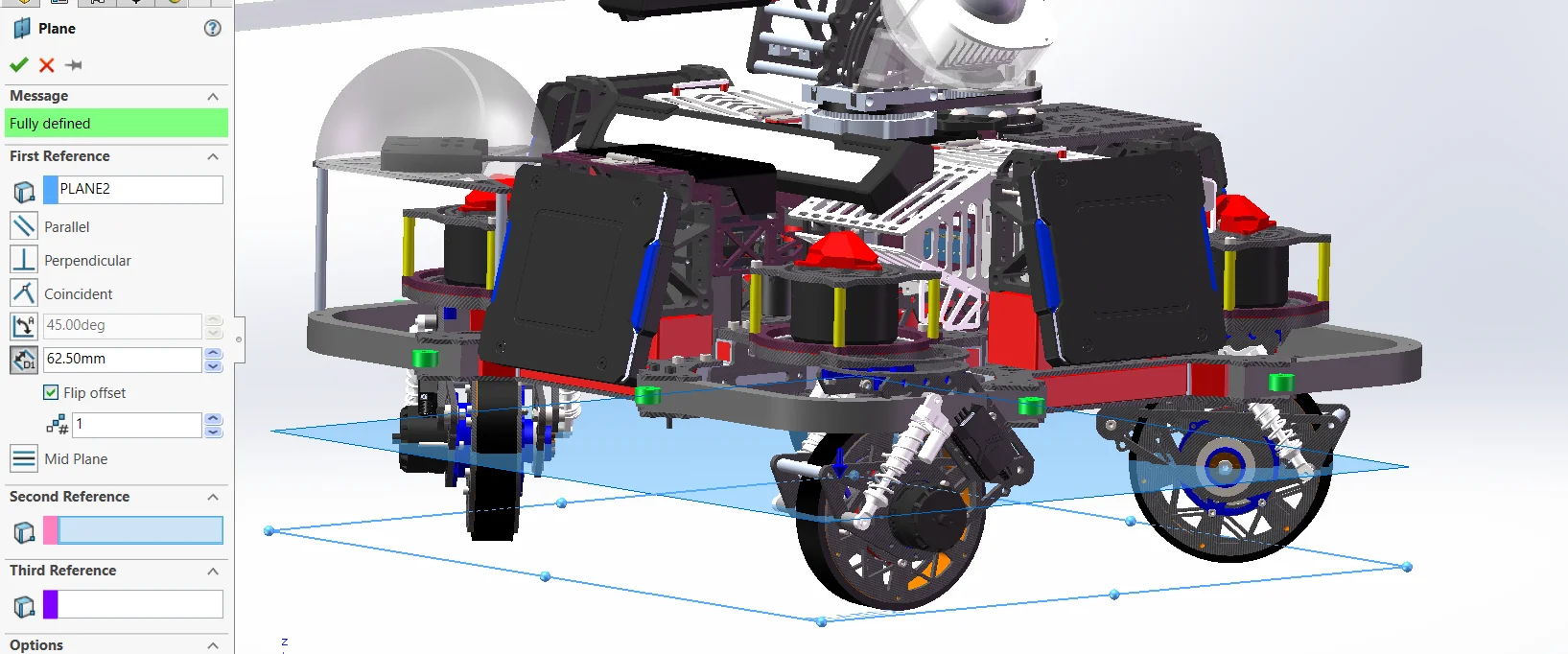
對這個面進行草圖繪製,然後把原點轉實體引用,這個點就是輪軸中點,也是chassis中點。(這是北極熊規定的輪軸中點就是chassis中點)
我這裏自然就是125mm/2=62.5mm
    <!-- 底盘距离水平地面的高度 -->
<xmacro_define_value name="chassis_height" value="0.0625" />還有個隻影響仿真的地方需要修改,在src/rmoss_gz_resources/resource/models/ysu2026_sentry_robot/ysu2026_sentry_robot.def.xmacro裏面 include 的卻還是北極熊公共輪子<xmacro_includeuri="model://rmua19_standard_robot/chassis_wheel.def.xmacro" />。
所以,真正的半徑在src/rmoss_gz_resources/resource/models/rmua19_standard_robot/chassis_wheel.def.xmacro。
裏面:
<xmacro_define_block name="chassis_wheel_l" params="prefix parent pose">

<xmacro_block
    name="inertia_cylinder"
    m="0.4"
    r="0.0758"
    l="0.0452"/>

<xmacro_block
    name="geometry_cylinder"
    r="0.0758"
    l="0.0452"/>

<xmacro_define_block name="chassis_wheel_r" params="prefix parent pose">

<xmacro_block
    name="inertia_cylinder"
    m="0.4"
    r="0.0758"
    l="0.0452"/>

<xmacro_block
    name="geometry_cylinder"
    r="0.0758"
l="0.0452"/>這裏的r="0.0758"就是仿真輪子的碰撞半徑。應該改成咱們輪子的半徑62.5mm。
但我不建議直接改這個文件rmua19_standard_robot/chassis_wheel.def.xmacro,這個文件是公用的。
推薦複製一份到src/rmoss_gz_resources/resource/models/ysu2026_sentry_robot/chassis_wheel.def.xmacro。
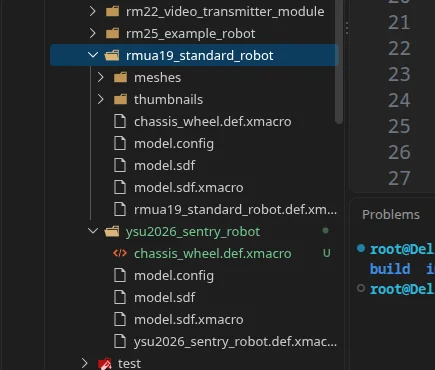
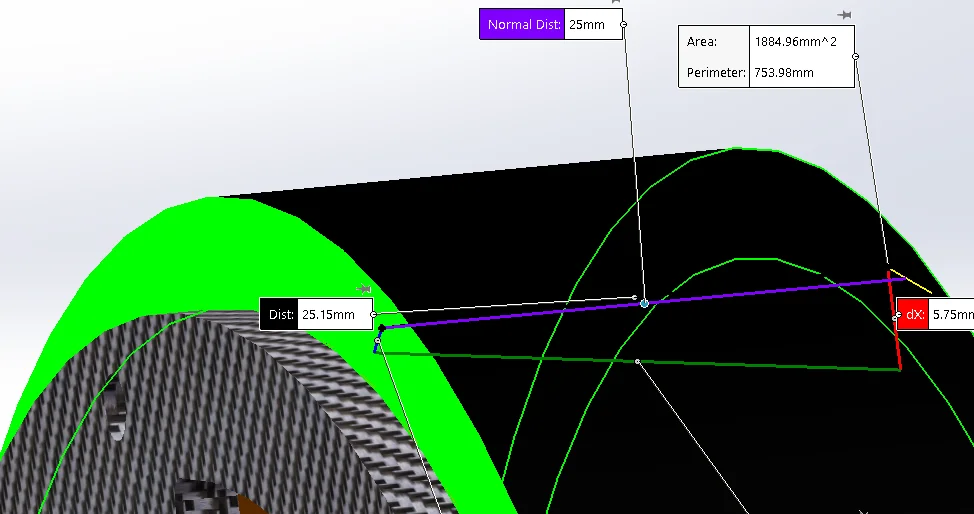
修改掉下面這倆裏的r半徑,然後輪子厚度l也可以改一下。(注意把左右輪子的都修改了)
r = 圓柱半徑 l = 圓柱沿自身軸線方向的長度
<xmacro_block name="inertia_cylinder"  m="0.4" r="0.0625" l="0.025"/>
<xmacro_block name="geometry_cylinder" r="0.0625" l="0.025"/>把ysu2026_sentry_robot.def.xmacro裏的<xmacro_include uri="model://rmua19_standard_robot/chassis_wheel.def.xmacro" />改成<xmacro_include uri="model://ysu2026_sentry_robot/chassis_wheel.def.xmacro" />。
- 雲台高度gimbal_yaw_height
chassis
   ↓
gimbal_yaw_odom_joint      ← 大 Yaw
   ↓
gimbal_yaw_odom
   ↓
gimbal_pitch_odom_joint    ← fixed,只做辅助 frame
   ↓
gimbal_pitch_odom
   ↓
gimbal_yaw_joint           ← 小 Yaw
   ↓
gimbal_yaw
   ↓
gimbal_pitch_joint         ← 小 Pitch
   ↓
gimbal_pitch
gimbal_pitch
●
│
│ gimbal_pitch_height
│
●
大 Yaw 旋转中心
│
│ gimbal_yaw_height
│
●
chassis 原点
= 轮轴中心平面gimbal_yaw_height
= chassis → 大 Yaw
gimbal_pitch_height
= 大 Yaw → Pitch <joint name="gimbal_yaw_odom_joint" type="revolute">
<pose relative_to='chassis'>
0 0 ${gimbal_yaw_height} 0 0 0
</pose>
<joint name="gimbal_pitch_odom_joint" type="fixed">
<pose relative_to='gimbal_yaw_odom'>0 0 ${gimbal_pitch_height} 0 0 0</pose>
<joint name="gimbal_yaw_joint" type="revolute">
<pose relative_to='gimbal_pitch_odom'>0 0 -${gimbal_pitch_height} 0 0 0
</pose>看這裏可以知道,gimbal_yaw_odom_joint和gimbal_yaw_joint是重合的。(大小Yaw重合)
他描述的是
chassis 坐标系原点
        │
        │ gimbal_yaw_height
        │
        ▼
云台 gimbal_yaw_odom_joint(大Yaw) 旋转轴原点
也就是chassis 座標系原點到 yaw 旋轉軸中心的 Z 向距離。
如果雲台相對於底盤有前後偏移,那麼不能只填gimbal_yaw_height,應該填完整的pose。
看這個雲台最中心的環與底盤原點之間只有dz,説明雲台在車的最中央,無偏移。
經測量,gimbal_yaw_height為210.46mm
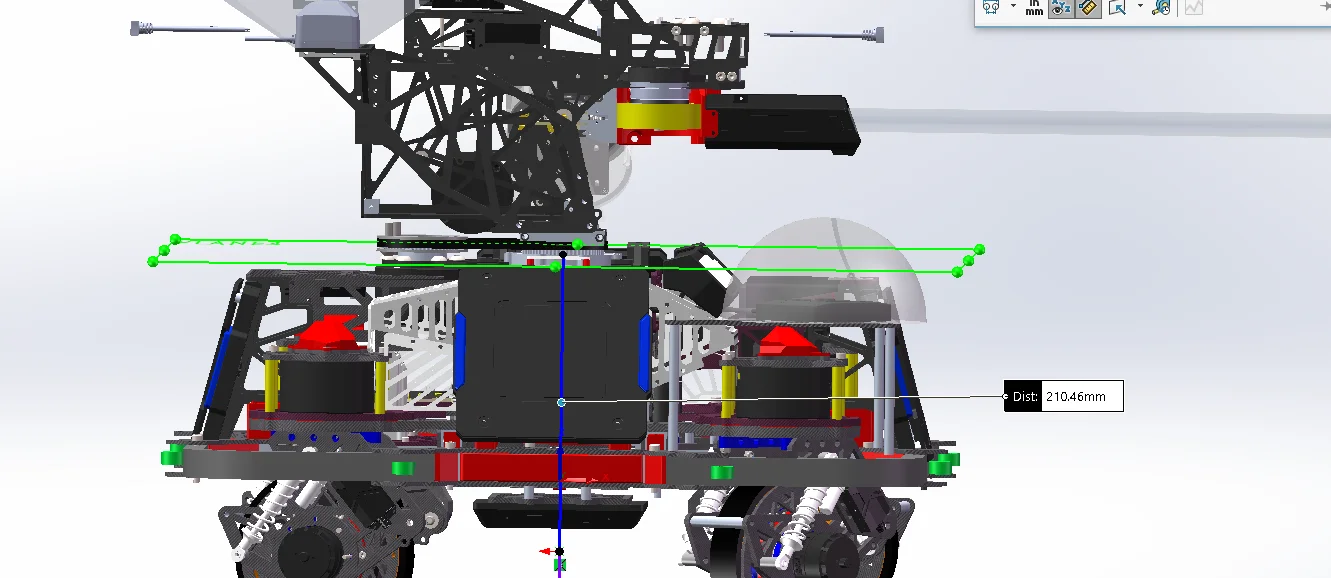
    <!-- gimbal_yaw 相对于底盘的 z 轴安装偏移 -->
<xmacro_define_value name="gimbal_yaw_height" value="0.21046" />除了改尺寸以外,由於咱們沒有大小Yaw結構,而Gazebo又只給了小Yaw控制器,所以咱們把gimbal_yaw_odom_joint給固定死吧。
打開/src/rmoss_gz_resources/resource/models/ysu2026_sentry_robot/ysu2026_sentry_robot.def.xmacro把
        <joint name="gimbal_yaw_odom_joint" type="revolute">
            <pose relative_to='chassis'>0 0 ${gimbal_yaw_height} 0 0 0</pose>
            <parent>chassis</parent>
            <child>gimbal_yaw_odom</child>
            <axis>
                <xyz>0 0 1</xyz>
                <limit>
                    <effort>100</effort>
                    <velocity>50</velocity>
                    <lower>-1.79769e+308</lower>
                    <upper>1.79769e+308</upper>
                </limit>
            </axis>
        </joint>
改成
        <joint name="gimbal_yaw_odom_joint" type="fixed">
            <pose relative_to="chassis">0 0 ${gimbal_yaw_height} 0 0 0</pose>
            <parent>chassis</parent>
            <child>gimbal_yaw_odom</child>
</joint>- 雲台高度gimbal_pitch_height
                    ● pitch 旋转轴
                    │
                    │ gimbal_pitch_height
                    │
                    ● yaw 旋转轴
                    │
                    │ gimbal_yaw_height
                    │
                    ● chassis 原点
                    │
                    │ chassis_height
                    │
────────────────────● 地面<joint name="gimbal_pitch_odom_joint" type="fixed">
<pose relative_to="gimbal_yaw_odom">
0 0 ${gimbal_pitch_height} 0 0 0
</pose><joint name="gimbal_pitch_joint" type="revolute">
<pose relative_to="gimbal_yaw">
0 0 ${gimbal_pitch_height} 0 0 0
</pose>這裏大小pitch是重合的。
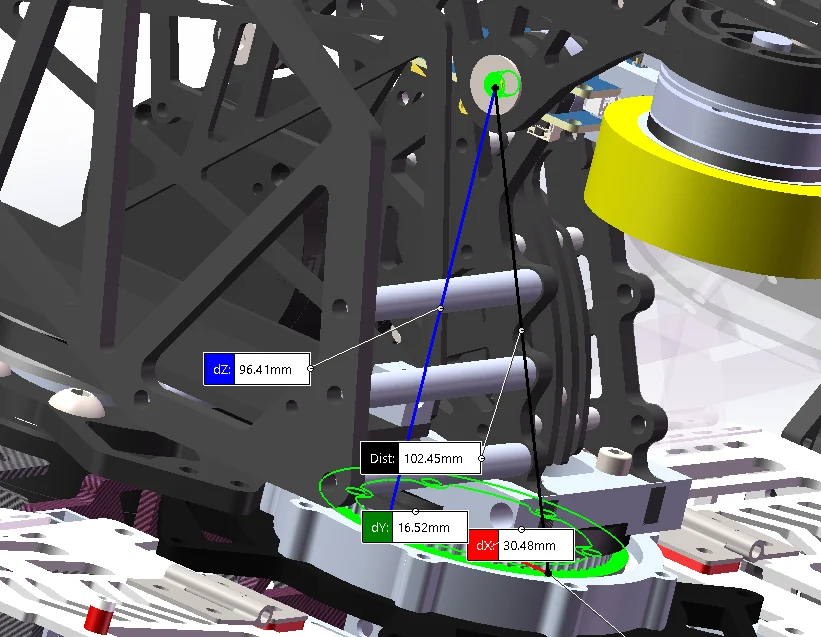
雲台高度gimbal_pitch_height所表示是大 Yaw 軸中心 → Pitch 旋轉軸中心的垂直高度差。
也就是 yaw 旋轉軸中心 → pitch 旋轉軸中心的垂直距離。
如下圖雲台高度gimbal_pitch_height是 96.41mm
    <!-- gimbal_pitch 相对于 gimbal_yaw 的高度差 -->
    <xmacro_define_value name="gimbal_pitch_height" value="0.09641" />