Wiki
robot_description(机器人模型与关节定义)
Existing English translations were reused. 9 current source blocks remain in Simplified Chinese, without triggering paid translation.
1.robot_description(机器人模型与关节定义)
This feature package is copied from pb2025_robot_description. To facilitate reuse, the feature package directory is named robot_description and the package.xml of <name>the CMakeLists.txt of project() and the package lookup name in the launch file are synchronously changed to robot_description.
The following source code paths are all relative to the navigation workspace /home/tungchiahui/UserFolder/MySource/ysu2026_rm_sentry/ysu2026_rm_sentry_nav.
Rename the copied src/robot_description/resource/xmacro/pb2025_sentry_robot.sdf.xmacro to reality_robot.sdf.xmacro. Keep simulation_robot.sdf.xmacro and delete the pb2025_infantry_robot.sdf.xmacro that is no longer used in this package. The upstream pb2025_robot_description package is kept for reference.
Previously, the local package name was ysu2026_robot_description, and the real vehicle entry file was ysu2026_sentry_robot.sdf.xmacro; now they have been changed to robot_description and reality_robot.sdf.xmacro respectively. The current relevant directories are as follows:
src/
├── robot_description/
│   ├── package.xml
│   ├── CMakeLists.txt
│   ├── README.md
│   ├── dependencies.repos
│   ├── launch/robot_description_launch.py
│   ├── params/robot_description.yaml
│   ├── env-hooks/gazebo.dsv.in
│   ├── rviz/visualize_robot.rviz
│   └── resource/
│       ├── xmacro/
│       │   ├── reality_robot.sdf.xmacro
│       │   └── simulation_robot.sdf.xmacro
│       └── models/
│           ├── mid360/
│           ├── industrial_camera/
│           └── rplidar_a2/
└── rmoss_gz_resources/
    └── resource/models/ysu2026_sentry_robot/
        ├── ysu2026_sentry_robot.def.xmacro
        ├── model.sdf.xmacro
        ├── model.config
        └── model.sdf
robot_description is a general-purpose description loading and TF publishing function package;reality_robot and simulation_robot are the real-vehicle and simulation description entry points, respectively. The underlying ysu2026_sentry_robot.def.xmacro defines the chassis, wheels, gimbal, and armor plate structure of the current vehicle model, retaining the vehicle model name. Both entry points still use it through include and macro calls.
After generalizing the entry names, the current mechanical dimensions, radar mounting positions, and joint state sources still come from the current robot's configuration. When switching robots, you can replace the model include, macro invocations, and mounting parameters in the entry, or use robot_xmacro_file to specify other description files and use params_file to specify the corresponding node configuration.
1.1.扩展知识点
1.1.1.xmacro(机器人模型宏文件)
- The variables correspond essentially completely.
xacro
<xacro:property name="wheel_radius" value="0.076"/>

<cylinder radius="${wheel_radius}" length="0.03"/>
xmacro
<xmacro_define_value name="wheel_radius" value="0.076"/>

<cylinder>
    <radius>${wheel_radius}</radius>
    <length>0.03</length>
</cylinder>- The macro definitions also almost correspond one-to-one.
xacro
<xacro:macro name="wheel" params="name radius width">
    <link name="${name}">
        ...
    </link>
</xacro:macro>
Call:
<xacro:wheel
    name="front_left_wheel"
    radius="0.076"
    width="0.03"
/>
xmacro
<xmacro_define_block
    name="wheel"
    params="name radius width">

    <link name="${name}">
        ...
    </link>

</xmacro_define_block>
Call:
<xmacro_block
    name="wheel"
    name_arg="front_left_wheel"
    radius="0.076"
    width="0.03"
/>- include
xacro
<xacro:include filename="wheel.xacro"/>xmacro
<xmacro_include uri="file://wheel.sdf.xmacro"/>In the current project, one can also see:
<xmacro_include
    uri="model://rm25_example_robot/rm25_example_robot.def.xmacro"
/>Heremodel:// is sdformat_tools the URI parsing support for Gazebo / SDF.
- ${} expression
Both xmacro and xacro support something like:
${radius}and mathematical expressions:
${2 * radius}For example:
<ixx>${m*(y*y+z*z)/12}</ixx>Therefore, simple mathematical operations can be performed in macro parameters.
- Condition
xacro
<xacro:if value="${use_lidar}">
    ...
</xacro:if>
xmacro
In xmacro, this can usually be controlled via the condition macro call:
<xmacro_block
    name="lidar"
    condition="${use_lidar}"
    ...
/>
Expand this macro when the condition is true; do not expand it when the condition is false.
- .def.xmacro
For example:
rm25_example_robot.def.xmacroHere, the.defis not special syntax for xmacro, but merely a file naming convention.
Typically indicates: this file is primarily responsible for defining macros.
Similar:
xxx.def.xmacro
    ↓
定义机器人结构、link、joint 等宏
Then:
simulation_robot.sdf.xmacro
    ↓
include 前面的 def.xmacro
    ↓
调用其中定义的宏
    ↓
生成完整 SDF
For example, in the future you can write:
ysu2026_sentry_robot.def.xmacroInside define:
<xmacro_define_block
    name="ysu2026_sentry_robot"
    params="chassis_height gimbal_yaw_height">

    ...

</xmacro_define_block>
Then at:
simulation_robot.sdf.xmacroIntroduce and call in:
<xmacro_include
    uri="model://ysu2026_sentry_robot/ysu2026_sentry_robot.def.xmacro"
/>

<xmacro_block
    name="ysu2026_sentry_robot"
    chassis_height="${chassis_height}"
    gimbal_yaw_height="${gimbal_yaw_height}"
/>
Memory:
xmacro_define_value
    ≈ xacro:property

xmacro_define_block
    ≈ xacro:macro

xmacro_block
    ≈ 调用 xacro macro

xmacro_include
    ≈ xacro:include

${...}
≈ ${...}1.2.总体框架
1.2.1.xmacro介绍(机器人模型宏文件)
This xmacro is a custom format defined in this project, in order to achieve:
                  ┌→ SDF → Gazebo
.sdf.xmacro ──────┤
                  └→ SDF → URDF → robot_state_publisher
And the previously learned xacro+urdf, this project is mainly xmacro+sdf. (understand by comparison)
Then everything we encountered before was
robot.urdf.xacro
      ↓
    xacro
      ↓
robot_description
      ↓
robot_state_publisher
      ↓
TF
And this project is:
simulation_robot.sdf.xmacro
          ↓
      xmacro4sdf
          ↓
         SDF
       ↙     ↘
   Gazebo    sdf2urdf
                 ↓
               URDF
                 ↓
      robot_state_publisher
                 ↓
TF| Function | xacro | xmacro |
|---|---|---|
| Define variables | <xacro:property name="r" value="0.1"/> |
<xmacro_define_value name="r" value="0.1"/> |
| Use variables | ${r} |
${r} |
| Mathematical expressions | ${2 * r} |
${2 * r} |
| Define macros | <xacro:macro name="wheel" params="r w"> |
<xmacro_define_block name="wheel" params="r w"> |
| Invoke macros | <xacro:wheel r="..." w="..."/> |
<xmacro_block name="wheel" r="..." w="..."/> |
| include | <xacro:include filename="xxx.xacro"/> |
<xmacro_include uri="file://xxx.xmacro"/> |
| Condition | <xacro:if value="${...}">...</xacro:if> |
Mainly through <xmacro_block ... condition="${...}"/> |
| namespace | xmlns:xacro=... |
not required |
| Advanced features such as default parameter values | Relatively rich | Much simplified |
1.2.2.如何先建立自己的功能包和模型包
Thissdf.xmacrowill be relied upon to publish the tf relationship between the models in the simulation and the physical objects.
Here, the following file is included, so this file needs to be found.
<xmacro_include uri="model://rm25_example_robot/rm25_example_robot.def.xmacro" />He is in/src/rmoss_gz_resources/resource/models/rm25_example_robot, copy this large folder and rename it toysu2026_sentry_robotand name the xmacro inside it toysu2026_sentry_robot.def.xmacro.
In this file, what needs to be modified is:
<!--macro defination: rm25_example_robot-->
<xmacro_define_block
    name="rm25_example_robot"
    params="sticker_type chassis_height gimbal_pitch_height gimbal_yaw_height">
Change the name here to
<!--macro definition: ysu2026_sentry_robot-->
<xmacro_define_block
    name="ysu2026_sentry_robot"
    params="sticker_type chassis_height gimbal_pitch_height gimbal_yaw_height">
Next, modify the one in the same directorymodel.sdf.xmacro :
    <!--include defination-->
    <xmacro_include uri="model://rm25_example_robot/rm25_example_robot.def.xmacro" />

    <!--rm25_example_robot model-->
    <model name="rm25_example_robot">
        <pose>0 0 0.15 0 0 0</pose>
        <xmacro_block name="rm25_example_robot" sticker_type="${global_armor_sticker_type}" chassis_height="${chassis_height}" gimbal_yaw_height="${gimbal_yaw_height}" gimbal_pitch_height="${gimbal_pitch_height}"/>
Replace every occurrence of rm25_example_robot above with ysu2026_sentry_robot.
    <!--include defination-->
    <xmacro_include uri="model://ysu2026_sentry_robot/ysu2026_sentry_robot.def.xmacro" />

    <!--ysu2026_sentry_robot model-->
    <model name="ysu2026_sentry_robot">
        <pose>0 0 0.15 0 0 0</pose>
        <xmacro_block name="ysu2026_sentry_robot" sticker_type="${global_armor_sticker_type}" chassis_height="${chassis_height}" gimbal_yaw_height="${gimbal_yaw_height}" gimbal_pitch_height="${gimbal_pitch_height}"/>
Next, modify the file in the same directory:model.config:
<?xml version="1.0"?>
<model>
  <name>rmua19_standard_robot</name>
  <version>1.0</version>
  <sdf version="1.7">model.sdf</sdf>

  <author>
    <name>Lihan Chen</name>
    <email>lihanchen2004@163.com</email>
  </author>

  <description>
    The Basic Version of Standard Robot for RoboMaster University Series.
  </description>
</model>
Change to:
<?xml version="1.0"?>
<model>
  <name>ysu2026_sentry_robot</name>
  <version>1.0</version>
  <sdf version="1.7">model.sdf</sdf>

  <author>
    <name>Tung Chia-hui</name>
    <email>tungchiahui@gmail.com</email>
  </author>

  <description>
    Yanshan University RoboMaster 2026 Sentry Robot.
  </description>
</model>Heremodel.sdfNo manual changes are needed; this thing is automatically generated:
model.sdf.xmacro
      ↓
xmacro4sdf
      ↓
model.sdf
You can take a look atmodel.sdfThe beginning explicitly states this, and does not recommend that you modify it directly:
<!-- =================================================================================== -->
<!-- |    This document was autogenerated by xmacro4sdf from model.sdf.xmacro          | -->
<!-- |    EDITING THIS FILE BY HAND IS NOT RECOMMENDED                                 | -->
<!-- =================================================================================== -->
So what will truly be maintained in the future is:
关于模型:
ysu2026_sentry_robot.def.xmacro
model.sdf.xmacro

关于(这个不改问题也不大):
model.config
Back to/src/robot_description/resource/xmacro/reality_robot.sdf.xmacro:
    <!--include defination-->
    <xmacro_include uri="model://rm25_example_robot/rm25_example_robot.def.xmacro" />

    <!--pb2025_sentry_robot model-->
    <model name="pb2025_sentry_robot">

        <pose>0 0 0.15 0 0 0</pose>
        <xmacro_block name="rm25_example_robot" sticker_type="${global_armor_sticker_type}" chassis_height="${chassis_height}" gimbal_yaw_height="${gimbal_yaw_height}" gimbal_pitch_height="${gimbal_pitch_height}"/>
Modify separately here: the included directory and the .def.xmacro file to ysu2026_sentry_robot and xmacro_block the macro name called also to ysu2026_sentry_robot; the top-level <model name> in the entry to reality_robot.
The top-level model name denotes the entry point of the current description, while the macro name denotes the specific mechanical structure being expanded; the two do not have to be the same:
    <!--include defination-->
    <xmacro_include uri="model://ysu2026_sentry_robot/ysu2026_sentry_robot.def.xmacro" />

    <!--reality_robot model-->
    <model name="reality_robot">

        <pose>0 0 0.15 0 0 0</pose>
        <xmacro_block name="ysu2026_sentry_robot" sticker_type="${global_armor_sticker_type}" chassis_height="${chassis_height}" gimbal_yaw_height="${gimbal_yaw_height}" gimbal_pitch_height="${gimbal_pitch_height}"/>
At this point, the above items are already working properly in therealityenvironment, butsimulationstill does not work. Open thesimulation_robot.sdf.xmacroin the same directory:
    <!--include defination-->
    <xmacro_include uri="model://rm25_example_robot/rm25_example_robot.def.xmacro" />

    <!--simulation_robot model-->
    <model name="simulation_robot">

        <pose>0 0 0.15 0 0 0</pose>
        <xmacro_block name="rm25_example_robot" sticker_type="${global_armor_sticker_type}" chassis_height="${chassis_height}" gimbal_yaw_height="${gimbal_yaw_height}" gimbal_pitch_height="${gimbal_pitch_height}"/>
Change to:
    <!--include defination-->
    <xmacro_include uri="model://ysu2026_sentry_robot/ysu2026_sentry_robot.def.xmacro" />

    <!--simulation_robot model-->
    <model name="simulation_robot">

        <pose>0 0 0.15 0 0 0</pose>
        <xmacro_block name="ysu2026_sentry_robot" sticker_type="${global_armor_sticker_type}" chassis_height="${chassis_height}" gimbal_yaw_height="${gimbal_yaw_height}" gimbal_pitch_height="${gimbal_pitch_height}"/>
At this point, you have finished modifying it.
grep -R "rm25_example_robot" src/robot_description src/rmoss_gz_resources/resource/models/ysu2026_sentry_robot

grep -R "pb2025_sentry_robot" src/robot_description src/rmoss_gz_resources/resource/models/ysu2026_sentry_robot
Below is the terminal record using the old package name ysu2026_robot_description, preserving the original output; when rechecking now, use the above src/robot_description path:
root@Desktop-Fedora:/home/tungchiahui/UserFolder/MySource/ysu2026_rm_sentry$ grep -R "rm25_example_robot" src/ysu2026_robot_description src/rmoss_gz_resources/resource/models/ysu2026_sentry_robot
src/rmoss_gz_resources/resource/models/ysu2026_sentry_robot/model.sdf:  <!--rm25_example_robot model-->
src/rmoss_gz_resources/resource/models/ysu2026_sentry_robot/model.sdf:  <model name="rm25_example_robot">
root@Desktop-Fedora:/home/tungchiahui/UserFolder/MySource/ysu2026_rm_sentry$ grep -R "pb2025_sentry_robot" src/ysu2026_robot_description src/rmoss_gz_resources/resource/models/ysu2026_sentry_robot
At that time only model.sdf still had residual old model names; the following records the steps to update the generated file:
Find this script:/src/rmoss_gz_resources/update_model.sh
#!/bin/bash
path=`pwd`
for dir in $path/models/*; do
    echo "parse "$dir
    cd $dir
    tempfile=`mktemp temp.XXXXXX`
    xmacro4sdf model.sdf.xmacro > $tempfile
    lines_num=`cat $tempfile | wc -l`
    if (($lines_num > 3 )) ;then
        cat $tempfile > model.sdf
    else
        cat $tempfile
    fi
    rm -f temp.*
done
Change to:
#!/bin/bash

SCRIPT_DIR="$(cd "$(dirname "${BASH_SOURCE[0]}")" && pwd)"
MODEL_DIR="$SCRIPT_DIR/resource/models"

# 让 xmacro4sdf 能解析 model://xxx/...
export IGN_GAZEBO_RESOURCE_PATH="$MODEL_DIR:${IGN_GAZEBO_RESOURCE_PATH:-}"
export GAZEBO_MODEL_PATH="$MODEL_DIR:${GAZEBO_MODEL_PATH:-}"

for dir in "$MODEL_DIR"/*; do
    [ -d "$dir" ] || continue
    [ -f "$dir/model.sdf.xmacro" ] || continue

    echo "parse $dir"

    cd "$dir" || exit 1

    tempfile=$(mktemp temp.XXXXXX)

    if xmacro4sdf model.sdf.xmacro > "$tempfile"; then
        lines_num=$(wc -l < "$tempfile")

        if (( lines_num > 3 )); then
            cat "$tempfile" > model.sdf
            echo "generated: $dir/model.sdf"
        else
            echo "ERROR: generated content too short"
            cat "$tempfile"
        fi
    else
        echo "ERROR: xmacro4sdf failed: $dir"
    fi

    rm -f "$tempfile"
done
Execute:
chmod +x ./src/rmoss_gz_resources/update_model.sh
./src/rmoss_gz_resources/update_model.sh
After generation is complete, return to the ws directory:
grep -R "rm25_example_robot" src/robot_description src/rmoss_gz_resources/resource/models/ysu2026_sentry_robotyou will find that there is no output either.
1.2.3.修改机器人参数
The main dimensions are the robot’s chassis length and width, track width and wheelbase, wheel radius, gimbal height, and Mid360 mounting position:
1. 底盘长宽高 / collision
2. 四个轮子的位置
3. 轮子半径
4. chassis_height
5. gimbal_yaw_height
6. gimbal_pitch_height
7. Mid360 的 parent 和 pose
First, you need to know the direction specified by ROS by default:
+x:车头方向
+y:车体左侧
+z:竖直向上
+roll:绕x轴逆时针
+pitch:绕y轴逆时针
+yaw:绕z轴逆时针The positive angular direction uniformly follows右手定则: If you stand at the positive end of each axis and look toward the origin, then positive rotations all appear counterclockwise. So for the robot coordinate system, it can be remembered more intuitively:
- +yaw: the vehicle nose turns left.
- +pitch: the vehicle nose presses downward.
- +roll: the left side rises and the right side lowers.
Moreover, in the current polar bear model, base_footprint is on the ground, and the chassis origin is basically located at the height of the axle centers of the four wheels.
| Parameter | What you should actually measure | Meaning in the current code |
|---|---|---|
| Chassis length | The distance from the front edge to the rear edge of the rigid body of the vehicle body, along X | geometry_box x=... |
| Chassis width | The distance from the left edge to the right edge of the rigid body of the vehicle body, along Y | geometry_box y=... |
| Chassis height | The distance from the bottom face to the top face of the rigid body, along Z | geometry_box z=... |
| Wheelbase | The X-direction distance from the front wheel axle center to the rear wheel axle center | x_front - x_rear |
| Track width | The Y-direction distance from the center plane of the left wheel to the center plane of the right wheel | y_left - y_right |
| Wheel diameter | The outer diameter of the wheel | Current 2 × 0.0758 |
chassis_height |
Ground → chassis coordinate system origin |
Current 0.076 m |
gimbal_yaw_height |
chassis Origin → gimbal yaw rotation axis origin |
Current 0.1376 m |
gimbal_pitch_height |
yaw axis origin → pitch axis origin | Current 0.16 m |
Mid360 pose |
parent coordinate system origin → front_mid360 origin |
Currently relative to chassis |
- ysu2026_sentry_robot.def.xmacro ← The single source of truth for the robot’s physical structure
- reality_robot.sdf.xmacro ← Entry point for the real robot: sensor mounts and hardware-specific heights and poses
- simulation_robot.sdf.xmacro ← Entry point for simulation: simulated sensors and Gazebo plugins
- model.sdf.xmacro ← Entry point for the standalone Gazebo model in rmoss_gz_resources
Change "what the robot body looks like" → change ysu2026_sentry_robot.def.xmacro. Change "where the real-vehicle sensors are mounted and which parameters the real vehicle uses" → change reality_robot.sdf.xmacro. Change "how it runs in Gazebo" → change simulation_robot.sdf.xmacro. model.sdf.xmacro is only the complete Gazebo model entry point in rmoss_gz_resources, not the main entry point for your real-vehicle TF. (So this model.sdf.xmacro is actually not that important, but changing it along the way is fine too.)
Find/src/rmoss_gz_resources/resource/models/ysu2026_sentry_robot:
Mainly modify the following several:
- Chassis length and chassis width (only affects Gazebo)
Chassis length and width are different from wheelbase and track width.
For example, now the polar bear:
        <!--chassis-->
        <link name="chassis">
            <inertial>
                <pose>0 0 0.055 0 0 0</pose>
                <xmacro_block name="inertia_box" m="15.0" x="0.36" y="0.24" z="0.13"/>
These parameters are mainly used for Gazebo.
底盘 collision:
底盘刚体的质量 m = 15.0 kg
长度 x = 0.36
宽度 y = 0.24
高度 z = 0.13
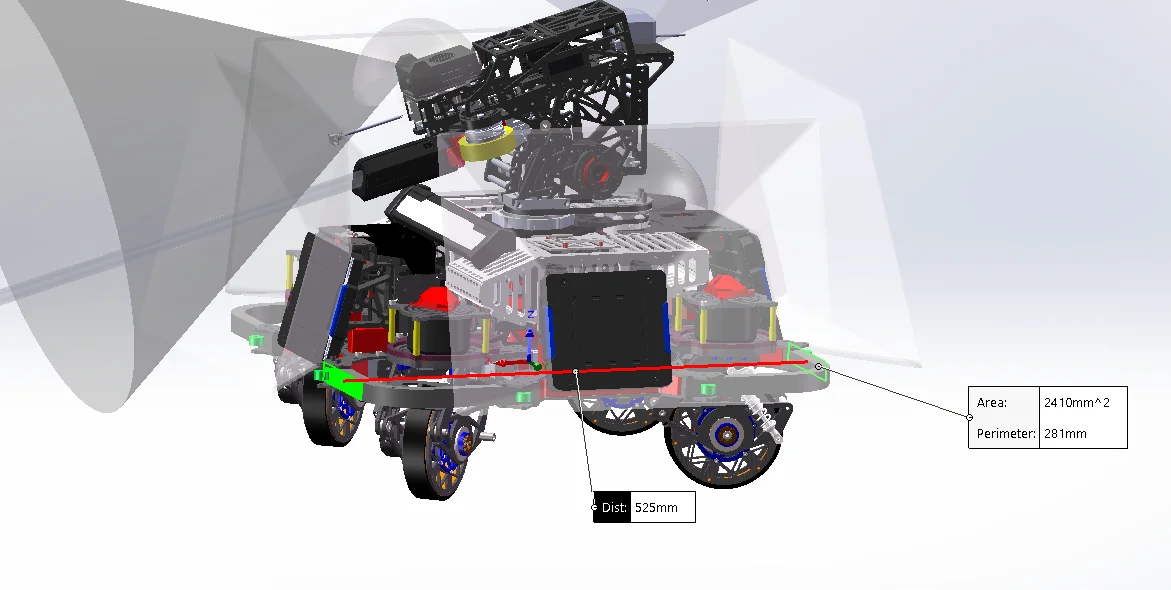
Measured vehicle length X=525mm
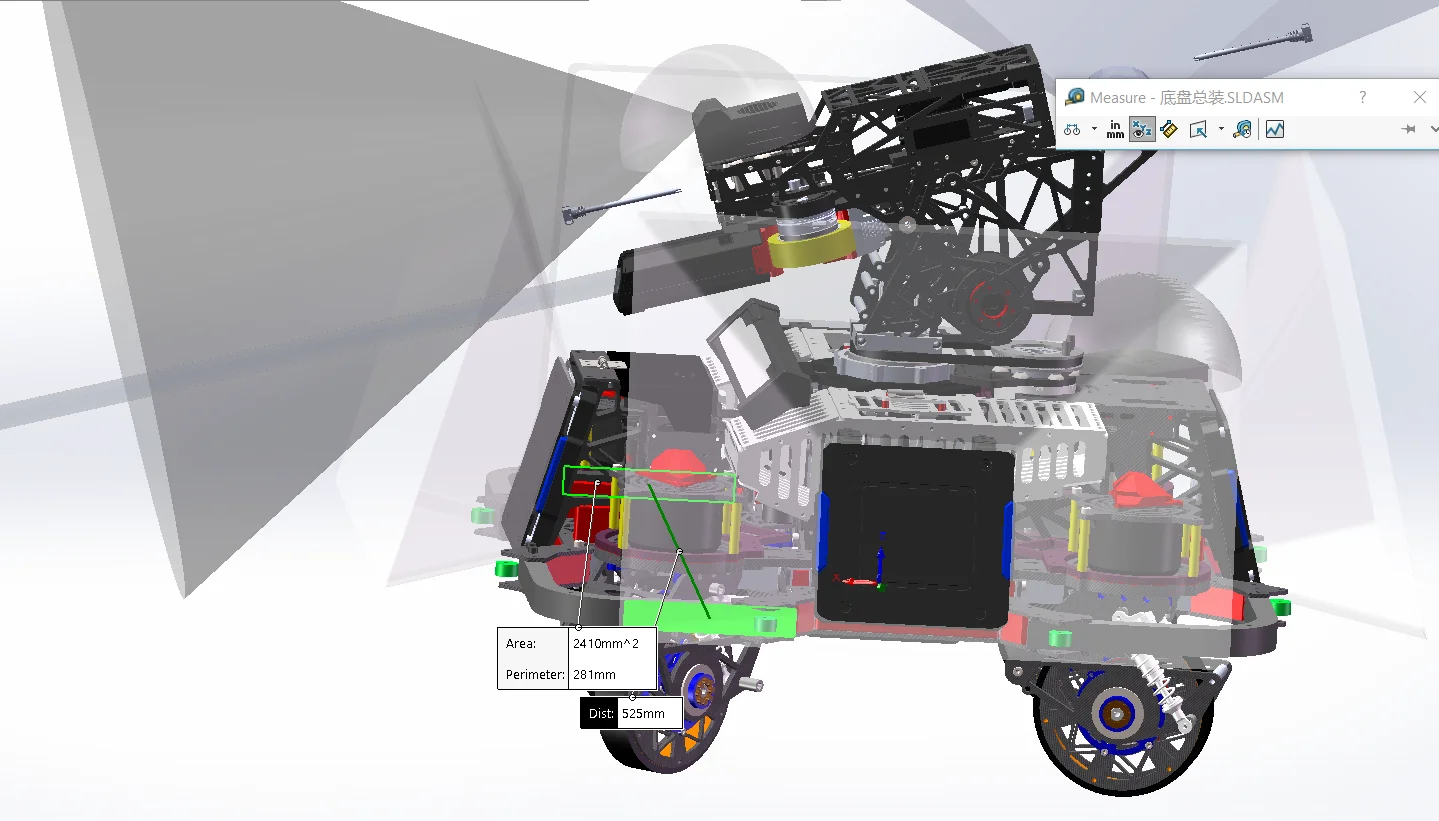
Measured vehicle width Y=525mm
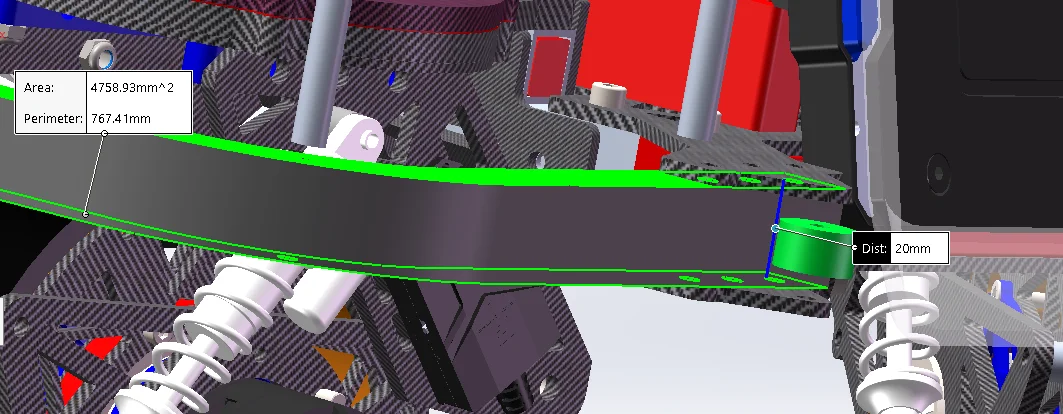
Measured vehicle height Z=20mm
Note that the<pose>0 0 0.055 0 0 0</pose>here0.055does not refer to the chassis height. It is actually the Z offset from the chassis coordinate origin → chassis center of mass COM. This Polar Bear system specifieschassis z=0 等于 轮轴中心平面Therefore, if the actual robot weight is all at the top, and the center of mass is approximately xxx mm above the wheel axle center plane, then fill in<pose>0 0 xxx 0 0 0</pose>.
This thing only affects Gazebo, so just fill it in freely and boldly; there is no need for it to be very precise.
Based on the above data, I modified it to
        <!--chassis-->
        <link name="chassis">
            <inertial>
                <pose>0 0 0.055 0 0 0</pose>
                <xmacro_block name="inertia_box" m="15.0" x="0.525" y="0.525" z="0.20"/>
</inertial>| Parameter | Real Vehicle TF | Gazebo |
|---|---|---|
Mid360 <sensor><pose>0.03 |
❌ | ✅ |
| wheel collision radius | Basic ❌ | ✅ |
| chassis collision | ❌ | ✅ |
chassis_height |
✅ | ✅ |
gimbal_yaw_height |
✅ | ✅ |
gimbal_pitch_height |
✅ | ✅ |
Mid360 <xmacro_block pose=...> |
✅ | ✅ |
Below there is also a bunch of original polar bear ones:
<collision name="chassis_base_collision">
<collision name="chassis_projectile_container_collision">
<collision name="chassis_fornt_wheel_holder_collision">
<collision name="chassis_rear_wheel_holder_collision">Here,pose zis the position of the center point of the central plane of the chassis rigid body relative to chassis point 0. It can be obtained by SW measurement and is 65.46 mm.
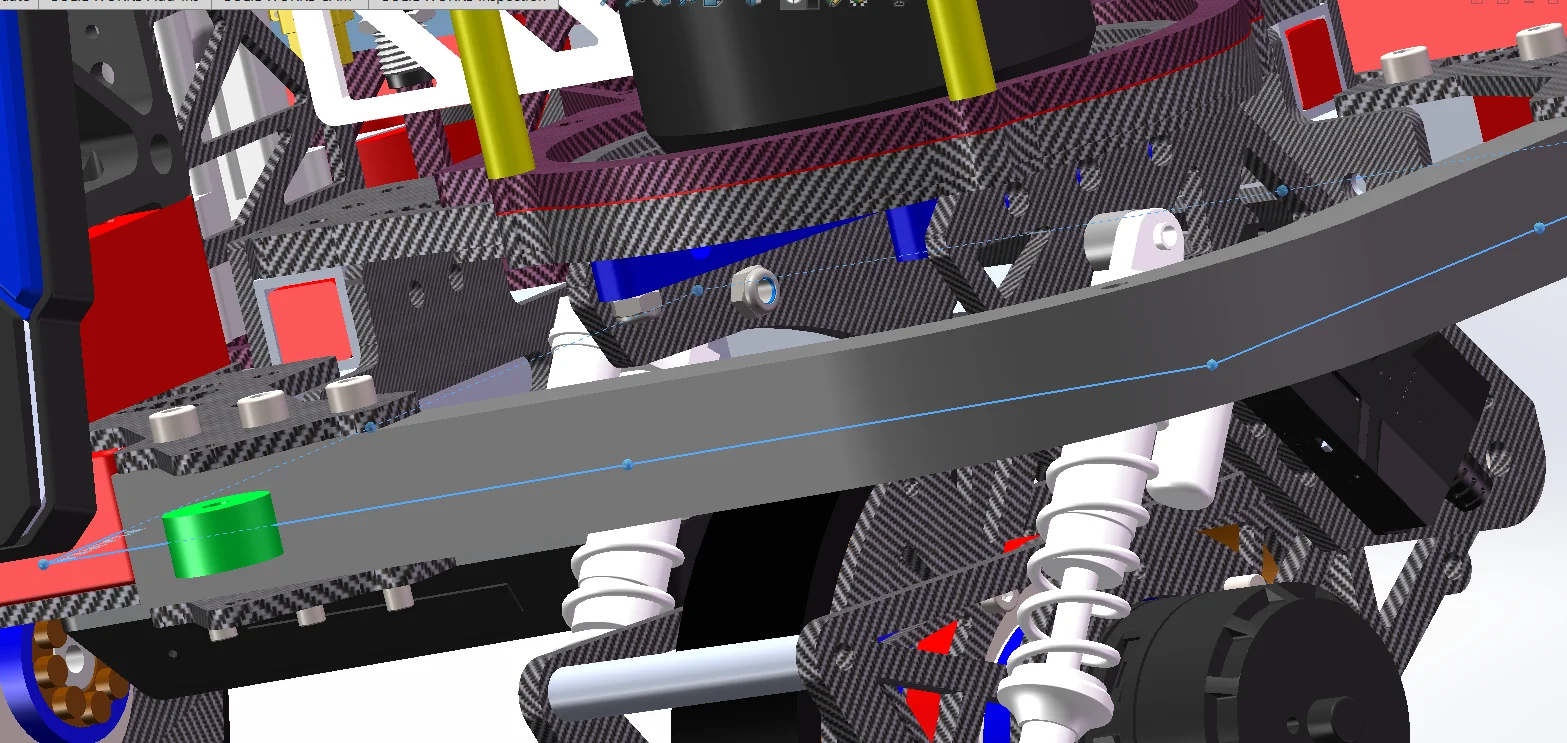
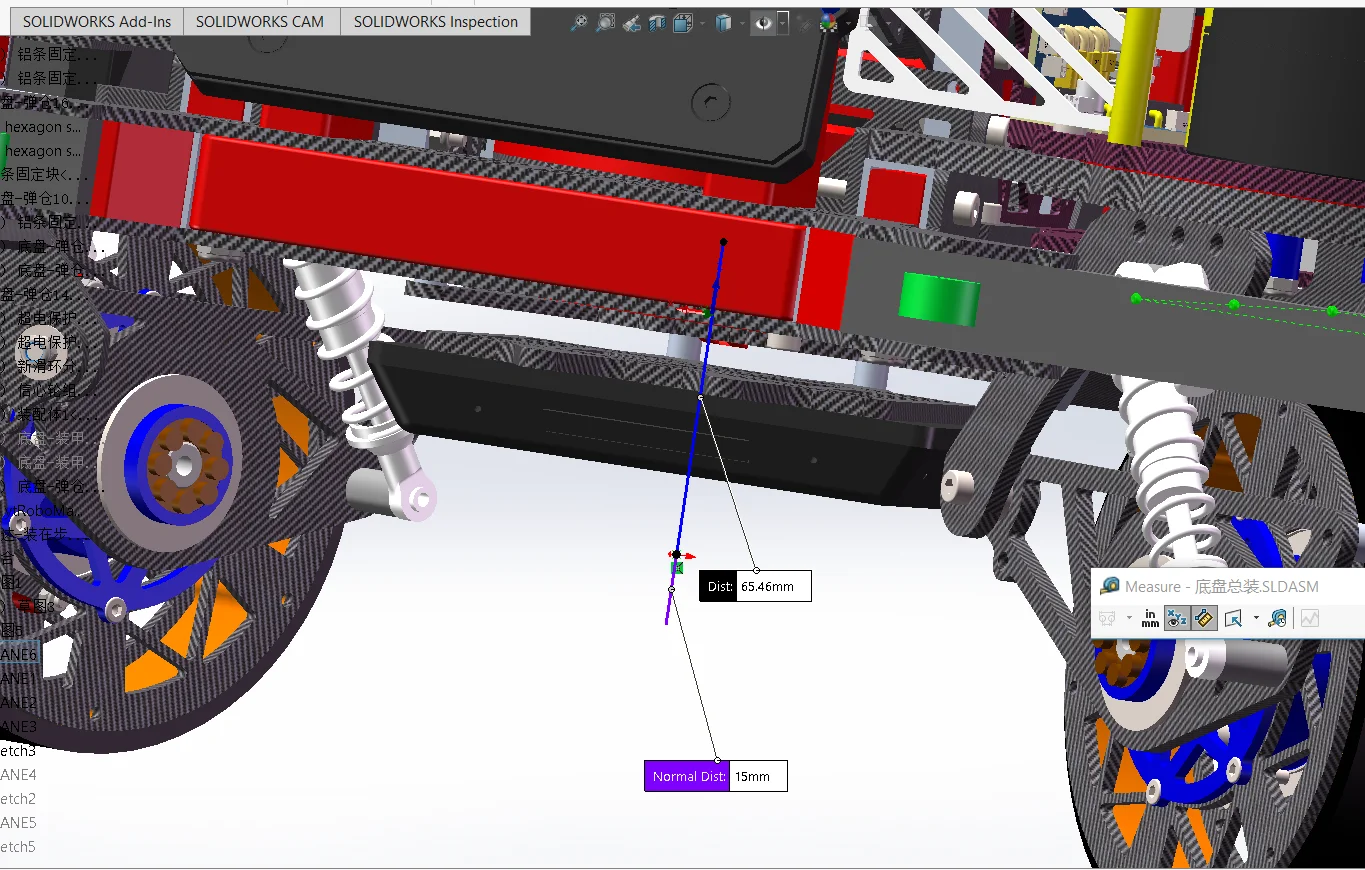
It can be modified to:
            <collision name="chassis_base_collision">
                <pose>0 0 0.06546 0 0 0</pose>
                <xmacro_block name="geometry_box" x="0.525" y="0.525" z="0.20"/>
            </collision>
The following three can all be commented out, because the collision area of our steering wheel chassis is approximately a square, usingchassis_base_collisionis sufficient.
<collision name="chassis_projectile_container_collision">
<collision name="chassis_fornt_wheel_holder_collision">
<collision name="chassis_rear_wheel_holder_collision">
<!-- <collision name="chassis_projectile_container_collision">
<pose>-0.122 0 0.177 0 0 0</pose>
<xmacro_block name="geometry_box" x="0.1" y="0.18" z="0.146"/>
</collision>
<collision name="chassis_fornt_wheel_holder_collision">
<pose>0.208 0 0 0 0 0</pose>
<xmacro_block name="geometry_box" x="0.055" y="0.367" z="0.055"/>
</collision>
<collision name="chassis_rear_wheel_holder_collision">
<pose>-0.208 0 0 0 0 0</pose>
<xmacro_block name="geometry_box" x="0.055" y="0.367" z="0.055"/>
</collision> -->- Chassis height
This parameter, as its literal meaning suggests, is the thickness of the chassis, that is, the distance from the upper top surface to the lower bottom surface of the chassis.
- For wheelbase and track width, you also measure the "wheel centers," not the chassis shell.
The polar bear's is:
        <!--front_left wheel link and joint-->
        <xmacro_block name="chassis_wheel_l" prefix="front_left" parent="chassis" pose="0.207 0.194 0 0 0 0"/>
        <!--front_right wheel link and joint-->
        <xmacro_block name="chassis_wheel_r" prefix="front_right" parent="chassis" pose="0.207 -0.194 0 0 0 0"/>
        <!--rear_left wheel link and joint-->
        <xmacro_block name="chassis_wheel_r" prefix="rear_left" parent="chassis" pose="-0.207 0.194 0 0 0 0"/>
        <!--rear_right wheel link and joint-->
        <xmacro_block name="chassis_wheel_l" prefix="rear_right" parent="chassis" pose="-0.207 -0.194 0 0 0 0"/>
FL: 0.207 0.194
FR: 0.207 -0.194
RL: -0.207 0.194
RR: -0.207 -0.194Then the wheelbase is = 0.207 - (-0.207) = 0.414 m
Then the wheel spacing is = 0.194 - (-0.194) = 0.388 m
Schematic diagram:
                 +X 前

       FL ●────────────● FR
          │            │
          │            │
          │            │
          │            │
       RL ●────────────● RR

          ←  轮距  →

前后两个轮轴中心的距离
        = 轴距
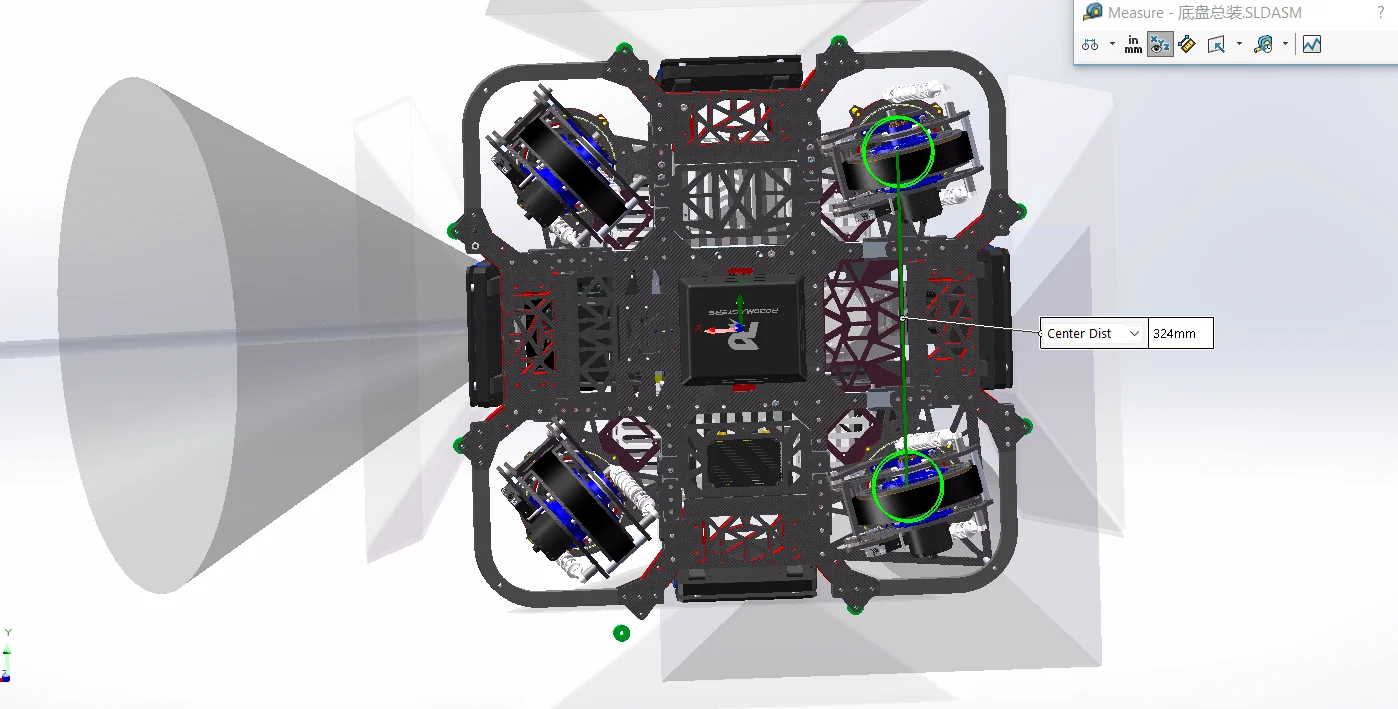
Therefore, the data to be measured are: Front left wheel center to rear left wheel center: distance in the X direction Left wheel center plane to right wheel center plane: distance in the Y direction Do not measure the outermost side of the tires.
As shown in the figure below, the wheel track is 324 mm
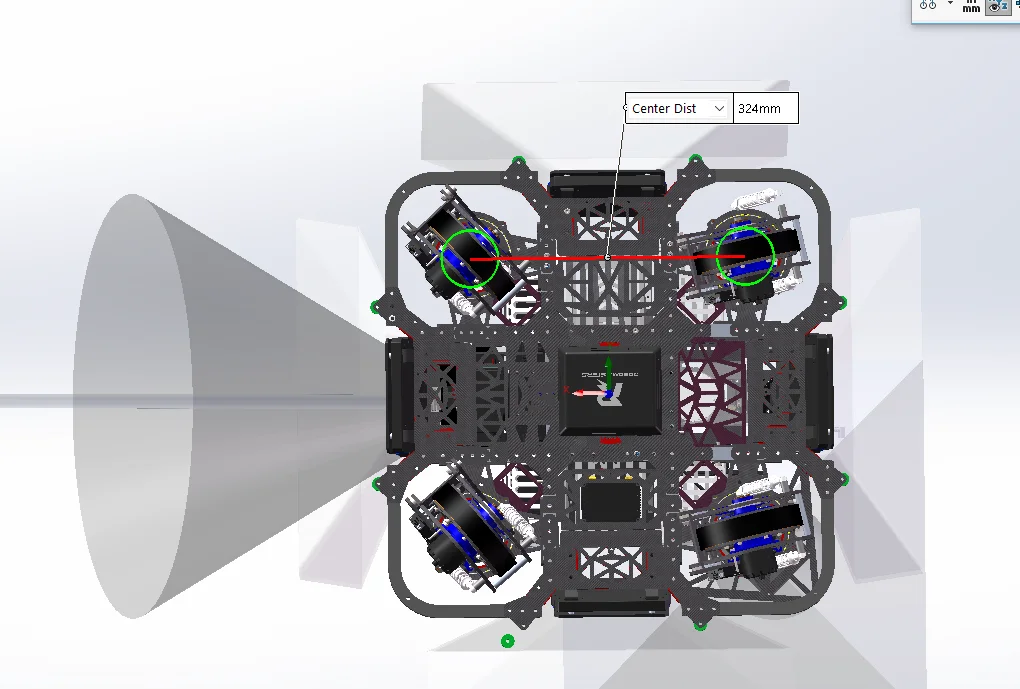
As shown in the figure, the wheelbase is also 324 mm.
324/2=162
So it is
FL:  0.162   0.162
FR:  0.162  -0.162
RL: -0.162   0.162
RR: -0.162  -0.162
<!--front_left wheel link and joint-->
<xmacro_block name="chassis_wheel_l" prefix="front_left" parent="chassis" pose="0.162 0.162 0 0 0 0"/>
<!--front_right wheel link and joint-->
<xmacro_block name="chassis_wheel_r" prefix="front_right" parent="chassis" pose="0.162 -0.162 0 0 0 0"/>
<!--rear_left wheel link and joint-->
<xmacro_block name="chassis_wheel_r" prefix="rear_left" parent="chassis" pose="-0.162 0.162 0 0 0 0"/>
<!--rear_right wheel link and joint-->
<xmacro_block name="chassis_wheel_l" prefix="rear_right" parent="chassis" pose="-0.162 -0.162 0 0 0 0"/>- Wheel diameter
Open/src/robot_description/resource/xmacro/reality_robot.sdf.xmacro:
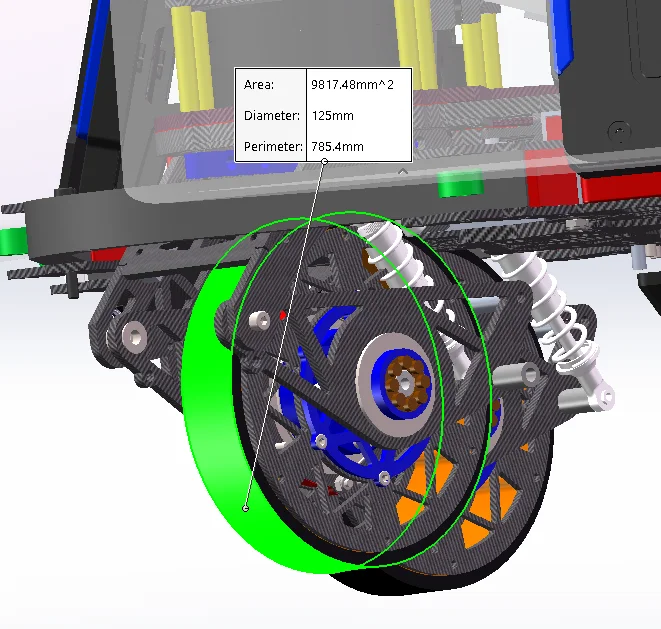
This is the diameter of the wheel, not the radius. Please note that.
As shown in the figure, the wheel diameter is 125 mm.
- Chassis height above level ground, chassis_height:
    <!-- 底盘距离水平地面的高度 -->
    <xmacro_define_value name="chassis_height" value="0.077" />
    <!-- gimbal_yaw 相对于底盘的 z 轴安装偏移 -->
    <xmacro_define_value name="gimbal_yaw_height" value="0.026" />
    <!-- gimbal_pitch 相对于 gimbal_yaw 的高度差 -->
    <xmacro_define_value name="gimbal_pitch_height" value="0.355" />
The several parameters here, thechassis_heightdescribed here is:
<joint name="base_to_chassis" type="fixed">
    <pose>0 0 ${chassis_height} 0 0 0</pose>
    <parent>base_footprint</parent>
    <child>chassis</child>
</joint>
Since the joints of all four wheels are:
parent="chassis"
pose="... ... 0 0 0 0"
So the structure is actually:
          chassis 原点
               ●──────── 底盘原点(北极熊这套规定为轮轴中心平面的中心点)
               │
               │ chassis_height
               │
地面 ──────────●──────────
          base_footprint
In fact, for the polar bear system, it is stipulated that z=0 in the chassis coordinate system is the horizontal plane on which the centers of the four wheel axles lie.
We follow the polar bear's rules
base_footprint: ground chassis:Axle center plane
In fact, this chassis does not actually need to be a real chassis; it can be air, either below or above the chassis.
Therefore, at this time, the chassis height is the wheel radius, which is the wheel diameter measured above divided by 2.
At this point, create a reference datum plane on the bottom face, then create another parallel datum plane at a distance above this reference datum plane equal to the wheel radius.
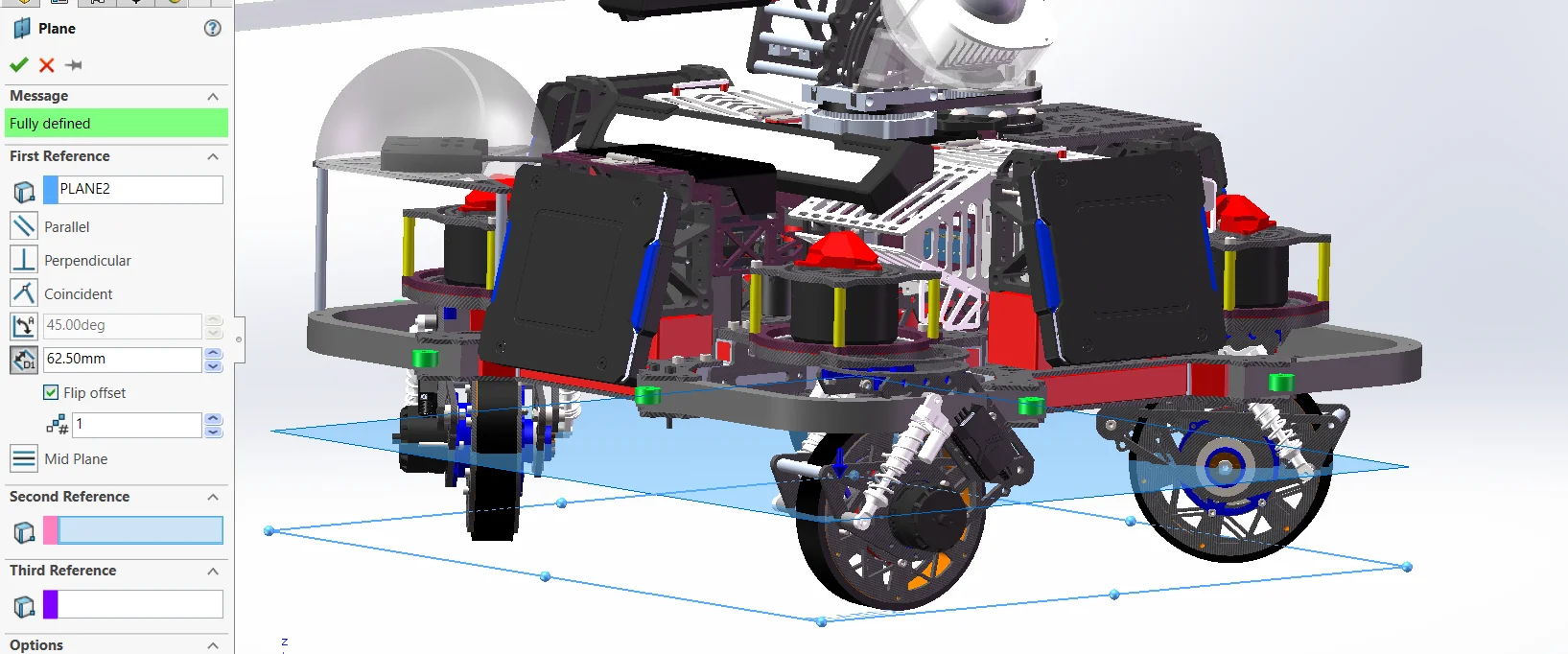
Sketch on this face, then convert the origin to a solid reference. This point is the axle midpoint, and it is also the chassis midpoint. (This is the rule set by Polar Bear: the axle midpoint is the chassis midpoint.)
Here, of course, I have 125mm/2=62.5mm
    <!-- 底盘距离水平地面的高度 -->
    <xmacro_define_value name="chassis_height" value="0.0625" />
There is also a place that only affects thesimulationthat needs to be modified; what is included insrc/rmoss_gz_resources/resource/models/ysu2026_sentry_robot/ysu2026_sentry_robot.def.xmacrois still the polar bear public wheel<xmacro_includeuri="model://rmua19_standard_robot/chassis_wheel.def.xmacro" />.
So, the true radius is atsrc/rmoss_gz_resources/resource/models/rmua19_standard_robot/chassis_wheel.def.xmacro.
Inside:
<xmacro_define_block name="chassis_wheel_l" params="prefix parent pose">

<xmacro_block
    name="inertia_cylinder"
    m="0.4"
    r="0.0758"
    l="0.0452"/>

<xmacro_block
    name="geometry_cylinder"
    r="0.0758"
    l="0.0452"/>

<xmacro_define_block name="chassis_wheel_r" params="prefix parent pose">

<xmacro_block
    name="inertia_cylinder"
    m="0.4"
    r="0.0758"
    l="0.0452"/>

<xmacro_block
    name="geometry_cylinder"
    r="0.0758"
l="0.0452"/>Here,r="0.0758"this is the collision radius of the simulated wheel. It should be changed to our wheel radius of 62.5 mm.
However, I do not recommend modifying this file directlyrmua19_standard_robot/chassis_wheel.def.xmacrothis file is shared.
It is recommended to copy one tosrc/rmoss_gz_resources/resource/models/ysu2026_sentry_robot/chassis_wheel.def.xmacro.
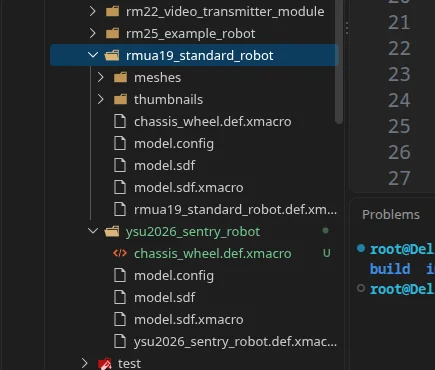
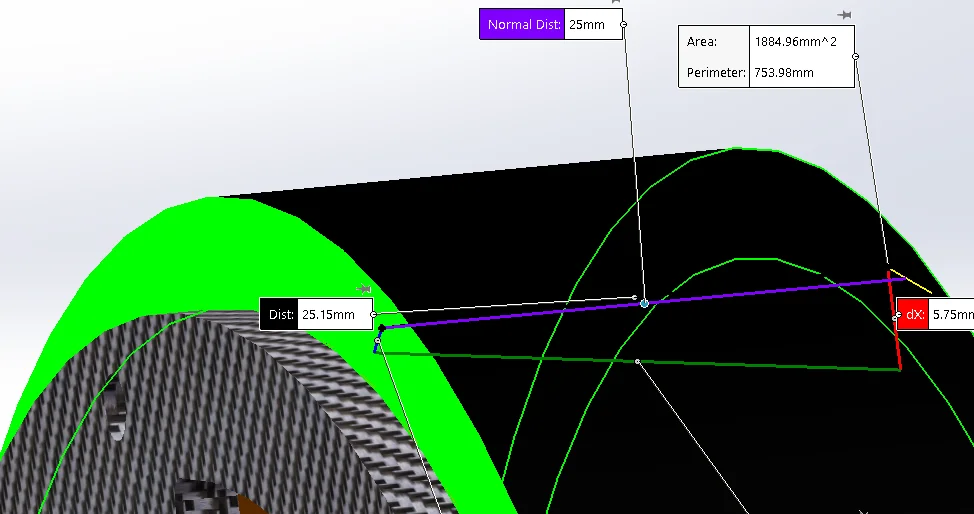
Modify the r radius in these two below, and then the wheel thickness l can also be changed. (Note that both the left and right wheels must be modified.)
r = radius of the cylinder l = length of the cylinder along its own axis
<xmacro_block name="inertia_cylinder"  m="0.4" r="0.0625" l="0.025"/>
<xmacro_block name="geometry_cylinder" r="0.0625" l="0.025"/>Changeysu2026_sentry_robot.def.xmacroin<xmacro_include uri="model://rmua19_standard_robot/chassis_wheel.def.xmacro" />to<xmacro_include uri="model://ysu2026_sentry_robot/chassis_wheel.def.xmacro" />.
- Gimbal height, gimbal_yaw_height
chassis
   ↓
gimbal_yaw_odom_joint      ← 大 Yaw
   ↓
gimbal_yaw_odom
   ↓
gimbal_pitch_odom_joint    ← fixed,只做辅助 frame
   ↓
gimbal_pitch_odom
   ↓
gimbal_yaw_joint           ← 小 Yaw
   ↓
gimbal_yaw
   ↓
gimbal_pitch_joint         ← 小 Pitch
   ↓
gimbal_pitch
gimbal_pitch
●
│
│ gimbal_pitch_height
│
●
大 Yaw 旋转中心
│
│ gimbal_yaw_height
│
●
chassis 原点
= 轮轴中心平面gimbal_yaw_height
= chassis → 大 Yaw
gimbal_pitch_height
= 大 Yaw → Pitch <joint name="gimbal_yaw_odom_joint" type="revolute">
<pose relative_to='chassis'>
0 0 ${gimbal_yaw_height} 0 0 0
</pose>
<joint name="gimbal_pitch_odom_joint" type="fixed">
<pose relative_to='gimbal_yaw_odom'>0 0 ${gimbal_pitch_height} 0 0 0</pose>
<joint name="gimbal_yaw_joint" type="revolute">
<pose relative_to='gimbal_pitch_odom'>0 0 -${gimbal_pitch_height} 0 0 0
</pose>It can be seen here thatgimbal_yaw_odom_jointandgimbal_yaw_jointcoincide. (The magnitudes Yaw coincide)
What he described is
chassis 坐标系原点
        │
        │ gimbal_yaw_height
        │
        ▼
云台 gimbal_yaw_odom_joint(大Yaw) 旋转轴原点
That is, the Z-direction distance from the origin of the chassis coordinate system to the center of the yaw rotation axis.
If the gimbal is offset forward or backward relative to the chassis, specify the full pose rather than only gimbal_yaw_height.
Look at this gimbal: between the centermost ring and the chassis origin, there is only dz, which indicates that the gimbal is at the very center of the vehicle with no offset.
As measured, gimbal_yaw_height is 210.46mm
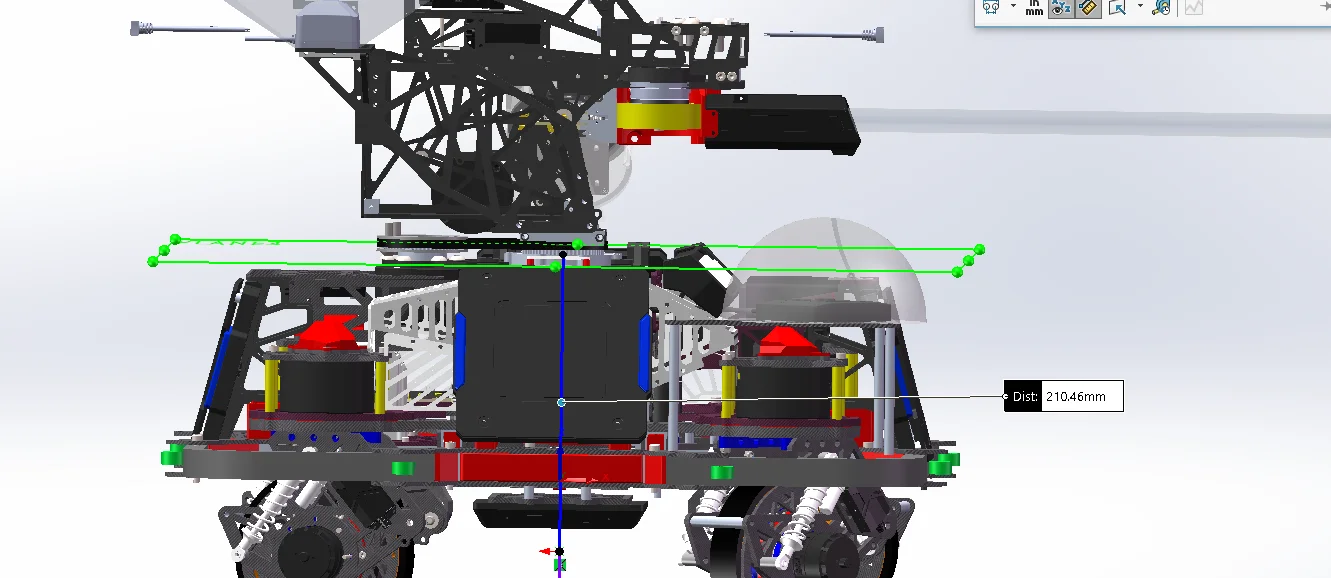
    <!-- gimbal_yaw 相对于底盘的 z 轴安装偏移 -->
    <xmacro_define_value name="gimbal_yaw_height" value="0.21046" />
Apart from changing the dimensions, since we do not have a large Yaw structure, and Gazebo only provides a small Yaw controller, let's setgimbal_yaw_odom_jointfixed.
Open/src/rmoss_gz_resources/resource/models/ysu2026_sentry_robot/ysu2026_sentry_robot.def.xmacroTake
        <joint name="gimbal_yaw_odom_joint" type="revolute">
            <pose relative_to='chassis'>0 0 ${gimbal_yaw_height} 0 0 0</pose>
            <parent>chassis</parent>
            <child>gimbal_yaw_odom</child>
            <axis>
                <xyz>0 0 1</xyz>
                <limit>
                    <effort>100</effort>
                    <velocity>50</velocity>
                    <lower>-1.79769e+308</lower>
                    <upper>1.79769e+308</upper>
                </limit>
            </axis>
        </joint>
Change to
        <joint name="gimbal_yaw_odom_joint" type="fixed">
            <pose relative_to="chassis">0 0 ${gimbal_yaw_height} 0 0 0</pose>
            <parent>chassis</parent>
            <child>gimbal_yaw_odom</child>
</joint>- Gimbal height, gimbal_pitch_height
                    ● pitch 旋转轴
                    │
                    │ gimbal_pitch_height
                    │
                    ● yaw 旋转轴
                    │
                    │ gimbal_yaw_height
                    │
                    ● chassis 原点
                    │
                    │ chassis_height
                    │
────────────────────● 地面<joint name="gimbal_pitch_odom_joint" type="fixed">
<pose relative_to="gimbal_yaw_odom">
0 0 ${gimbal_pitch_height} 0 0 0
</pose><joint name="gimbal_pitch_joint" type="revolute">
<pose relative_to="gimbal_yaw">
0 0 ${gimbal_pitch_height} 0 0 0
</pose>Here the large and small pitches coincide.
The gimbal height gimbal_pitch_height represents the vertical height difference from the center of the large Yaw axis to the center of the Pitch rotation axis.
That is, the vertical distance from the center of the yaw rotation axis → the center of the pitch rotation axis.
As shown in the figure below, the gimbal height gimbal_pitch_height is 96.41 mm
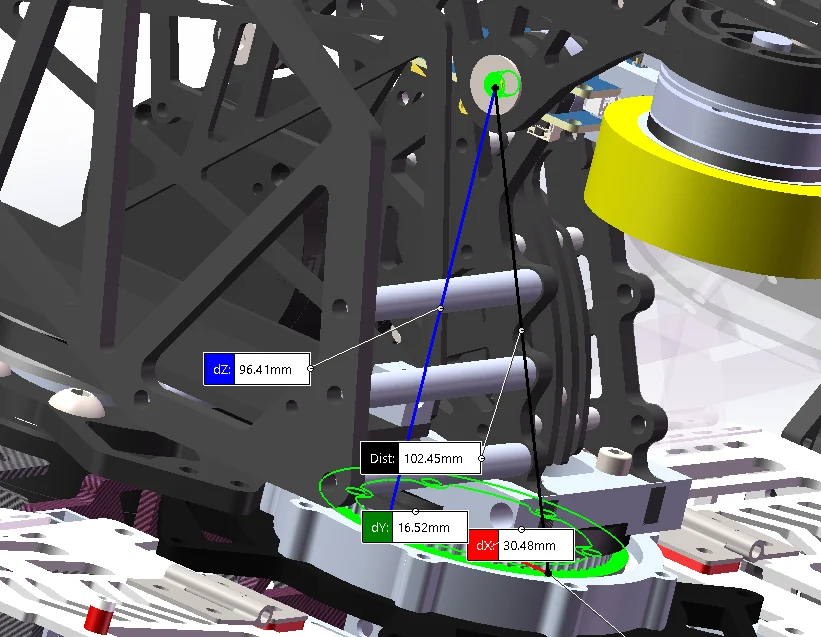
    <!-- gimbal_pitch 相对于 gimbal_yaw 的高度差 -->
    <xmacro_define_value name="gimbal_pitch_height" value="0.09641" />