Wiki
std::chrono
Existing English translations were reused. 1 current source blocks remain in Simplified Chinese, without triggering paid translation.
1.What problem does this section solve?
在 C 语言中,处理时间用 time()、clock()、sleep()、gettimeofday() 等函数,它们使用不同的单位和类型(秒、毫秒、微秒...),容易搞混,精度也不够。
std::chrono is introduced by C++11a type-safe time librarywhich clearly separates the concepts of "time point", "duration", and "clock". Units are automatically managed in the type system, with no need for manual conversion.
2.What is this feature?
std::chrono Three core concepts are provided:
- Duration
duration: A length of time, such as 5 seconds or 10 milliseconds. - Timestamp
time_point: A specific moment, such as 2026-06-02 12:00:00. - Clock
clock: A tool for obtaining the current time, such assystem_clock、steady_clock.
3.C++ Standard Edition
C++11 (basic), C++20 added calendar, time zone, etc.
4.Required header files
#include <chrono>
#include <thread> // for std::this_thread::sleep_for5.Basic syntax
using namespace std::chrono;

// 时长
auto t1 = 5s;           // 5 秒
auto t2 = 100ms;        // 100 毫秒
auto t3 = 50us;         // 50 微秒
auto t4 = 10ns;         // 10 纳秒
auto t5 = 1min;         // 1 分钟(C++20)
auto t6 = 2h;           // 2 小时(C++20)

// 时间点
auto now = std::chrono::system_clock::now();  // 当前时间(系统时钟)
auto now2 = std::chrono::steady_clock::now(); // 单调时钟(不会往回跳)

// 时长转换
auto sec = std::chrono::duration_cast<std::chrono::seconds>(100ms);  // 0s(截断)

// 休眠
std::this_thread::sleep_for(500ms);6.Comparison of Common Clocks
| Clock | Characteristics | Uses |
|---|---|---|
system_clock |
System time, convertible to calendar time | Displays time and timestamps |
steady_clock |
Monotonically increasing, will not jump backwards | Measuring elapsed time (most commonly used) |
high_resolution_clock |
Highest-precision clock | Timing requiring the highest precision |
7.Example code
7.1.Example 1: Measuring the execution time of a piece of code
#include <iostream>
#include <chrono>
#include <thread>  // for sleep

int main()
{
    // 记录开始时间
    auto start = std::chrono::steady_clock::now();

    // 模拟耗时操作
    std::this_thread::sleep_for(std::chrono::milliseconds(500));

    // 记录结束时间
    auto end = std::chrono::steady_clock::now();

    // 计算耗时
    auto elapsed = end - start;
    auto elapsed_ms = duration_cast<std::chrono::milliseconds>(elapsed);
    auto elapsed_us = duration_cast<std::chrono::microseconds>(elapsed);

    std::cout << "Elapsed: " << elapsed_ms.count() << " ms\n";
    std::cout << "Elapsed: " << elapsed_us.count() << " us\n";

    return 0;
}
Execution result(approximately):
Elapsed: 500 ms
Elapsed: 500000 us
The US here may fluctuate, generally within the hundreds.
7.2.Example 2: Based on Example 1, the use and conversion of different time units
#include <iostream>
#include <chrono>

int main()
{
    using namespace std::chrono_literals;  //可以使用1s,100ms,500us这种更便捷

    // 不同单位
    auto s = 1s;         // 1 秒 等同于 auto s = std::chrono::seconds(1);
    auto ms = 100ms;     // 100 毫秒 等同于 auto ms = std::chrono::milliseconds(100);
    auto us = 500us;     // 500 微秒 等同于 auto us = std::chrono::microseconds(500);

    // 时长可以相加
    auto total = s + ms + us;
    std::cout << "total in us: " << std::chrono::duration_cast<std::chrono::microseconds>(total).count() << " us\n";

    // 秒到毫秒的转换
    auto two_seconds = 2s;
    auto as_ms = std::chrono::duration_cast<std::chrono::milliseconds>(two_seconds);
    std::cout << "2s = " << as_ms.count() << " ms\n";

    // 毫秒到秒的转换(会截断)
    auto ms_to_sec = std::chrono::duration_cast<std::chrono::seconds>(1500ms);
    std::cout << "1500ms = " << ms_to_sec.count() << " s\n";  // 1 秒

    return 0;
}
Running result:
total in us: 1100500 us
2s = 2000 ms
1500ms = 1 s
7.3.Example 3: Based on Example 2, implement a simple timer
#include <chrono>
#include <cstdio>
#include <functional>
#include <print>

// 简单的计时器:测量函数运行时间
double measure(std::function<void()> func)
{
    auto start = std::chrono::steady_clock::now();
    func();
    auto end = std::chrono::steady_clock::now();

    return std::chrono::duration_cast<std::chrono::microseconds>(end - start).count() / 1000.0;  // 返回毫秒(先转us再转ms可以保留小数,只是最终展示形式以ms形式)
}

void slow_operation()
{
    long int sum = 0;
    for (int i = 0; i < 10000000; ++i)
    {
        sum += i;
    }
    std::println("sum = {}",sum);
}

void quick_operation()
{
    int sum = 0;
    for (int i = 0; i < 1000; ++i)
    {
        sum += i;
    }
    std::println("sum = {}",sum);
}

int main()
{
    std::print("slow_op took {} ms\n",measure(slow_operation));
    std::print("quick_op took {} ms\n",measure(quick_operation));

    return 0;
}
Running results(The running time varies by machine):
sum = 49999995000000
slow_op took 17.712 ms
sum = 499500
quick_op took 0.005 ms
7.4.Example 4: On the basis of Example 3, obtain and format the system time
#include <chrono>
#include <ctime>
#include <print>

int main()
{
    using namespace std::chrono_literals;

    // 获取当前系统时间
    auto now = std::chrono::system_clock::now();

    // 获取自 epoch(1970-01-01)以来的秒数
    auto epoch_seconds = std::chrono::duration_cast<std::chrono::seconds>(now.time_since_epoch());
    std::println("Seconds since epoch: {}",epoch_seconds.count());

    // 转换为 C 风格的 time_t 打印 (打印的是本地时间,比如上海时间UTC+8)
    std::time_t now_c = std::chrono::system_clock::to_time_t(now);
    std::print("Current time: {}",std::ctime(&now_c));  //std::ctime()自己带一个换行

    // 计算未来时间点(C++23的chrono格式化打印,打印UTC时间)
    auto future = now + 24h;  // C++20 的 24h 字面量
    // 如果没有 C++20,可以用: auto future = now + std::chrono::hours(24);
    std::println("24 hours later: {:%Y-%m-%d %H:%M:%S}",future); // 末尾会带一串高精度纳秒级部分

    //转秒单位,来忽略future带的更高精度的时间(C++23的chrono格式化打印,打印UTC时间)
    auto future_sec = std::chrono::time_point_cast<std::chrono::seconds>(future);
    std::println("24 hours later: {:%Y-%m-%d %H:%M:%S}",future_sec);

    return 0;
}
Run results(the date varies depending on the run time):
Seconds since epoch: 1788875788
Current time: Tue Sep  8 21:56:28 2026
24 hours later: 2026-09-09 13:56:28.573118608
24 hours later: 2026-09-09 13:56:28
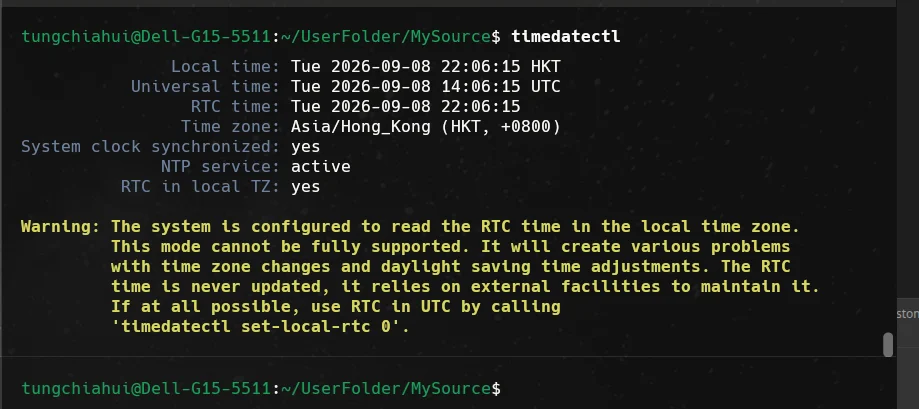
Why is therectime()and{:%Y-%m-%d %H:%M:%S}a difference of 8 hours from the printed time?
system_clock::now()
    ↓
绝对时间点
没有“本地时间”这个概念
    │
    ├── ctime()
    │      ↓
    │   自动按系统本地时区显示
    │
    ├── 直接 chrono 格式化 system_clock::time_point
    │      ↓
    │   按 UTC 显示
    │
    └── zoned_time
           ↓
        按指定时区显示
Therefore
13:56 UTC
   =
21:56 UTC+8
You can use the following command in the terminal to see what time zone your computer is in.
date
timedatectl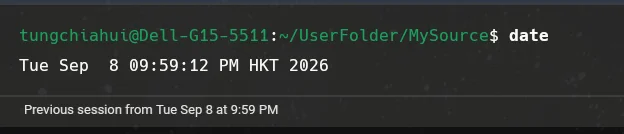
8.Operation result
See the "run results" for each example above.
9.Key syntax explanation in the example
| Example | What it explains | New syntax introduced | Why it is written this way | Notes |
|---|---|---|---|---|
| Example 1 | Measuring code execution time | steady_clock::now()、duration_cast、literal 500ms |
steady_clock monotonically increasing, suitable for timing | The literal requires using namespace std::chrono |
| Example 2 | Duration unit conversion | 1s、100ms、duration_cast |
The type automatically manages units; an explicit cast is required when converting | duration_cast is truncation, not rounding |
| Example 3 | Generic timer | measure(function<void()>) |
Wrap it into a utility function for reuse | steady_clock is the best choice |
| Example 4 | System time and formatting | system_clock::now()、to_time_t()、24h |
system_clock can be converted to calendar time | system_clock may be affected by system time adjustments and should not be used for timing |
10.Do not mix timing and time display.
| Requirement | Recommended Clock | Reason |
|---|---|---|
| Measure function elapsed time | steady_clock |
Monotonic, unaffected by system time adjustments |
| Timeout determination | steady_clock |
Will not cause timeout errors due to system time jumps |
| Print current date and time | system_clock |
Can be converted to calendar time |
| Generate log timestamps | system_clock |
Human-readable |
A common mistake is using system_clock for timeout determination. If the system time is set back by NTP or manually by the user, the program may "wait a long time without timing out." For both measuring elapsed time and timeouts, prefer using steady_clock.
10.1.Example 5: Using steady_clock for timeout determination
#include <chrono>
#include <thread>
#include <print>

int main()
{
    // 程序从 main 函数开始执行,下面的语句会按顺序运行。
    using namespace std::chrono_literals;

    auto deadline = std::chrono::steady_clock::now() + 300ms;

    while (std::chrono::steady_clock::now() < deadline)
    {
        std::println("waiting...");

        std::this_thread::sleep_for(100ms);
    }

    std::println("timeout");

    // 返回 0 表示程序正常结束。
    return 0;
}
Possible run results:
waiting...
waiting...
waiting...
timeout
The point here is not the loop itself, but the timeout baseline uses steady_clock. This kind of coding style is very common in timers, serial port read timeouts, and network wait timeouts.
11.Common Errors
Error 1: Forgetting using namespace std::chrono_literals or using namespace std::chrono causes the literal to be unrecognized
auto t = 500ms; // ❌ 编译错误!Correct approach: add using namespace std::chrono_literals; or add using namespace std::chrono or write std::chrono::milliseconds(500).
Error 2: Measuring elapsed time with system_clock
auto start = system_clock::now(); // ❌ 系统时间可能被人调回去了!Correct approach: always use steady_clock to measure elapsed time.
Error 3: Forgetting to .count() directly output duration
std::cout << duration_cast<milliseconds>(elapsed); // ❌ 不能直接输出Correct approach:std::cout << elapsed_ms.count() << " ms\n";
Error 4: Truncation issue of duration_cast
auto sec = duration_cast<seconds>(1500ms); // 1 秒!不是 1.5 秒Correct approach: If decimals are needed, use duration<double> or duration_cast<milliseconds> to preserve precision.
std::chrono::duration<double> sec = 1500ms;  //std::chrono::duration<double>的默认单位就是“秒”,只不过底层数值类型从整数变成了 double。
std::println("{}", sec.count());  //输出1.5
auto ms = 1500ms;
std::println("{}", ms.count() / 1000.0); //输出1.512.Usage Recommendations
- For measuring elapsed time use
steady_clock: monotonically increasing, unaffected by system time adjustments. - For displaying time use
system_clock: can be converted to calendar time. - Use literals
1sand100msrather than writing numbers directly:better readability. duration_castis truncation, not rounding:precision is lost, pay attention to the use case.- C++20 added calendar and time zone support:
std::chrono::year_month_dayetc., more powerful. - Timeout determination also uses
steady_clock: like measuring elapsed time, unaffected by system time adjustments.
13.Summary
std::chronoProvides type-safe time handling: duration, time_point (time point), clock.- Use
steady_clock::now()to measure elapsed time, andsystem_clock::now()to obtain system time. - Literals
1s、100ms、50usmake time code intuitive and readable. duration_castPerform unit conversion,.count()obtain the value.std::this_thread::sleep_for(500ms)Perform thread sleep.
13.1.Engineering Expansion
In ROS2, the usage of rclcpp::Duration and rclcpp::Time is very similar to that of std::chrono. Once you have learned std::chrono well, it is easy to understand the time handling in ROS2. In Boost.Asio, timers also make extensive use of std::chrono::duration.