Wiki
Serial Communication Tutorial
Existing English translations were reused. 8 current source blocks remain in Simplified Chinese, without triggering paid translation.
串口是机器人里最常见的通信方式之一:上位机 ROS2 / Linux 程序通过 USB-TTL、USB-CAN 转串口、CH340、CP2102、FT232 等设备和 STM32、ESP32、下位机控制板通信。
This section still follows the order:
先写普通 main() 里的同步示例
再写普通 main() 里的异步示例
最后写类封装版本
All asynchronous callbacks uniformly use std::bind.
1.Preparing a Virtual Serial Port Test Environment on Linux
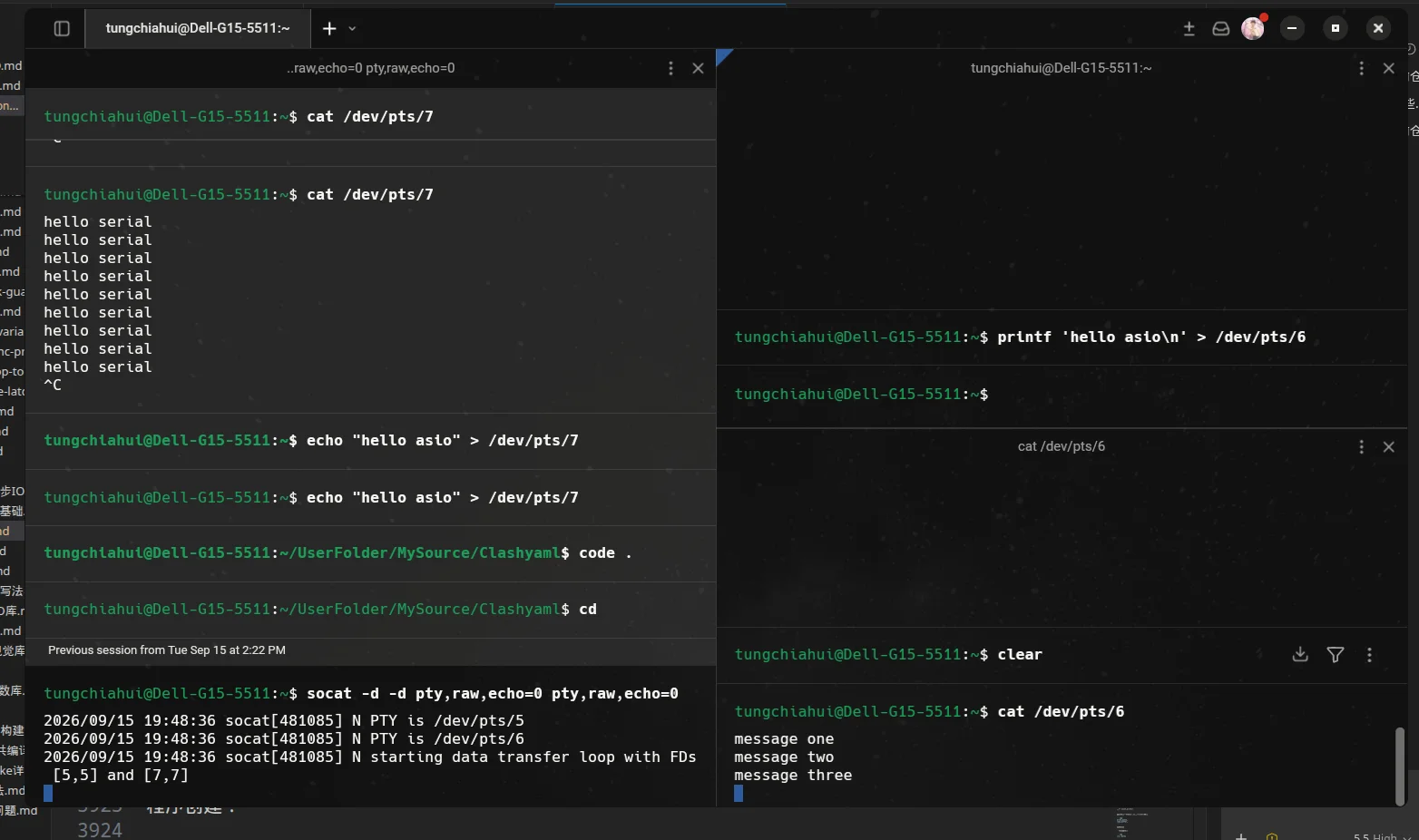
If you do not have a real STM32 on hand, you can use socat to create a pair of virtual serial ports.
1.1.Install socat
Ubuntu / Debian:
sudo apt install socatFedora:
sudo dnf install socat1.2.Create a pair of virtual serial ports
Open a new terminal and run:
socat -d -d \
  PTY,raw,echo=0,link=/tmp/ttyV0 \
  PTY,raw,echo=0,link=/tmp/ttyV1
You will see output similar to:
2026/05/24 12:00:00 socat[12345] N PTY is /dev/pts/3
2026/05/24 12:00:00 socat[12345] N PTY is /dev/pts/4
2026/05/24 12:00:00 socat[12345] N starting data transfer loop with FDs [5,5] and [7,7]
This indicates:
/dev/pts/3 和 /dev/pts/4 是一对互通的虚拟串口
程序写 /dev/pts/3,另一个终端读 /dev/pts/4 就能看到
程序读 /dev/pts/3,另一个终端写 /dev/pts/4 就能发给程序

同时我也给了他们别名
/dev/pts/3 和 /tmp/ttyV0是同一个东西
/dev/pts/4 和 /tmp/ttyV1是同一个东西
The following examples all assume that the program uses /dev/pts/3, and another terminal uses /dev/pts/4. You should modify them according to the actual output of your own terminal.
2.Example 1: In normal main() open the serial port synchronously and send one line
2.1.Program Objectives
The program opens the serial port /dev/pts/3, sets the baud rate to 115200, and then sends:
hello serialAnother terminal reads this line of data from /dev/pts/4.
2.2.Complete code
#include <boost/asio.hpp>
#include <boost/system/error_code.hpp>
#include <print>
#include <string>

int main(int argc, char* argv[])
{
    // 程序从 main 函数开始执行,argc/argv 用来接收命令行参数。
    std::string port_name = "/dev/pts/3";

    if (argc >= 2)
    {
        port_name = argv[1];
    }

    // io_context 是 Asio 的事件循环对象,异步任务需要靠它调度。
    boost::asio::io_context io;
    // serial_port 表示串口设备,后续读写都通过它完成。
    boost::asio::serial_port serial(io);
    boost::system::error_code ec;

    std::println("main:准备打开串口 {}", port_name);

    serial.open(port_name, ec);
    if (ec)
    {
        std::println("打开串口失败:{}", ec.message());
        return 1;
    }

    serial.set_option(boost::asio::serial_port_base::baud_rate(115200));
    serial.set_option(boost::asio::serial_port_base::character_size(8));
    serial.set_option(boost::asio::serial_port_base::parity(
        boost::asio::serial_port_base::parity::none));
    serial.set_option(boost::asio::serial_port_base::stop_bits(
        boost::asio::serial_port_base::stop_bits::one));
    serial.set_option(boost::asio::serial_port_base::flow_control(
        boost::asio::serial_port_base::flow_control::none));

    std::string msg = "hello serial\n";

    // 把缓冲区中的数据写入连接。
    std::size_t n = boost::asio::write(serial, boost::asio::buffer(msg), ec);
    if (ec)
    {
        std::println("发送失败:{}", ec.message());
        return 1;
    }

    std::println("main:发送成功,字节数 = {}", n);
    std::println("main:程序结束");

    return 0;
}
Running result : See “Running output and chronological order” below; if the example involves timers, threads, networks, or external devices, the specific timing and order may vary slightly depending on the environment.
2.3.Compile and run
Terminal 1: Create a virtual serial port.
socat -d -d \
  PTY,raw,echo=0,link=/tmp/ttyV0 \
  PTY,raw,echo=0,link=/tmp/ttyV1
Terminal 2: Listening on the other end.
cat /dev/pts/4Terminal 3: Compile and run the program.
Run the cpp that was just written to send data.
2.4.Run output and chronological order
Program terminal output:
main:准备打开串口 /dev/pts/3
main:发送成功,字节数 = 13
main:程序结束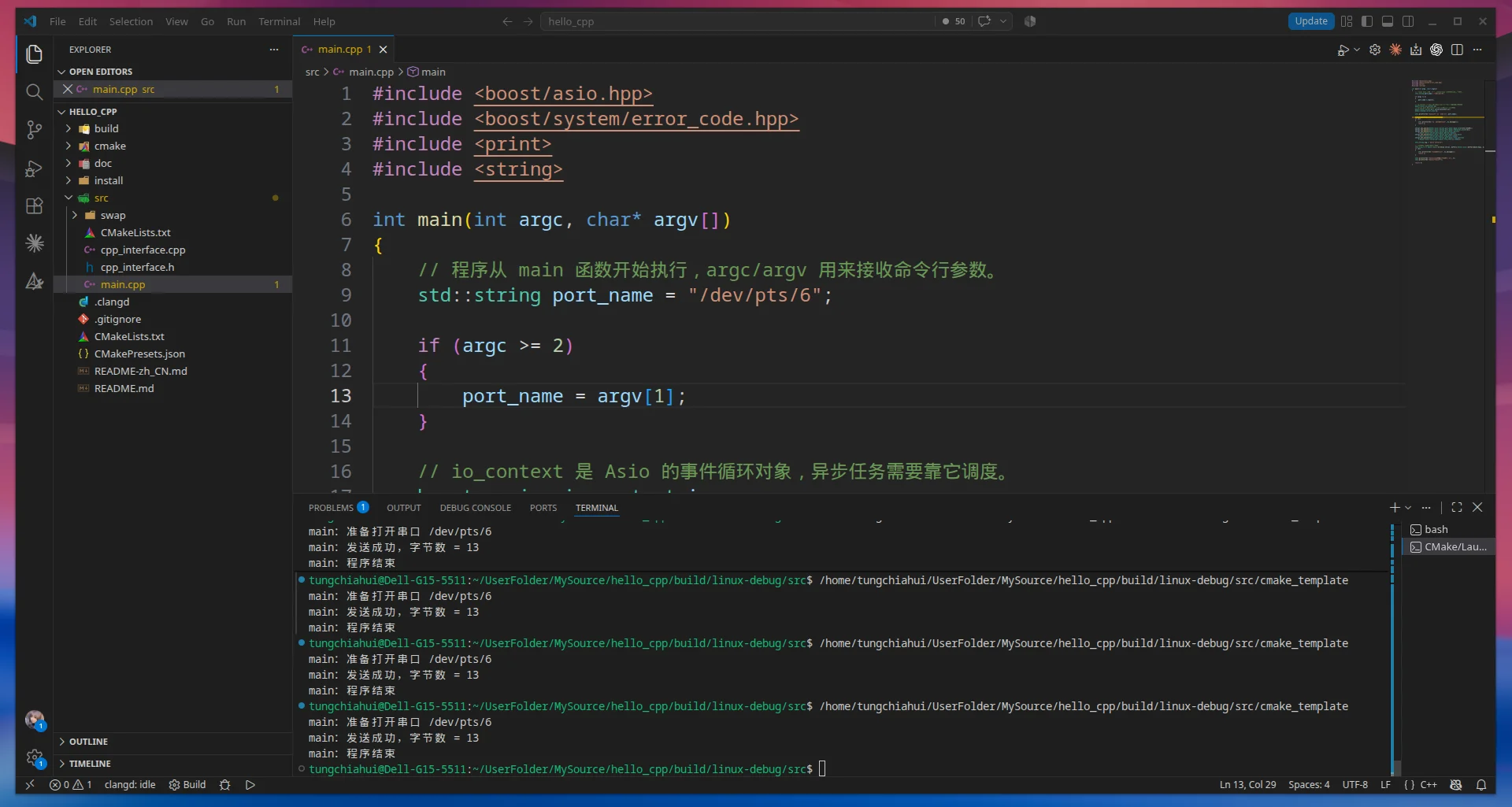
Monitor terminal output:
hello serial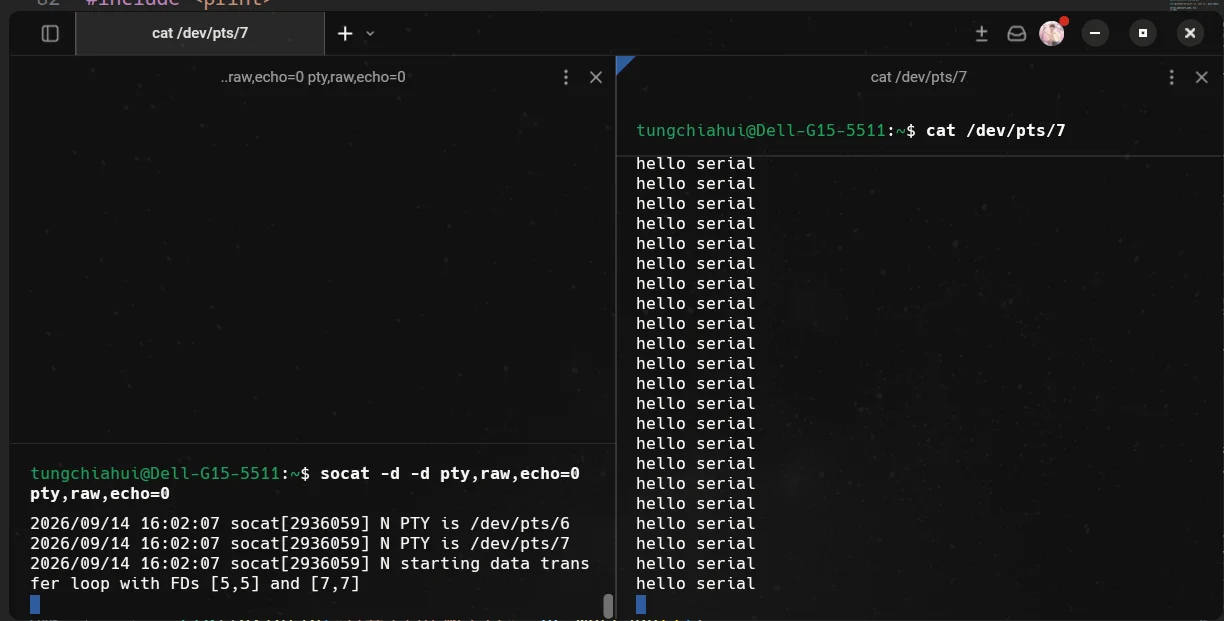
This example has essentially no noticeable delay; the program ends immediately after sending is complete.
2.5.Points to note in this example
This is a synchronous serial port write.boost::asio::write() It will block until the data is fully written or an error occurs.
2.6.Key Function Description
2.6.1.serial.open(port_name, ec)
Function: Opens the serial port device.
Parameters:
port_nameFor example, /dev/ttyUSB0、/dev/ttyACM0、/dev/pts/3.
ecUsed to receive error information. Writing it this way will not throw exceptions, making it more suitable for tutorials and robotics engineering.
2.6.2.serial.set_option(...)
Function: Set serial port parameters, such as baud rate, data bits, parity, stop bits, and flow control.
2.6.3.boost::asio::write(serial, boost::asio::buffer(msg), ec)
Function: Synchronous data write. (Blocking data transmission)
Return value: the number of bytes actually written.
3.示例 2:普通 main() 里同步读取串口数据
3.1.Program Objectives
The program opens the serial port /dev/pts/3, sets the baud rate to 115200, and then blocks waiting to receive 11 bytes.
Another terminal sends to /dev/pts/4:
hello asioBecause echo automatically appends a newline character at the end \n,what is actually sent is:
hello asio\nA total of 11 bytes.
3.2.Complete code
#include <boost/asio.hpp>
#include <boost/system/error_code.hpp>

#include <array>
#include <print>
#include <string>

int main(int argc, char* argv[])
{
    // 程序从 main 函数开始执行,argc/argv 用来接收命令行参数。
    std::string port_name = "/dev/pts/3";

    if (argc >= 2)
    {
        port_name = argv[1];
    }

    // io_context 是 Asio 的 I/O 上下文。
    boost::asio::io_context io;

    // serial_port 表示串口设备,后续读写都通过它完成。
    boost::asio::serial_port serial(io);

    boost::system::error_code ec;

    std::println("main:准备打开串口 {}", port_name);

    serial.open(port_name, ec);

    if (ec)
    {
        std::println("打开串口失败:{}", ec.message());
        return 1;
    }

    serial.set_option(
        boost::asio::serial_port_base::baud_rate(115200));

    serial.set_option(
        boost::asio::serial_port_base::character_size(8));

    serial.set_option(
        boost::asio::serial_port_base::parity(
            boost::asio::serial_port_base::parity::none));

    serial.set_option(
        boost::asio::serial_port_base::stop_bits(
            boost::asio::serial_port_base::stop_bits::one));

    serial.set_option(
        boost::asio::serial_port_base::flow_control(
            boost::asio::serial_port_base::flow_control::none));

    // 创建一个 11 字节的接收缓冲区。
    std::array<char, 11> buffer{};

    std::println("main:等待接收 11 个字节");

    // 同步读取串口数据。
    // 会一直阻塞,直到整个 buffer 被填满或者发生错误。
    std::size_t n =
        boost::asio::read(
            serial,
            boost::asio::buffer(buffer),
            ec);

    if (ec)
    {
        std::println("读取失败:{}", ec.message());
        return 1;
    }

    // 把实际读取到的 n 个字节转换成字符串。
    std::string msg(buffer.data(), n);

    std::println("main:读取成功,字节数 = {}", n);
    std::println("main:收到的数据 = {}", msg);

    std::println("main:程序结束");

    return 0;
}
Running results See "Run output and chronological order" below; if the example involves a serial port, threads, network, or external devices, the exact timing and order may vary slightly depending on the environment.
3.3.Compile and run
Terminal 1: Create a virtual serial port.
socat -d -d \
  PTY,raw,echo=0,link=/tmp/ttyV0 \
  PTY,raw,echo=0,link=/tmp/ttyV1
Assume we obtain:
/dev/pts/3
/dev/pts/4
Terminal 2: Compile and run the program.
After compiling and running the program,
The program outputs at this point:
main:准备打开串口 /dev/pts/3
main:等待接收 11 个字节
Then the program blocks and waits for serial port data.
Terminal 3: send data to the other end.
echo "hello asio" > /dev/pts/4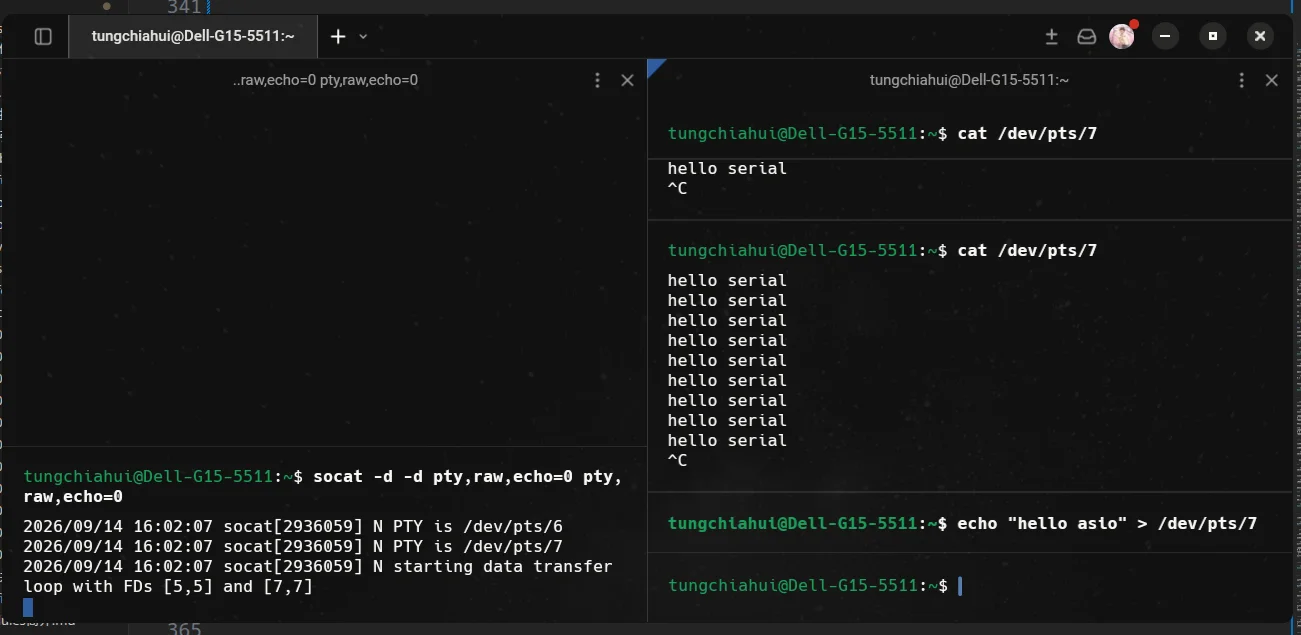
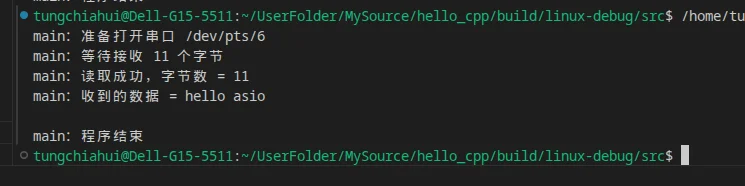
3.4.Run output and chronological order
After the program starts, output:
main:准备打开串口 /dev/pts/3
main:等待接收 11 个字节
Then the program executes:
boost::asio::read(
    serial,
    boost::asio::buffer(buffer),
    ec);
Because:
std::array<char, 11> buffer{};The buffer size is 11 bytes, so the program will block until it receives 11 bytes.
When another terminal executes:
echo "hello asio" > /dev/pts/4The data actually sent is:
hello asio\nExactly 11 bytes.
The program then continues outputting:
main:读取成功,字节数 = 11
main:收到的数据 = hello asio

main:程序结束
It looks like there will be an extra line break here because the received data itself ends with:
\nThe waiting time in this example depends on when you send data to the serial port.
3.5.Points to note in this example
This is synchronous serial port reading.
boost::asio::read() Blocks the current thread until the specified buffer is filled or an error occurs.
In this example:
std::array<char, 11> buffer{};Therefore:
boost::asio::read(
    serial,
    boost::asio::buffer(buffer),
    ec);
Indicates:
一直等待并读取数据
↓
累计收到 11 个字节
↓
read() 返回
If only sending:
helloSince 11 bytes have not yet been reached, the program will still block and wait for the remaining data.
Because synchronous reading is used here, it is not needed:
io.run();3.6.如果实际收到的数据远远超过 11 个字节,会不会把 array 撑爆?
No, it won't.
For example, in this case the receive buffer only has:
std::array<char, 11> buffer{};Therefore:
boost::asio::buffer(buffer)The information told to Asio is equivalent to:
这块接收内存最多只有 11 字节Therefore, even if the serial port has actually already received 100 bytes:
0 1 2 3 4 5 6 7 8 9 10 11 12 ... 99This time:
boost::asio::read(
    serial,
    boost::asio::buffer(buffer),
    ec);
will also only write 11 bytes into buffer.
It can be understood as:
串口接收数据:

┌───────────────────────────────────────────────┐
│ 前 11 字节 │            剩余数据             │
└───────────────────────────────────────────────┘
     ↓
写入 buffer

std::array<char, 11>
┌───┬───┬───┬─────┬────┐
│ 0 │ 1 │ 2 │ ... │ 10 │
└───┴───┴───┴─────┴────┘
The extra data will not continue to be written after this array, so it will not write array out of bounds.
The remaining data still stays in the operating system's serial port receive buffer, waiting for the program to read it next time.
For example, the serial port received at one time:
ABCDEFGHIJKLMNOPQRSTUVWXYZThere are 26 bytes in total.
First read of 11 bytes:
ABCDEFGHIJKRemaining:
LMNOPQRSTUVWXYZhas not yet been taken by the program.
3.7.On the next read, from where in array will writing start?
If it happens again next time:
boost::asio::read(
    serial,
    boost::asio::buffer(buffer),
    ec);
Then it will again start from:
buffer[0]Start writing.
That is, the same buffer will be reused.
For example, after the first read:
buffer:

┌───┬───┬───┬───┬────────┐
│ A │ B │ C │ D │  ...   │
└───┴───┴───┴───┴────────┘
 ↑
buffer[0]
Second re-read:
boost::asio::read(
    serial,
    boost::asio::buffer(buffer),
    ec);
Newly received data still comes from:
buffer[0]Start writing, so it will overwrite the data from the last save.
It can be understood as:
第一次读取:

buffer
↓
ABCDEFGHIJK
Second read:
buffer
↓
LMNOPQRSTUV
The second set of data will overwrite the first set of data.
So if the previous data still needs to be used afterward, it should be done before the next read:
复制出去Or:
解析处理掉You cannot expect the same array to automatically save the data from every read for you.
3.8.What if the remaining data is not enough to fill the entire array?
For example, the first read has already been performed:
ABCDEFGHIJKSerial port remaining:
LMNOPQRSTUVWXYZSecond read of 11 bytes:
LMNOPQRSTUVAt this point, only the serial port remains:
WXYZOnly 4 bytes.
If executed again for the third time:
boost::asio::read(
    serial,
    boost::asio::buffer(buffer),
    ec);
Because the buffer requires 11 bytes, the process becomes:
先读取已有的:

WXYZ
↓
只有 4 字节
↓
还差 7 字节
↓
继续阻塞等待
↓
以后又收到 7 字节
↓
累计达到 11 字节
↓
read() 返回
Therefore:
boost::asio::read()What is being focused on is "filling up the entire buffer you provide," rather than "one serial transmission corresponding to one read."
A serial port is essentially a continuous byte stream and does not automatically preserve for the program the boundary between "this message" and "the next message".
3.9.Key Function Description
3.9.1.serial.open(port_name, ec)
Function: Opens the serial port device.
Parameters:
port_nameFor example:
/dev/ttyUSB0
/dev/ttyACM0
/dev/pts/3ecUsed to receive error information.
If opening fails:
if (ec)
{
    std::println("打开串口失败:{}", ec.message());
    return 1;
}3.9.2.serial.set_option(...)
Function: Sets serial port parameters, such as baud rate, data bits, parity, stop bits, and flow control.
This example sets:
波特率:115200
数据位:8
校验位:无
停止位:1
流控:无
That is, the common ones:
115200 8N13.9.3.std::array<char, 11> buffer{}
Purpose: Create an 11-byte receive buffer.
std::array<char, 11> buffer{};It can be simply understood as:
准备一块 11 字节的连续内存
用来存放这一次读取到的串口数据
Its capacity is fixed at 11 bytes.
If the data in the serial port exceeds 11 bytes:
本次最多读取 11 字节
↓
多出来的数据不会写越界
↓
剩余数据等待下一次读取
If the same one is used again next time:
bufferThen the new data will again start from:
buffer[0]Start writing, overwriting the previous data.
3.9.4.boost::asio::buffer(buffer)
Purpose: Wrap the contiguous memory corresponding to buffer into a buffer usable by Asio.
boost::asio::buffer(buffer)It can be simply understood as telling Asio:
这块内存从哪里开始
+
这块内存有多大
In this example, it is equivalent to telling Asio:
起始地址:buffer.data()

可用空间:11 字节
Therefore, Asio will not write more than 11 bytes of data into this block of memory.
It itself does not copy the data, nor does it own this block of memory.
3.9.5.boost::asio::read(serial, boost::asio::buffer(buffer), ec)
Function: synchronously read serial port data.
std::size_t n =
    boost::asio::read(
        serial,
        boost::asio::buffer(buffer),
        ec);
Among them:
serialIndicates which serial port to read from.
boost::asio::buffer(buffer)Indicates:
接收到的数据放到哪里
+
需要读取多少数据ecUsed to receive error information.
Return value:
std::size_t nIndicates the actual number of bytes read.
In this example, after normal reading is completed:
n = 11So it can be simply understood as:
boost::asio::read()will synchronously block to read data until the specified entire buffer is filled or an error occurs.
3.9.6.std::string msg(buffer.data(), n)
Purpose: Convert the received bytes into a string to facilitate output.
buffer.data()Represents the starting address of the buffer.
nIndicates the actual number of bytes read.
Therefore:
std::string msg(buffer.data(), n);It can be understood as:
从 buffer 的开头
取出前 n 个字节
↓
构造一个 std::string
Remember in one sentence:
boost::asio::read()Only writes data within the buffer range you provide; if there is more data in the serial port, the excess portion will be left for the next read, and when the same buffer is used next time, it will start writing again frombuffer[0]and overwrite the old data.
4.some()Related read functions (not commonly used)
4.1.read() / write() and read_some() / write_some() differences
Boost.Asio 的同步读写接口可以分成两组:
boost::asio::read()
boost::asio::write()
and:
serial.read_some()
serial.write_some()
Their biggest difference is:
read()/write()会尽量把整个指定 buffer 处理完;
read_some()/write_some()只进行一次读写操作,实际处理多少就返回多少。
4.1.1.boost::asio::read()
For example:
std::array<char, 11> buffer{};

std::size_t n =
    boost::asio::read(
        serial,
        boost::asio::buffer(buffer),
        ec);
Here, the buffer size is 11 bytes.
boost::asio::read() By default, it will keep reading until:
累计读取到 11 字节Or:
发生错误For example, serial port data does not all arrive at once:
第一次来了 3 字节
第二次来了 5 字节
第三次来了 3 字节
read() It can be understood as:
第一次读取 3 字节
↓
还差 8 字节
↓
继续等

第二次读取 5 字节
↓
还差 3 字节
↓
继续等

第三次读取 3 字节
↓
累计 11 字节
↓
read() 返回
Therefore:
boost::asio::read(...)It can be simply understood as:
I want to read this buffer until it is full before returning.
4.1.2.serial.read_some()
For example:
std::array<char, 100> buffer{};

std::size_t n =
    serial.read_some(
        boost::asio::buffer(buffer),
        ec);
Although the buffer can hold 100 bytes, however:
read_some()It is not required to read exactly 100 bytes.
If only 8 bytes have been read so far, it may directly:
n = 8Then return.
For example:
buffer 最大容量:100 字节

当前串口可以读取:8 字节
↓
read_some()
↓
读取 8 字节
↓
立即返回
Therefore:
read_some()It can be simply understood as:
Read as much as you have for me first; it is not required to fill the entire buffer.
4.1.3.boost::asio::write()
For example:
std::string msg = "hello asio";

std::size_t n =
    boost::asio::write(
        serial,
        boost::asio::buffer(msg),
        ec);
Assumption:
msg = 10 字节boost::asio::write() Will keep trying to write until:
整个 10 字节都写完Or:
发生错误For example, the first time the bottom layer can only write 4 bytes:
准备发送 10 字节
↓
第一次写 4 字节
↓
还剩 6 字节
↓
继续写
↓
又写 6 字节
↓
全部完成
↓
write() 返回 n = 10
Therefore:
boost::asio::write(...)It can be simply understood as:
I want to write out the entire buffer before returning.
4.1.4.serial.write_some()
For example:
std::string msg = "hello asio";

std::size_t n =
    serial.write_some(
        boost::asio::buffer(msg),
        ec);
Even if:
msg 一共有 10 字节This call also does not guarantee that all writing will be completed.
For example, possibly:
准备发送:10 字节
↓
write_some()
↓
实际写入:4 字节
↓
返回 n = 4
The rest:
6 字节It needs to be further processed by the program.
Therefore:
write_some()It can be simply understood as:
This time, write as much as you can first, then tell me how much you actually wrote.
4.2.Comparison of Four APIs
| API | Type | Whether the entire buffer is required to be completed |
|---|---|---|
boost::asio::read() |
Synchronous read | Yes, by default it reads until the entire buffer is filled or an error occurs |
serial.read_some() |
Synchronous read | No, it can return once some data has been read |
boost::asio::write() |
Synchronous write | Yes, by default it writes until the entire buffer is written or an error occurs |
serial.write_some() |
Synchronous write | No, it returns as much as is actually written this time |
It can be directly remembered as:
read()
→ 读满

read_some()
→ 读一些
write()
→ 写完
write_some()
→ 写一些4.3.Why is read() / write() not a member function of serial?
You will find:
serial.read_some(...)
serial.write_some(...)
Belongs to:
serialThe object's own member function.
However:
boost::asio::read(...)
boost::asio::write(...)
However:
boost::asioAn ordinary function in a namespace.
This is because:
read_some()
write_some()
A single I/O operation belonging to the underlying layer.
And:
boost::asio::read()
boost::asio::write()
Belongs to a higher-level combinatorial operation.
For example:
boost::asio::write(
    serial,
    boost::asio::buffer(msg),
    ec);
It can be roughly understood as the following being continuously performed internally:
write_some()
↓
没写完
↓
继续 write_some()
↓
没写完
↓
继续
↓
整个 buffer 写完
Similarly:
boost::asio::read(...)It can be roughly understood as:
read_some()
↓
buffer 还没满
↓
继续 read_some()
↓
还没满
↓
继续
↓
整个 buffer 填满
Therefore, it can be understood as:
read_some() / write_some()
        ↓
底层单次操作

read() / write()
        ↓
建立在底层操作之上的组合操作
而且 boost::asio::read() 和 boost::asio::write() 不只可以用于串口,还可以用于其他符合 Asio 读写接口要求的对象,例如 socket。
So Asio did not design a separate one for every type of device:
serial.read()
serial.write()

socket.read()
socket.write()
Instead, it uniformly provides:
boost::asio::read(...)
boost::asio::write(...)4.4.How do you choose when using it?
If your requirement is:
我明确知道需要读取固定长度的数据For example:
固定读取 8 字节
固定读取 32 字节
固定读取一个已知长度的数据块
Can be used:
boost::asio::read()If your requirement is:
串口来了多少数据我先取多少then it is more suitable:
read_some()Sending is the same as well.
If your requirement is:
我要把整个 buffer 全部发送出去Usually use directly:
boost::asio::write()If you wish:
自己控制每一次底层写操作it will be used directly:
write_some()Remember in one sentence:
read()/write()means "process the entire buffer";read_some()/write_some()means "process as much as can be processed this time first".
5.Example 3: Ordinary main() asynchronously send serial port data
5.1.Program Objectives
Example 1 above uses:
boost::asio::write()Send data synchronously.
In this section, change it to the asynchronous version:
boost::asio::async_write()The program opens the serial port /dev/pts/3, then asynchronously sends:
hello asyncAnother terminal reads data from /dev/pts/4.
The entire execution process is:
注册 async_write()
↓
async_write() 立即返回
↓
main 继续执行
↓
调用 io.run()
↓
Asio 等待异步发送完成
↓
调用发送完成回调
↓
没有其他异步任务
↓
io.run() 返回5.2.Complete code
#include <boost/asio.hpp>
#include <boost/system/error_code.hpp>

#include <functional>
#include <print>
#include <string>

void on_write(
    const boost::system::error_code& ec,
    std::size_t bytes_transferred)
{
    if (ec)
    {
        std::println("on_write:发送失败:{}", ec.message());
        return;
    }

    std::println(
        "on_write:发送成功,字节数 = {}",
        bytes_transferred);
}

int main(int argc, char* argv[])
{
    std::string port_name = "/dev/pts/3";

    if (argc >= 2)
    {
        port_name = argv[1];
    }

    // io_context 是 Asio 的事件循环对象。
    // 异步任务需要由 io.run() 驱动。
    boost::asio::io_context io;

    boost::asio::serial_port serial(io);

    boost::system::error_code ec;

    std::println("main:准备打开串口 {}", port_name);

    serial.open(port_name, ec);

    if (ec)
    {
        std::println("打开串口失败:{}", ec.message());
        return 1;
    }

    serial.set_option(
        boost::asio::serial_port_base::baud_rate(115200));

    serial.set_option(
        boost::asio::serial_port_base::character_size(8));

    serial.set_option(
        boost::asio::serial_port_base::parity(
            boost::asio::serial_port_base::parity::none));

    serial.set_option(
        boost::asio::serial_port_base::stop_bits(
            boost::asio::serial_port_base::stop_bits::one));

    serial.set_option(
        boost::asio::serial_port_base::flow_control(
            boost::asio::serial_port_base::flow_control::none));

    std::string msg = "hello async\n";

    std::println("main:注册 async_write");

    boost::asio::async_write(
        serial,
        boost::asio::buffer(msg),
        std::bind(
            on_write,
            std::placeholders::_1,
            std::placeholders::_2));

    std::println("main:async_write() 已返回");

    std::println("main:开始 io.run()");

    io.run();

    std::println("main:io.run() 返回");
    std::println("main:程序结束");

    return 0;
}5.3.Compile and run
Terminal 1: Create a virtual serial port.
socat -d -d \
  PTY,raw,echo=0,link=/tmp/ttyV0 \
  PTY,raw,echo=0,link=/tmp/ttyV1
Assume we obtain:
/dev/pts/3
/dev/pts/4
Terminal 2: Listen to the other end of the serial port.
cat /dev/pts/4Terminal 3: Compile and run the program.
5.4.Run output and chronological order
The program output is similar to:
main:准备打开串口 /dev/pts/3
main:注册 async_write
main:async_write() 已返回
main:开始 io.run()
on_write:发送成功,字节数 = 12
main:io.run() 返回
main:程序结束
Monitor terminal output:
hello asyncThe most noteworthy point here is:
main:注册 async_write
main:async_write() 已返回
will appear first.
This indicates:
boost::asio::async_write(...)itself will not wait for data transmission to complete.
What it does is:
登记一个异步发送任务
↓
告诉 Asio:

“把这些数据发出去,
发完以后调用 on_write()”
↓
async_write() 立即返回
What truly waits for and handles asynchronous events is:
io.run();5.5.Points to note in this example
Synchronous send:
boost::asio::write(...)The process is:
调用 write()
↓
当前线程阻塞
↓
整个 buffer 发送完成
↓
write() 返回
Asynchronous sending:
boost::asio::async_write(...)The process is:
调用 async_write()
↓
登记异步发送任务
↓
立即返回
↓
io.run() 驱动任务
↓
发送完成
↓
调用回调
Therefore, asynchronous interfaces usually must be used together with:
io.run();If this example is deleted:
io.run();Then the program will soon reach:
return 0;Asynchronous tasks will not be driven by a normal event loop.
5.6.async_write() callback parameters
Callback function for this example:
void on_write(
    const boost::system::error_code& ec,
    std::size_t bytes_transferred)
There are two parameters.
First:
const boost::system::error_code& ecIndicates whether an error occurred in the asynchronous operation.
Second:
std::size_t bytes_transferredIndicates the number of bytes actually transmitted.
Therefore, when binding:
std::bind(
    on_write,
    std::placeholders::_1,
    std::placeholders::_2)
Among them:
_1
→ ec

_2
→ bytes_transferred5.7.Why can msg not be destroyed prematurely?
Here:
std::string msg = "hello async\n";Then:
boost::asio::async_write(
    serial,
    boost::asio::buffer(msg),
    ...);
boost::asio::buffer(msg) will not copy msg data.
It merely describes:
msg 的内存地址
+
msg 的长度
Therefore, before the asynchronous write is completed:
msg 必须仍然存在There is no problem with this example, because:
msg 是 main() 的局部变量
↓
async_write()
↓
io.run()
↓
异步写完成
↓
io.run() 返回
↓
main() 最后才结束
Therefore, during asynchronous transmission:
msghas always existed.
It cannot be written in this structure:
void send(boost::asio::serial_port& serial)
{
    std::string msg = "hello\n";

    boost::asio::async_write(
        serial,
        boost::asio::buffer(msg),
        handler);
}
Then immediately make:
send()Return.
Because:
send() 返回
↓
msg 被销毁
↓
异步写可能还没有完成
↓
buffer 指向的内存失效5.8.boost::asio::async_write() Description
boost::asio::async_write(
    serial,
    boost::asio::buffer(msg),
    handler);
Function:
Asynchronously send the entire specified buffer.
It does not wait for the send to complete.
Instead:
注册任务
↓
立即返回
↓
io.run() 驱动
↓
整个 buffer 发送完成
↓
执行 handler
Remember in one sentence:
async_write()= "I want to asynchronously send the entire buffer, and call the callback after completion."
6.示例 4:普通 main() 里异步读取串口数据
6.1.Program Objectives
The previous example 2 uses:
boost::asio::read()Synchronously read 11 bytes.
In this section, change it to:
boost::asio::async_read()Asynchronous read.
Program opened /dev/pts/3, then register one:
异步读取 11 字节task.
Send from another terminal:
hello asio\nA total of 11 bytes.
After the read operation completes, Asio invokes the callback function.
Execution process:
注册 async_read()
↓
async_read() 立即返回
↓
main 调用 io.run()
↓
等待数据
↓
累计收到 11 字节
↓
调用 on_read()
↓
没有其他异步任务
↓
io.run() 返回6.2.Complete code
#include <boost/asio.hpp>
#include <boost/system/error_code.hpp>
#include <array>
#include <functional>
#include <print>
#include <string>

void on_read(
    const boost::system::error_code& ec,
    std::size_t bytes_transferred,
    std::array<char, 11>* buffer)
{
    if (ec)
    {
        std::println("on_read:读取失败:{}", ec.message());
        return;
    }

    std::string msg(
        buffer->data(),
        bytes_transferred);

    std::println(
        "on_read:读取成功,字节数 = {}",
        bytes_transferred);

    std::println(
        "on_read:收到的数据 = {}",
        msg);
}

int main(int argc, char* argv[])
{
    std::string port_name = "/dev/pts/3";

    if (argc >= 2)
    {
        port_name = argv[1];
    }

    boost::asio::io_context io;

    boost::asio::serial_port serial(io);

    boost::system::error_code ec;

    std::println("main:准备打开串口 {}", port_name);

    serial.open(port_name, ec);

    if (ec)
    {
        std::println("打开串口失败:{}", ec.message());
        return 1;
    }

    serial.set_option(
        boost::asio::serial_port_base::baud_rate(115200));

    serial.set_option(
        boost::asio::serial_port_base::character_size(8));

    serial.set_option(
        boost::asio::serial_port_base::parity(
            boost::asio::serial_port_base::parity::none));

    serial.set_option(
        boost::asio::serial_port_base::stop_bits(
            boost::asio::serial_port_base::stop_bits::one));

    serial.set_option(
        boost::asio::serial_port_base::flow_control(
            boost::asio::serial_port_base::flow_control::none));

    std::array<char, 11> buffer{};

    std::println("main:注册 async_read,等待接收 11 个字节");

    boost::asio::async_read(
        serial,
        boost::asio::buffer(buffer),
        std::bind(
            on_read,
            std::placeholders::_1,
            std::placeholders::_2,
            &buffer));

    std::println("main:async_read() 已返回");

    std::println("main:开始 io.run()");

    io.run();

    std::println("main:io.run() 返回");
    std::println("main:程序结束");

    return 0;
}6.3.Compile and run
Terminal 1: Create a virtual serial port.
socat -d -d \
  PTY,raw,echo=0,link=/tmp/ttyV0 \
  PTY,raw,echo=0,link=/tmp/ttyV1
Terminal 2: Compile and run the program.
The program will output:
main:准备打开串口 /dev/pts/3
main:注册 async_read,等待接收 11 个字节
main:async_read() 已返回
main:开始 io.run()
At this point, the program is paused at:
io.run();等待异步操作完成。
Terminal 3:
echo "hello asio" > /dev/pts/46.4.Run output and chronological order
Full output similar to:
main:准备打开串口 /dev/pts/3
main:注册 async_read,等待接收 11 个字节
main:async_read() 已返回
main:开始 io.run()

on_read:读取成功,字节数 = 11
on_read:收到的数据 = hello asio

main:io.run() 返回
main:程序结束
The most important thing here is:
boost::asio::async_read(...)will not block here.
Therefore:
async_read()
↓
立即返回
↓
继续执行 main
↓
io.run()
↓
等待读取完成6.5.Points to note in this example
Synchronous read:
boost::asio::read(...)Yes:
调用 read()
↓
当前线程阻塞
↓
buffer 被填满
↓
read() 返回
Asynchronous read:
boost::asio::async_read(...)Yes:
登记一个读取任务
↓
立即返回
↓
io.run() 驱动任务
↓
读取完成
↓
调用回调
This example buffer:
std::array<char, 11> buffer{};Therefore:
boost::asio::async_read(
    serial,
    boost::asio::buffer(buffer),
    ...);
Indicates:
Asynchronously wait until this 11-byte buffer is filled or an error occurs.
If only sending:
helloThe asynchronous operation will not complete.
io.run() will still continue waiting.
Until cumulatively received:
11 字节Later:
on_read()it will be called.
6.6.Why pass &buffer additionally to the callback? (Very important, remember this)
When an asynchronous read completes, Asio automatically passes the following to the callback:
const boost::system::error_code& ec
std::size_t bytes_transferred
But it does not automatically:
bufferpassed to you as a callback parameter.
So we use:
std::bind(
    on_read,
    std::placeholders::_1,
    std::placeholders::_2,
    &buffer)
Equivalent to calling later:
on_read(
    ec,
    bytes_transferred,
    &buffer);
Therefore, the callback can be achieved through:
buffer->data()Access the data actually received.
6.7.buffer lifecycle
Here:
std::array<char, 11> buffer{};It must be ensured that:
async_read()It exists continuously until completion.
In this example:
buffer 创建于 main()
↓
注册 async_read()
↓
io.run()
↓
读取完成
↓
on_read()
↓
io.run() 返回
↓
main() 最后结束
Therefore, the buffer's lifetime is long enough.
This point is the same as in asynchronous sending:
msgIt is the same question:
The underlying data used by an asynchronous operation must not be destroyed before the operation completes.
6.8.boost::asio::async_read() Description
boost::asio::async_read(
    serial,
    boost::asio::buffer(buffer),
    handler);
Function:
Asynchronous read until the specified entire buffer is filled or an error occurs.
It itself returns immediately.
The actual reading work is performed by:
io.run();Driver.
After completion, call:
handler(ec, bytes_transferred);Remember in one sentence:
async_read()= "I want to asynchronously read the entire buffer to full, and call the callback when it is complete."
7.Example 5: Encapsulating an Asynchronous Serial Write Queue in a Class
7.1.Program Objectives
The previous example 3 can already send one piece of data asynchronously:
boost::asio::async_write(...)However, actual programs usually do not send only once.
For example, calls may be made consecutively:
async_send("message one\n");
async_send("message two\n");
async_send("message three\n");
If each time a new one is started directly:
async_write()Then, multiple asynchronous write operations may operate on the same serial port simultaneously.
A more reliable approach is to establish:
发送队列Rules:
新数据到来
↓
放进 write_queue_

如果当前没有正在发送的数据
↓
立即开始发送队首

如果当前已经有数据正在发送
↓
只加入队列,不再启动第二个写操作

当前发送完成
↓
删除队首
↓
继续发送下一条
Final guarantee:
同一时刻
只有一个 async_write()
正在操作串口7.2.Complete code
#include <boost/asio.hpp>
#include <boost/system/error_code.hpp>
#include <deque>
#include <functional>
#include <print>
#include <string>

class SerialWriter
{
public:
    SerialWriter(
        boost::asio::io_context& io,
        const std::string& port_name)
        : serial_(io)
    {
        boost::system::error_code ec;

        serial_.open(port_name, ec);

        if (ec)
        {
            std::println(
                "打开串口失败:{}",
                ec.message());

            return;
        }

        serial_.set_option(
            boost::asio::serial_port_base::baud_rate(115200));

        serial_.set_option(
            boost::asio::serial_port_base::character_size(8));

        serial_.set_option(
            boost::asio::serial_port_base::parity(
                boost::asio::serial_port_base::parity::none));

        serial_.set_option(
            boost::asio::serial_port_base::stop_bits(
                boost::asio::serial_port_base::stop_bits::one));

        serial_.set_option(
            boost::asio::serial_port_base::flow_control(
                boost::asio::serial_port_base::flow_control::none));

        std::println("SerialWriter:串口打开成功");
    }

    void async_send(const std::string& msg)
    {
        // 队列原来非空,说明当前已经有写操作正在进行,
        // 或者已经有数据排队等待。
        bool writing = !write_queue_.empty();

        // 先把数据保存到队列中。
        // 这样可以保证异步写期间字符串一直存在。
        write_queue_.push_back(msg);

        std::print(
            "加入发送队列:{}",
            msg);

        // 原来队列为空,说明当前没有正在执行的写操作。
        // 此时由这次调用启动整个发送链。
        if (!writing)
        {
            do_write();
        }
    }

private:
    void do_write()
    {
        // 永远只发送队首数据。
        boost::asio::async_write(
            serial_,
            boost::asio::buffer(
                write_queue_.front()),
            std::bind(
                &SerialWriter::on_write,
                this,
                std::placeholders::_1,
                std::placeholders::_2));
    }

    void on_write(
        const boost::system::error_code& ec,
        std::size_t bytes_transferred)
    {
        if (ec)
        {
            std::println(
                "发送失败:{}",
                ec.message());

            return;
        }

        std::println(
            "发送完成,字节数 = {}",
            bytes_transferred);

        // 当前队首已经发送完成,可以删除。
        write_queue_.pop_front();

        // 如果后面还有数据,继续发送新的队首。
        if (!write_queue_.empty())
        {
            do_write();
        }
    }

private:
    boost::asio::serial_port serial_;

    // 保存等待发送以及当前正在发送的数据。
    std::deque<std::string> write_queue_;
};

int main(int argc, char* argv[])
{
    std::string port_name = "/dev/pts/3";

    if (argc >= 2)
    {
        port_name = argv[1];
    }

    boost::asio::io_context io;

    SerialWriter writer(io, port_name);

    writer.async_send("message one\n");
    writer.async_send("message two\n");
    writer.async_send("message three\n");

    std::println("main:开始 io.run()");

    io.run();

    std::println(
        "main:发送队列处理完成,程序结束");

    return 0;
}7.3.Compile and run
Terminal 1:
socat -d -d \
  PTY,raw,echo=0,link=/tmp/ttyV0 \
  PTY,raw,echo=0,link=/tmp/ttyV1
Terminal 2: Listen to the other end of the serial port.
cat /dev/pts/4Recompile and execute the program
7.4.Run output and chronological order
The program output is similar to:
SerialWriter:串口打开成功
加入发送队列:message one
加入发送队列:message two
加入发送队列:message three
main:开始 io.run()

发送完成,字节数 = 12
发送完成,字节数 = 12
发送完成,字节数 = 14

main:发送队列处理完成,程序结束
Monitoring terminal:
message one
message two
message three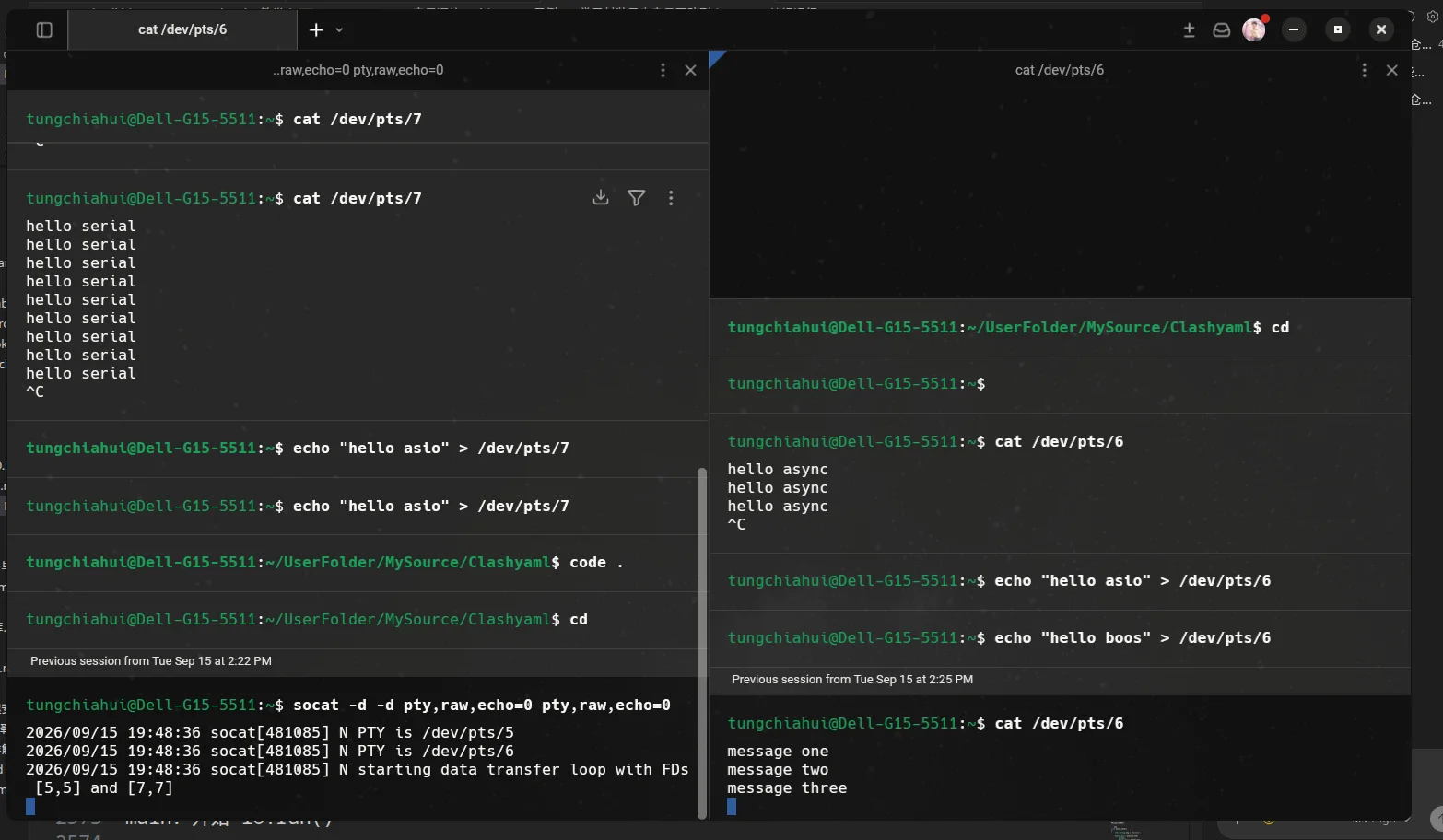
7.5.What happened when async_send() was called for the first time?
First time:
writer.async_send("message one\n");At this point:
write_queue_.empty()As:
trueTherefore:
bool writing = !write_queue_.empty();Obtained:
writing = falseThen:
write_queue_.push_back(msg);The queue becomes:
[ message one ]Because:
writing = falseThis indicates that there was originally no sending task in execution.
Therefore:
do_write();Start asynchronous sending:
message one7.6.What happens on the second and third call?
Second:
writer.async_send("message two\n");At this point the queue is already:
[ message one ]Therefore:
writing = trueThen append:
[ message one ]
[ message two ]
But it will not be called again:
do_write();Because:
message oneAlready sending asynchronously.
The third time is the same:
[ message one   ] ← 正在发送
[ message two   ] ← 等待
[ message three ] ← 等待7.7.What happens after the first message is sent?
Article 1:
message oneAfter sending is complete:
on_write(...)Called.
First:
write_queue_.pop_front();Delete completed:
message oneThe queue becomes:
[ message two   ]
[ message three ]
Then:
if (!write_queue_.empty())
{
    do_write();
}
Start sending:
message twoSo the whole process is:
message one
↓
发送完成
↓
pop_front()

message two
↓
发送完成
↓
pop_front()

message three
↓
发送完成
↓
pop_front()

队列为空
↓
不再 do_write()
↓
没有其他异步任务
↓
io.run() 返回7.8.Why must the sent data be saved?
This cannot be written as:
void async_send()
{
    std::string msg = "hello\n";

    boost::asio::async_write(
        serial_,
        boost::asio::buffer(msg),
        ...);
}
Because:
async_send() 返回
↓
msg 被销毁
↓
async_write 可能还没有完成
↓
buffer 指向失效内存
This example uses:
std::deque<std::string> write_queue_;Save the data.
As long as the current data has not yet been fully sent:
它就在 deque 中After sending is complete:
write_queue_.pop_front();it is truly deleted.
So the buffer lifecycle is safe.
7.9.Why does asynchronous serial port writing usually require a queue?
If a program continuously generates a lot of data:
数据 A
数据 B
数据 C
We hope:
async_write(A)
↓
完成
↓
async_write(B)
↓
完成
↓
async_write(C)
rather than:
async_write(A)
async_write(B)
async_write(C)

三个写操作同时进行
Therefore, the core function of the write queue is:
Ensure that multiple asynchronous transmissions on the same serial port are executed one by one in order.
Remember in one sentence:
async_send()responsible for "enqueue",do_write()responsible for "send queue head",on_write()responsible for "delete queue head after sending is complete and start the next one".
8.Example 6: Encapsulating continuous asynchronous serial port reads in a class
8.1.Program Objectives
Example 4 above:
boost::asio::async_read(...)Only one asynchronous read was registered.
After reading is complete:
on_read()
↓
没有新的异步任务
↓
io.run() 返回
↓
程序结束
Real programs typically need:
一直读取串口Therefore, we can take:
serial_port
buffer
async_read()
回调
Encapsulate everything into a single class.
After each read is completed:
on_read()Finally, call again:
start_read();Thus forming:
start_read()
↓
等待 11 字节
↓
on_read()
↓
处理数据
↓
start_read()
↓
等待下一组 11 字节
↓
...8.2.Complete code
#include <boost/asio.hpp>
#include <boost/system/error_code.hpp>
#include <array>
#include <functional>
#include <print>
#include <string>

class SerialReader
{
public:
    SerialReader(
        boost::asio::io_context& io,
        const std::string& port_name)
        : serial_(io)
    {
        boost::system::error_code ec;

        serial_.open(port_name, ec);

        if (ec)
        {
            std::println(
                "打开串口失败:{}",
                ec.message());

            return;
        }

        serial_.set_option(
            boost::asio::serial_port_base::baud_rate(115200));

        serial_.set_option(
            boost::asio::serial_port_base::character_size(8));

        serial_.set_option(
            boost::asio::serial_port_base::parity(
                boost::asio::serial_port_base::parity::none));

        serial_.set_option(
            boost::asio::serial_port_base::stop_bits(
                boost::asio::serial_port_base::stop_bits::one));

        serial_.set_option(
            boost::asio::serial_port_base::flow_control(
                boost::asio::serial_port_base::flow_control::none));

        std::println(
            "SerialReader:串口打开成功,开始异步读取");

        start_read();
    }

private:
    void start_read()
    {
        std::println(
            "SerialReader:等待下一组 11 字节");

        boost::asio::async_read(
            serial_,
            boost::asio::buffer(buffer_),
            std::bind(
                &SerialReader::on_read,
                this,
                std::placeholders::_1,
                std::placeholders::_2));
    }

    void on_read(
        const boost::system::error_code& ec,
        std::size_t bytes_transferred)
    {
        if (ec)
        {
            std::println(
                "SerialReader::on_read 错误:{}",
                ec.message());

            return;
        }

        std::string msg(
            buffer_.data(),
            bytes_transferred);

        std::println(
            "收到数据,字节数 = {},内容 = {}",
            bytes_transferred,
            msg);

        // 当前数据处理完成以后,
        // 再注册下一次异步读取。
        start_read();
    }

private:
    boost::asio::serial_port serial_;

    // 每次固定读取 11 个字节。
    std::array<char, 11> buffer_{};
};

int main(int argc, char* argv[])
{
    std::string port_name = "/dev/pts/3";

    if (argc >= 2)
    {
        port_name = argv[1];
    }

    boost::asio::io_context io;

    SerialReader reader(io, port_name);

    std::println(
        "main:调用 io.run(),按 Ctrl+C 结束程序");

    io.run();

    std::println("main:io.run() 返回");

    return 0;
}8.3.Compile and run
Terminal 1:
socat -d -d \
  PTY,raw,echo=0,link=/tmp/ttyV0 \
  PTY,raw,echo=0,link=/tmp/ttyV1
Program compilation and execution
Program output:
SerialReader:串口打开成功,开始异步读取
SerialReader:等待下一组 11 字节
main:调用 io.run(),按 Ctrl+C 结束程序
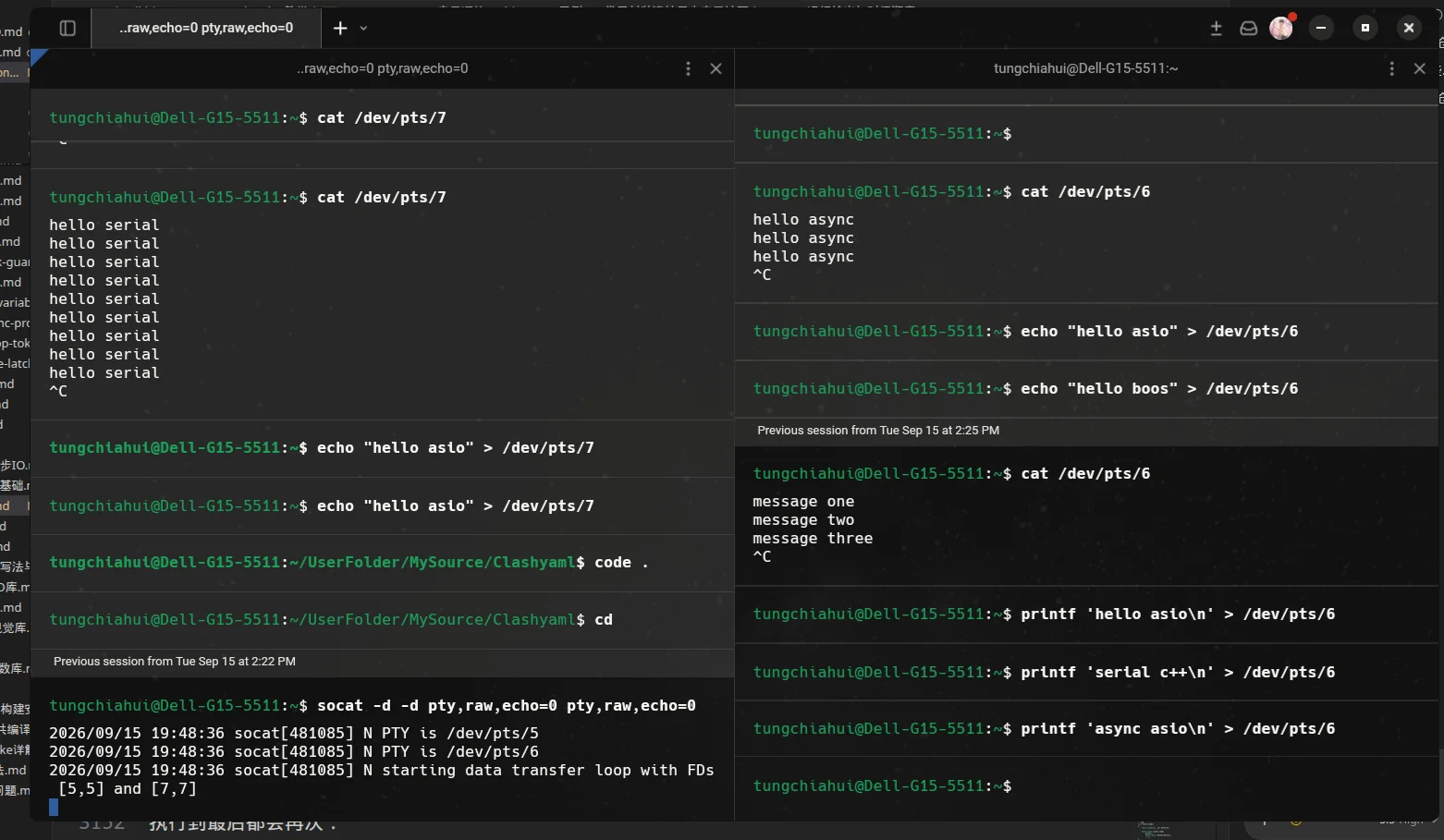
Terminal 2 can continuously send:
printf 'hello asio\n' > /dev/pts/4
printf 'serial c++\n' > /dev/pts/4
printf 'async asio\n' > /dev/pts/4
These three sets of data are all 11 bytes.
8.4.Run output and chronological order
The program may output:
SerialReader:串口打开成功,开始异步读取
SerialReader:等待下一组 11 字节
main:调用 io.run(),按 Ctrl+C 结束程序

收到数据,字节数 = 11,内容 = hello asio
SerialReader:等待下一组 11 字节

收到数据,字节数 = 11,内容 = serial c++
SerialReader:等待下一组 11 字节

收到数据,字节数 = 11,内容 = async asio
SerialReader:等待下一组 11 字节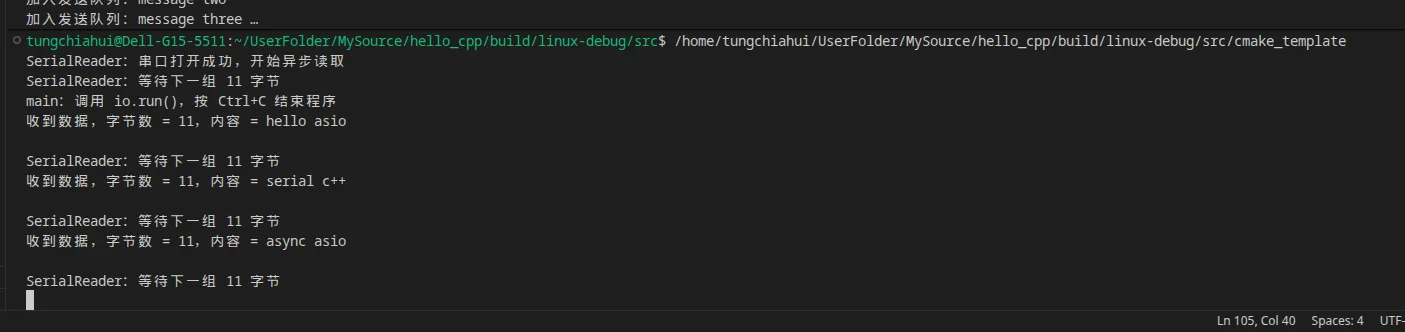
The program will not terminate automatically.
The reason is each time:
on_read()At the end of execution, it will again:
start_read();Register a new asynchronous task.
Therefore:
io.run();There are always unfinished asynchronous read tasks that need to be waited for.
8.5.How is continuous asynchronous reading formed?
Program just created object:
SerialReader reader(io, port_name);At the end of the constructor:
start_read();First registration:
async_read()
↓
等待 11 字节
After receiving:
on_read()
↓
打印数据
↓
start_read()
Registering again:
async_read()
↓
等待下一组 11 字节
Thus, it forms:
start_read()
    ↓
async_read()
    ↓
等待数据
    ↓
on_read()
    ↓
处理数据
    ↓
start_read()
    ↓
async_read()
    ↓
等待下一组数据
    ↓
...
This sentence:
start_read();is the key to achieving continuous asynchronous reading.
If it is deleted:
void on_read(...)
{
    ...

    // 没有 start_read();
}
Then the program reads it only once.
First time:
11 字节读取完成
↓
on_read()
↓
回调结束
↓
没有新的异步任务
↓
io.run() 返回
↓
程序结束8.6.Why should serial_ and buffer_ be made member variables?
Here:
boost::asio::serial_port serial_;
std::array<char, 11> buffer_{};
All are:
SerialReader 对象的成员变量Therefore, as long as:
SerialReader readerThere are also:
serial_
buffer_
it has always existed.
This is well suited for asynchronous operations.
Because:
boost::asio::async_read(
    serial_,
    boost::asio::buffer(buffer_),
    ...);
After registration is complete:
async_read() 已经返回However, Asio still needs to continue being used afterward:
serial_
buffer_
If buffer is a local variable that will be destroyed quickly:
void start_read()
{
    std::array<char, 11> buffer{};

    boost::asio::async_read(
        serial_,
        boost::asio::buffer(buffer),
        ...);
}
Then:
start_read() 返回
↓
局部 buffer 被销毁
↓
异步读取还没完成
↓
Asio 使用的内存失效
Therefore, when a class encapsulates asynchronous I/O , it often puts:
I/O 对象
buffer
状态
队列
Save them all as member variables.
8.7.Why does the next read overwrite the previous buffer_?
This example always uses the same one:
std::array<char, 11> buffer_{};First read:
buffer_

hello asio\n
Enter:
on_read()Later, we first:
std::string msg(
    buffer_.data(),
    bytes_transferred);
Copy the current data to:
msgThen process it.
After processing is complete:
start_read();Again:
boost::asio::async_read(
    serial_,
    boost::asio::buffer(buffer_),
    ...);
The next set of data still starts from:
buffer_[0]Start writing.
Therefore:
第一次:

buffer_
↓
hello asio\n
Next:
buffer_
↓
serial c++\n
Old content will be overwritten.
This is not a problem, because:
上一组数据已经在 on_read() 中处理完成
↓
才重新启动下一次读取8.8.Why won't two reads modify it at the same time here buffer_?
Because:
start_read();It is not about calling it continuously many times without stopping.
Instead:
第一次 async_read()
↓
等待完成
↓
on_read()
↓
当前读取已经结束
↓
才 start_read()
↓
注册下一次 async_read()
Therefore, at any given moment there is only:
一个 async_read()In use:
buffer_The process is strictly as follows:
读取 1
↓
完成

读取 2
↓
完成

读取 3
↓
完成
rather than:
读取 1 ────────┐
读取 2 ────────┼→ 同时操作 buffer_
读取 3 ────────┘8.9.Member functions' std::bind
Here:
std::bind(
    &SerialReader::on_read,
    this,
    std::placeholders::_1,
    std::placeholders::_2)
Among them:
&SerialReader::on_readIndicates:
要调用 SerialReader 的成员函数 on_read()thisIndicates:
对当前这个 SerialReader 对象调用Two placeholders:
_1
→ ec

_2
→ bytes_transferred
So after the asynchronous read is completed, it is equivalent to:
this->on_read(
    ec,
bytes_transferred);8.10.Difference between Example 4 and Example 6
Example 4:
注册一次 async_read()
↓
读取一次
↓
回调一次
↓
结束
Example 6:
start_read()
↓
async_read()
↓
on_read()
↓
start_read()
↓
async_read()
↓
on_read()
↓
...
Therefore:
示例 4
→ 学习一次异步读取是怎么工作的

示例 6
→ 学习怎样把异步读取封装进类并持续运行
Remember in one sentence:
The core of continuous asynchronous reading is not to write a dead loop, but to register the next asynchronous read within the callback of one completed asynchronous read.
9.Example 7: Encapsulating both asynchronous serial transmission and reception in a class
9.1.Program Objectives
The previous two examples respectively accomplished:
示例 5:
异步发送队列

示例 6:
连续异步接收
This section merges them into the same class.
Finally, we get:
AsyncSerialPort
│
├── 接收
│   │
│   ├── start_read()
│   ├── async_read()
│   └── on_read()
│        ↓
│      再次 start_read()
│
└── 发送
    │
    ├── async_send()
    ├── write_queue_
    ├── do_write()
    └── on_write()
         ↓
       继续发送队首
This class can:
一边持续接收串口数据

同时

一边异步发送串口数据
This example still only has:
一个线程调用 io.run()Therefore, multithreading concurrency issues are not involved for the time being.
9.2.Complete code
#include <boost/asio.hpp>
#include <boost/system/error_code.hpp>
#include <array>
#include <deque>
#include <functional>
#include <print>
#include <string>

class AsyncSerialPort
{
public:
    AsyncSerialPort(
        boost::asio::io_context& io,
        const std::string& port_name)
        : serial_(io)
    {
        boost::system::error_code ec;

        serial_.open(port_name, ec);

        if (ec)
        {
            std::println(
                "打开串口失败:{}",
                ec.message());

            return;
        }

        serial_.set_option(
            boost::asio::serial_port_base::baud_rate(115200));

        serial_.set_option(
            boost::asio::serial_port_base::character_size(8));

        serial_.set_option(
            boost::asio::serial_port_base::parity(
                boost::asio::serial_port_base::parity::none));

        serial_.set_option(
            boost::asio::serial_port_base::stop_bits(
                boost::asio::serial_port_base::stop_bits::one));

        serial_.set_option(
            boost::asio::serial_port_base::flow_control(
                boost::asio::serial_port_base::flow_control::none));

        std::println(
            "AsyncSerialPort:串口打开成功");

        // 注册第一次异步读取。
        start_read();
    }

    void async_send(const std::string& msg)
    {
        // 队列原来非空,说明已经有数据正在发送,
        // 或者已经有其他数据正在排队。
        bool writing = !write_queue_.empty();

        // 保存发送数据,保证异步写期间内存一直存在。
        write_queue_.push_back(msg);

        std::print(
            "加入发送队列:{}",
            msg);

        // 如果原来没有正在发送的数据,
        // 就从当前队首开始整个发送流程。
        if (!writing)
        {
            do_write();
        }
    }

private:
    void start_read()
    {
        std::println(
            "AsyncSerialPort:等待接收下一组 11 字节");

        boost::asio::async_read(
            serial_,
            boost::asio::buffer(read_buffer_),
            std::bind(
                &AsyncSerialPort::on_read,
                this,
                std::placeholders::_1,
                std::placeholders::_2));
    }

    void on_read(
        const boost::system::error_code& ec,
        std::size_t bytes_transferred)
    {
        if (ec)
        {
            std::println(
                "读取失败:{}",
                ec.message());

            return;
        }

        std::string msg(
            read_buffer_.data(),
            bytes_transferred);

        std::println(
            "收到数据,字节数 = {},内容 = {}",
            bytes_transferred,
            msg);

        // 当前这一组数据处理完成以后,
        // 再注册下一次异步读取。
        start_read();
    }

    void do_write()
    {
        boost::asio::async_write(
            serial_,
            boost::asio::buffer(
                write_queue_.front()),
            std::bind(
                &AsyncSerialPort::on_write,
                this,
                std::placeholders::_1,
                std::placeholders::_2));
    }

    void on_write(
        const boost::system::error_code& ec,
        std::size_t bytes_transferred)
    {
        if (ec)
        {
            std::println(
                "发送失败:{}",
                ec.message());

            return;
        }

        std::println(
            "发送完成,字节数 = {}",
            bytes_transferred);

        // 当前队首已经发送完成。
        write_queue_.pop_front();

        // 如果队列还有数据,继续发送新的队首。
        if (!write_queue_.empty())
        {
            do_write();
        }
    }

private:
    boost::asio::serial_port serial_;

    // 每次固定读取 11 个字节。
    std::array<char, 11> read_buffer_{};

    // 保存正在发送以及等待发送的数据。
    std::deque<std::string> write_queue_;
};

int main(int argc, char* argv[])
{
    std::string port_name = "/dev/pts/3";

    if (argc >= 2)
    {
        port_name = argv[1];
    }

    boost::asio::io_context io;

    AsyncSerialPort serial(io, port_name);

    // 先注册几条异步发送任务。
    serial.async_send("message one\n");
    serial.async_send("message two\n");
    serial.async_send("message three\n");

    std::println(
        "main:开始 io.run(),按 Ctrl+C 结束程序");

    io.run();

    std::println("main:io.run() 返回");

    return 0;
}9.3.Compile and run
Terminal 1: Create a virtual serial port.
socat -d -d \
  PTY,raw,echo=0,link=/tmp/ttyV0 \
  PTY,raw,echo=0,link=/tmp/ttyV1
Assume we obtain:
/dev/pts/3
/dev/pts/4
Terminal 2: Listen for data sent by the program.
cat /dev/pts/4Compile and run the program.
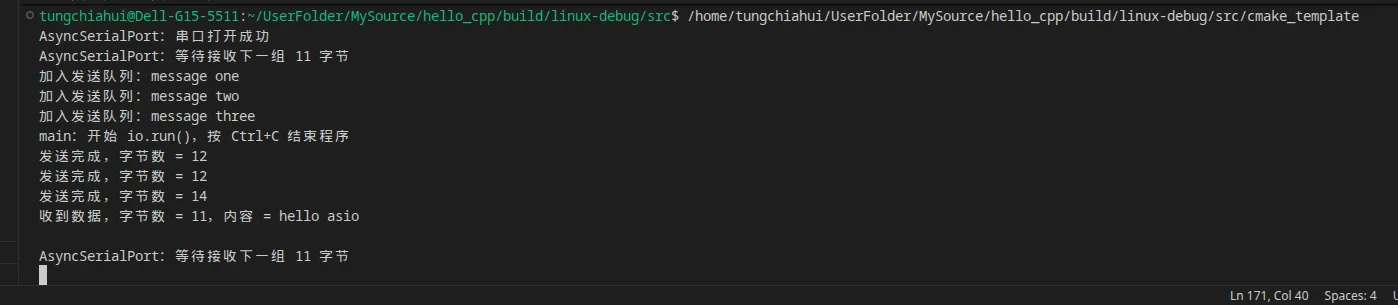
If you also want to test receiving, you can open another terminal and write to /dev/pts/4:
printf 'hello asio\n' > /dev/pts/4Because:
hello asio\nexactly 11 bytes.
9.4.The working process of the entire class
Program creation:
AsyncSerialPort serial(io, port_name);The constructor is called last:
start_read();Therefore, first register one:
异步接收 11 字节task.
Meanwhile:
serial.async_send("message one\n");
serial.async_send("message two\n");
serial.async_send("message three\n");
A send queue was also established:
message one   ← 正在发送
message two   ← 等待
message three ← 等待
Therefore:
                     AsyncSerialPort
                           │
             ┌─────────────┴─────────────┐
             ↓                           ↓
           接收                         发送
             ↓                           ↓
      async_read()                async_write()
             ↓                           ↓
        on_read()                   on_write()
             ↓                           ↓
      再次 async_read()          发送下一条
Reception and transmission can occur simultaneously.
In other words:
一个异步读操作
+
一个异步写操作
They can be attached to the same serial port object at the same time.
9.5.Why is it not needed here mutex?
Although:
read_buffer_
write_queue_
All are member variables, but this example only has:
main 线程Call:
io.run();So all asynchronous handlers:
on_read()
on_write()
In fact, they are all executed one after another in the same thread.
Will not appear:
线程 1:on_read()

同时

线程 2:on_write()
Therefore, there is temporarily no simultaneous access by multiple threads here:
write_queue_
read_buffer_
problem.
So there is no need for:
std::mutexNot needed either:
strand9.6.The most important structure of this example
You can remember the entire class as:
接收:

start_read()
↓
async_read()
↓
on_read()
↓
处理数据
↓
start_read()
Send:
async_send()
↓
加入 write_queue_
↓
do_write()
↓
async_write()
↓
on_write()
↓
pop_front()
↓
继续下一条
Remember in one sentence:
A complete asynchronous serial port class usually contains both a "continuous read chain" and a "transmit queue chain."
10.Example 8: The main thread produces data, and an independent Asio thread handles serial communication.
This situation generally applies to one serial port device. (In this case, main has 1 main thread, and asio has 1 thread.)
10.1.Program Objectives
In Example 7:
io.run();Run directly on the main thread.
This means:
main 线程
↓
进入 io.run()
↓
长期负责 Asio 事件循环
In actual programs, it is often desirable to:
main 线程
→ 继续处理自己的业务逻辑

Asio 线程
→ 专门处理串口收发
Then the program becomes:
                 主线程
                   │
          产生需要发送的数据
                   │
                   ↓
        serial.async_send(...)
                   │
                   ↓
                post()
                   │
                   ↓
================================
              Asio 线程
================================
                   │
                   ↓
             write_queue_
                   │
                   ↓
             async_write()
                   │
                   ↓
                 串口
Meanwhile, the serial port reception is also:
串口
 ↓
async_read()
 ↓
Asio 线程执行 on_read()
Like so:
The main thread is responsible for "generating tasks", while the Asio thread is responsible for "actually handling the serial port".
10.2.Complete code
#include <boost/asio.hpp>
#include <boost/system/error_code.hpp>
#include <array>
#include <deque>
#include <functional>
#include <iostream>
#include <print>
#include <string>
#include <thread>

class AsyncSerialPort
{
public:
    AsyncSerialPort(
        boost::asio::io_context& io,
        const std::string& port_name)
        : io_(io),
          serial_(io)
    {
        boost::system::error_code ec;

        serial_.open(port_name, ec);

        if (ec)
        {
            std::println(
                "打开串口失败:{}",
                ec.message());

            return;
        }

        serial_.set_option(
            boost::asio::serial_port_base::baud_rate(115200));

        serial_.set_option(
            boost::asio::serial_port_base::character_size(8));

        serial_.set_option(
            boost::asio::serial_port_base::parity(
                boost::asio::serial_port_base::parity::none));

        serial_.set_option(
            boost::asio::serial_port_base::stop_bits(
                boost::asio::serial_port_base::stop_bits::one));

        serial_.set_option(
            boost::asio::serial_port_base::flow_control(
                boost::asio::serial_port_base::flow_control::none));

        std::println(
            "AsyncSerialPort:串口打开成功");
    }

    void start()
    {
        // 不直接在调用 start() 的线程里操作内部状态,
        // 而是把 start_read() 投递给 io_context。
        boost::asio::post(
            io_,
            std::bind(
                &AsyncSerialPort::start_read,
                this));
    }

    void async_send(const std::string& msg)
    {
        // main 线程不直接修改 write_queue_。
        // 只把“加入发送队列”这个任务投递给 Asio 线程。
        boost::asio::post(
            io_,
            std::bind(
                &AsyncSerialPort::enqueue_write,
                this,
                msg));
    }

    void stop()
    {
        // 停止操作也交给 Asio 线程完成。
        boost::asio::post(
            io_,
            std::bind(
                &AsyncSerialPort::do_stop,
                this));
    }

private:
    void start_read()
    {
        if (stopping_ || !serial_.is_open())
        {
            return;
        }

        std::println(
            "Asio线程:等待下一组 11 字节");

        boost::asio::async_read(
            serial_,
            boost::asio::buffer(read_buffer_),
            std::bind(
                &AsyncSerialPort::on_read,
                this,
                std::placeholders::_1,
                std::placeholders::_2));
    }

    void on_read(
        const boost::system::error_code& ec,
        std::size_t bytes_transferred)
    {
        if (ec)
        {
            std::println(
                "读取结束:{}",
                ec.message());

            return;
        }

        std::string msg(
            read_buffer_.data(),
            bytes_transferred);

        std::println(
            "Asio线程:收到数据,字节数 = {},内容 = {}",
            bytes_transferred,
            msg);

        if (!stopping_)
        {
            start_read();
        }
    }

    void enqueue_write(std::string msg)
    {
        if (stopping_)
        {
            return;
        }

        bool writing = !write_queue_.empty();

        write_queue_.push_back(msg);

        std::print(
            "Asio线程:加入发送队列:{}",
            msg);

        if (!writing)
        {
            do_write();
        }
    }

    void do_write()
    {
        if (stopping_ || write_queue_.empty())
        {
            return;
        }

        boost::asio::async_write(
            serial_,
            boost::asio::buffer(
                write_queue_.front()),
            std::bind(
                &AsyncSerialPort::on_write,
                this,
                std::placeholders::_1,
                std::placeholders::_2));
    }

    void on_write(
        const boost::system::error_code& ec,
        std::size_t bytes_transferred)
    {
        if (ec)
        {
            std::println(
                "发送结束:{}",
                ec.message());

            return;
        }

        std::println(
            "Asio线程:发送完成,字节数 = {}",
            bytes_transferred);

        write_queue_.pop_front();

        if (!write_queue_.empty())
        {
            do_write();
        }
    }

    void do_stop()
    {
        if (stopping_)
        {
            return;
        }

        stopping_ = true;

        std::println(
            "Asio线程:开始关闭串口");

        boost::system::error_code ec;

        serial_.cancel(ec);

        ec.clear();

        serial_.close(ec);
    }

private:
    boost::asio::io_context& io_;

    boost::asio::serial_port serial_;

    std::array<char, 11> read_buffer_{};

    std::deque<std::string> write_queue_;

    bool stopping_ = false;
};

void run_io(boost::asio::io_context* io)
{
    std::println(
        "Asio线程:开始 io.run(),线程 id = {}",
        std::this_thread::get_id());

    io->run();

    std::println(
        "Asio线程:io.run() 返回");
}

int main(int argc, char* argv[])
{
    std::string port_name = "/dev/pts/3";

    if (argc >= 2)
    {
        port_name = argv[1];
    }

    boost::asio::io_context io;

    // 保证 Asio 后台线程即使暂时没有任务,
    // io.run() 也不会立刻返回。
    auto guard =
        boost::asio::make_work_guard(io);

    AsyncSerialPort serial(io, port_name);

    // 单独创建一个线程运行 Asio 事件循环。
    std::thread io_thread(
        std::bind(
            run_io,
            &io));

    // 此时 Asio 线程已经可能进入 io.run()。
    // start() 把第一次读取任务投递给 Asio 线程。
    serial.start();

    std::println(
        "main线程 id = {}",
        std::this_thread::get_id());

    // 模拟 main 中的其他业务逻辑不断产生待发送数据。
    serial.async_send("message one\n");
    serial.async_send("message two\n");
    serial.async_send("message three\n");

    std::println(
        "main:数据已经提交给 Asio,main 可以继续处理其他工作");

    std::println(
        "main:按 Enter 结束程序");

    std::string input;
    std::getline(std::cin, input);

    // 把关闭串口任务投递给 Asio 线程。
    serial.stop();

    // 允许 io.run() 在剩余任务处理完成后自然返回。
    guard.reset();

    io_thread.join();

    std::println("main:程序结束");

    return 0;
}10.3.Compile and run
Terminal 1:
socat -d -d \
  PTY,raw,echo=0,link=/tmp/ttyV0 \
  PTY,raw,echo=0,link=/tmp/ttyV1
Terminal 2: Listen for data sent by the program.
cat /dev/pts/4You can also look at it in hexadecimal:
xxd -g 1 /dev/pts/4
# 或者
cat /dev/pts/4 | xxd -g 1
Run the program.
To test the program receiving data, you can open another terminal:
printf 'hello asio\n' > /dev/pts/4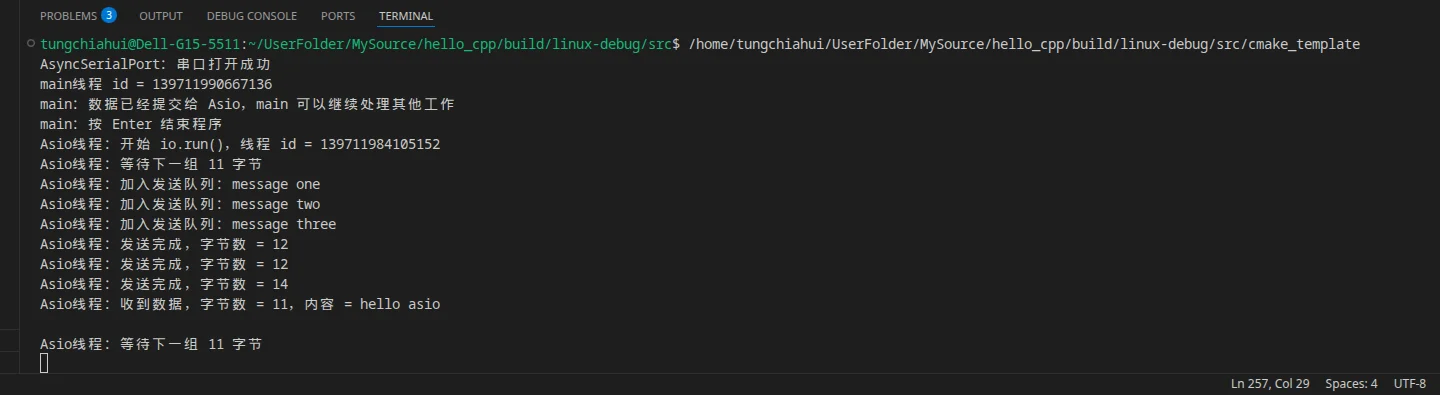
10.4.the entire thread relationship
The program now already has two threads:
主线程

Asio线程
Main thread:
main()
↓
产生数据
↓
serial.async_send()
↓
继续做其他工作
Asio thread:
io.run()
↓
执行串口相关 handler
↓
读串口
↓
写串口
↓
维护 write_queue_
It can be drawn as:
主线程
│
├── async_send("message one")
│
├── async_send("message two")
│
└── async_send("message three")
        │
        │ post()
        ↓
================================
             Asio线程
================================
        │
        ↓
   enqueue_write()
        ↓
    write_queue_
        ↓
     do_write()
        ↓
   async_write()
Therefore:
async_send()This does not mean that the main thread personally operates the serial port.
It simply hands the task over to:
Asio线程Execute.
10.5.Why use post()?
This is a very important point in this example.
Suppose we do not use:
boost::asio::post(...)Instead, let:
async_send()Direct execution:
write_queue_.push_back(msg);The following will appear:
main线程
↓
write_queue_.push_back()

          同时

Asio线程
↓
write_queue_.pop_front()
That is, two threads operating simultaneously:
write_queue_This produces:
data race10.6.If directly sharing write_queue_,then it is necessary to mutex
The traditional solution is:
std::mutex mutex_;Then the main thread modifies the queue:
{
    std::scoped_lock lock(mutex_);

    write_queue_.push_back(msg);
}
Asio thread deletes the queue head:
{
    std::scoped_lock lock(mutex_);

    write_queue_.pop_front();
}
Therefore:
main线程 ─────┐
              │
              ↓
            mutex
              ↓
         write_queue_
              ↑
              │
Asio线程 ─────┘
In this way, only one thread can access the queue at the same time.
This is:
mutexMost typical use:
When multiple threads must directly access the same shared mutable data, use a lock to protect the critical section.
10.7.But why is this example not using mutex?
Because we changed the design.
The main thread no longer directly touches:
write_queue_The main thread only executes:
boost::asio::post(...)Real:
write_queue_.push_back()Occurs at:
enqueue_write()Inside.
while enqueue_write() is composed of:
唯一的 Asio线程Executed.
Simultaneously:
on_write()It is also executed by this Asio thread.
Therefore:
main线程
↓
只 post()
↓
不访问 write_queue_


Asio线程
↓
push_back()
pop_front()
front()
↓
所有队列操作都由同一个线程完成
Therefore:
没有两个线程同时访问 write_queue_Naturally, there is also no need for:
mutexThis is a very important concurrent design concept:
If a problem can be solved by making a certain state belong to only one thread, then it is not necessarily required to have multiple threads share it and then add locks everywhere.
10.8.post() What can it be understood as?
For example:
serial.async_send("message one\n");Internal:
boost::asio::post(
    io_,
    std::bind(
        &AsyncSerialPort::enqueue_write,
        this,
        msg));
It can be simply understood as:
main线程:

“这里有一个任务,
以后请 io_context 帮我执行。”
↓
post()
↓
立即返回
Then:
Asio线程:

io.run()
↓
发现一个 post 过来的任务
↓
执行 enqueue_write()
Therefore:
post()Very suitable:
其他线程
↓
向 Asio 线程提交任务10.9.work_guard Why is this particularly important here?
The program first:
auto guard =
    boost::asio::make_work_guard(io);
Then start:
std::thread io_thread(
    std::bind(
        run_io,
        &io));
At this point, one possibility exists:
Asio线程启动得非常快
↓
进入 io.run()
↓
serial.start() 还没来得及 post
↓
当前没有任务
If not:
work_guardThen:
io.run()
↓
发现没有工作
↓
直接返回
↓
Asio线程结束
Then main again:
serial.start();
serial.async_send(...);
Although the task is submitted into:
io_contextHowever, there are no threads left to execute:
io.run()the task will not be processed.
Got it:
work_guardThe process becomes:
Asio线程
↓
io.run()
↓
暂时没有任务
↓
但 guard 还在
↓
不能退出
↓
继续等待
↓
main post 新任务
↓
开始执行
So here:
work_guardThis truly reflects:
When the background Asio thread temporarily has no tasks, do not let it exit either; other threads may still submit tasks later.
10.10.Why does it end with stop() first, and then guard.reset()?
On program exit:
serial.stop();

guard.reset();

io_thread.join();
Among them:
serial.stop();The serial port is not directly closed by the main thread.
Inside it:
post(...)Handle:
关闭串口This task is handed off to the Asio thread.
Then:
guard.reset();Indicates:
No longer artificially keeping
io.run()alive.
Asio thread processing completed:
关闭串口
取消异步读取
处理剩余 handler
From now on, if there is no other work:
io.run()
↓
返回
Finally:
io_thread.join();Wait for the Asio thread to actually finish.
Therefore, the exit process:
main
↓
post(stop)
↓
guard.reset()
↓
等待 join()


Asio线程
↓
处理 stop
↓
取消串口异步任务
↓
没有其他工作
↓
io.run() 返回
↓
线程结束10.11.Example 8: The Most Important Architecture
It can be directly remembered as:
业务线程 / main线程
        │
        │ async_send()
        ↓
      post()
        │
        ↓
==============================
       Asio通信线程
==============================
        │
        ├── serial_port
        ├── read_buffer_
        ├── write_queue_
        ├── async_read()
        └── async_write()
Like so:
业务逻辑and:
串口 I/Othey are placed in different threads.
At the same time, utilize:
post()Avoid having the main thread and the Asio thread directly modify the serial port's internal state together.
Remember in one sentence:
With a single dedicated Asio communication thread, other threads can submit tasks only through
post()and leave internal state such as the serial port, buffer, and send queue entirely to the Asio thread, thereby reducing the need formutex.
11.Example 9: Multiple threads running simultaneously io.run(), use strand to avoid handler concurrency
This situation generally applies to multiple communication devices. (In this case, main has 1 main thread, and asio has 2+ threads.)
11.1.Program Objectives
In Example 8, there is only:
一个 Asio线程Execute:
io.run();Therefore:
enqueue_write()
on_write()
on_read()
These handlers themselves do not execute concurrently.
But if we, in order to make:
io_contextHas stronger concurrent processing capability, change to:
Asio线程1 → io.run()

Asio线程2 → io.run()
Then:
不同 handlerit may be executed simultaneously on two threads.
For example:
Asio线程1
↓
enqueue_write()
↓
write_queue_.push_back()


Asio线程2
↓
on_write()
↓
write_queue_.pop_front()
If they occur simultaneously, a data race is created again.
This section uses:
strandSolve this problem.
Core rules:
Handlers bound to the same
stranddo not execute concurrently with each other.
11.2.Complete code
#include <boost/asio.hpp>
#include <boost/system/error_code.hpp>
#include <array>
#include <deque>
#include <functional>
#include <iostream>
#include <print>
#include <string>
#include <thread>

class AsyncSerialPort
{
public:
    AsyncSerialPort(
        boost::asio::io_context& io,
        const std::string& port_name)
        : strand_(boost::asio::make_strand(io)),
          serial_(io)
    {
        boost::system::error_code ec;

        serial_.open(port_name, ec);

        if (ec)
        {
            std::println(
                "打开串口失败:{}",
                ec.message());

            return;
        }

        serial_.set_option(
            boost::asio::serial_port_base::baud_rate(115200));

        serial_.set_option(
            boost::asio::serial_port_base::character_size(8));

        serial_.set_option(
            boost::asio::serial_port_base::parity(
                boost::asio::serial_port_base::parity::none));

        serial_.set_option(
            boost::asio::serial_port_base::stop_bits(
                boost::asio::serial_port_base::stop_bits::one));

        serial_.set_option(
            boost::asio::serial_port_base::flow_control(
                boost::asio::serial_port_base::flow_control::none));

        std::println(
            "AsyncSerialPort:串口打开成功");
    }

    void start()
    {
        // start_read() 也通过 strand 执行。
        boost::asio::post(
            strand_,
            std::bind(
                &AsyncSerialPort::start_read,
                this));
    }

    void async_send(const std::string& msg)
    {
        // 所有修改发送队列的任务,
        // 都先投递到同一个 strand。
        boost::asio::post(
            strand_,
            std::bind(
                &AsyncSerialPort::enqueue_write,
                this,
                msg));
    }

    void stop()
    {
        boost::asio::post(
            strand_,
            std::bind(
                &AsyncSerialPort::do_stop,
                this));
    }

private:
    void start_read()
    {
        if (stopping_ || !serial_.is_open())
        {
            return;
        }

        boost::asio::async_read(
            serial_,
            boost::asio::buffer(read_buffer_),

            // 读取完成的 handler 也绑定到同一个 strand。
            boost::asio::bind_executor(
                strand_,
                std::bind(
                    &AsyncSerialPort::on_read,
                    this,
                    std::placeholders::_1,
                    std::placeholders::_2)));
    }

    void on_read(
        const boost::system::error_code& ec,
        std::size_t bytes_transferred)
    {
        if (ec)
        {
            std::println(
                "读取结束:{},线程 id = {}",
                ec.message(),
                std::this_thread::get_id());

            return;
        }

        std::string msg(
            read_buffer_.data(),
            bytes_transferred);

        std::println(
            "收到数据,bytes = {},线程 id = {},内容 = {}",
            bytes_transferred,
            std::this_thread::get_id(),
            msg);

        if (!stopping_)
        {
            start_read();
        }
    }

    void enqueue_write(std::string msg)
    {
        if (stopping_)
        {
            return;
        }

        std::println(
            "enqueue_write(),线程 id = {}",
            std::this_thread::get_id());

        bool writing =
            !write_queue_.empty();

        write_queue_.push_back(msg);

        if (!writing)
        {
            do_write();
        }
    }

    void do_write()
    {
        if (stopping_ || write_queue_.empty())
        {
            return;
        }

        boost::asio::async_write(
            serial_,
            boost::asio::buffer(
                write_queue_.front()),

            // 写完成 handler 同样绑定到 strand。
            boost::asio::bind_executor(
                strand_,
                std::bind(
                    &AsyncSerialPort::on_write,
                    this,
                    std::placeholders::_1,
                    std::placeholders::_2)));
    }

    void on_write(
        const boost::system::error_code& ec,
        std::size_t bytes_transferred)
    {
        if (ec)
        {
            std::println(
                "发送结束:{},线程 id = {}",
                ec.message(),
                std::this_thread::get_id());

            return;
        }

        std::println(
            "发送完成,bytes = {},线程 id = {}",
            bytes_transferred,
            std::this_thread::get_id());

        write_queue_.pop_front();

        if (!write_queue_.empty())
        {
            do_write();
        }
    }

    void do_stop()
    {
        if (stopping_)
        {
            return;
        }

        stopping_ = true;

        std::println(
            "关闭串口,线程 id = {}",
            std::this_thread::get_id());

        boost::system::error_code ec;

        serial_.cancel(ec);

        ec.clear();

        serial_.close(ec);
    }

private:
    boost::asio::strand<
        boost::asio::io_context::executor_type>
        strand_;

    boost::asio::serial_port serial_;

    std::array<char, 11> read_buffer_{};

    std::deque<std::string> write_queue_;

    bool stopping_ = false;
};

void run_io(
    boost::asio::io_context* io,
    const std::string& name)
{
    std::println(
        "{}:开始 io.run(),线程 id = {}",
        name,
        std::this_thread::get_id());

    io->run();

    std::println(
        "{}:io.run() 返回",
        name);
}

int main(int argc, char* argv[])
{
    std::string port_name = "/dev/pts/3";

    if (argc >= 2)
    {
        port_name = argv[1];
    }

    boost::asio::io_context io;

    auto guard =
        boost::asio::make_work_guard(io);

    AsyncSerialPort serial(io, port_name);

    // 两个线程同时运行同一个 io_context。
    std::thread t1(
        std::bind(
            run_io,
            &io,
            std::string("Asio线程1")));

    std::thread t2(
        std::bind(
            run_io,
            &io,
            std::string("Asio线程2")));

    serial.start();

    serial.async_send("message one\n");
    serial.async_send("message two\n");
    serial.async_send("message three\n");

    std::println(
        "main:两个 Asio 线程正在运行,按 Enter 结束");

    std::string input;
    std::getline(std::cin, input);

    serial.stop();

    guard.reset();

    t1.join();
    t2.join();

    std::println("main:程序结束");

    return 0;
}11.3.Compile and run
Terminal 1:
socat -d -d \
  PTY,raw,echo=0,link=/tmp/ttyV0 \
  PTY,raw,echo=0,link=/tmp/ttyV1
Terminal 2:
cat /dev/pts/4Compile and run the program
If the test receives:
printf 'hello asio\n' > /dev/pts/411.4.Why does Example 8 not need strand, while Example 9 does?
Example 8:
只有一个线程

↓
io.run()
Therefore all Asio handlers:
handler A
↓
handler B
↓
handler C
Can only be executed one at a time.
Even if:
boost::asio::post(io, handler);Many tasks were submitted, and they ultimately were handled by:
唯一一个 Asio线程Execute.
Therefore:
write_queue_
read_buffer_
stopping_
will not be accessed by two Asio handlers at the same time.
Example 9:
Asio线程1 → io.run()
Asio线程2 → io.run()At this point, io_context can schedule two handlers simultaneously.
For example:
时间 ─────────────────────────→
线程1:[ enqueue_write() ]
线程2: [ on_write() ]
↑
发生重叠Both functions may operate on:
write_queue_This results in a data race.
11.5.strandWhat role does it play here?
Create:
strand_(boost::asio::make_strand(io))Then all with:
AsyncSerialPort 内部状态Put all relevant handlers into:
strand_above.
For example:
boost::asio::post(
strand_,
handler);And:
boost::asio::bind_executor(
strand_,
handler);Therefore:
enqueue_write() ─┐
on_write() ├── 同一个 strand
on_read() │
do_stop() ┘Strand guarantee:
These handlers do not execute concurrently with one another.
So even if:
线程1
线程2All are executing:
io.run();It can only appear as:
线程1:
[ enqueue_write() ]
线程2:
[ on_write() ]Or:
线程2:
[ on_write() ]
线程1:
[ on_read() ]Instead of:
线程1:
[ enqueue_write() ]
线程2:
[ on_write() ]
↑
重叠执行11.6.strandIt is not about pinning the serial port to a particular thread.
This point is very important.
Possible first time:
on_read()Executed in thread 1.
Next:
on_read()Execute on Thread 2.
For example, the output could be:
收到数据,线程 id = 111111
发送完成,线程 id = 222222
收到数据,线程 id = 222222
发送完成,线程 id = 111111This is completely normal.
What strand guarantees is:
执行时间不重叠rather than:
永远固定在线程1Therefore:
strand
≠ 固定线程
strand
= 串行化一组 handler11.7.Why is it not only on_read() / on_write() that needs to bind the strand?
Suppose we only write:
boost::asio::bind_executor(
strand_,
on_write_handler);However:
async_send()Still:
boost::asio::post(
io,
enqueue_write_handler);Then:
enqueue_write()No strand was crossed.
Two Asio threads can still occur:
线程1:
enqueue_write()
↓
push_back()
线程2:
on_write()
↓
pop_front()So it is still not safe.
Therefore, as long as an operation accesses:
AsyncSerialPort 的共享内部状态It should simply be made to follow the same one:
strand_Therefore, this example uniformly uses:
start()
↓
post(strand_)
async_send()
↓
post(strand_)
stop()
↓
post(strand_)
on_read()
↓
bind_executor(strand_)
on_write()
↓
bind_executor(strand_)Like so:
write_queue_
read_buffer_
stopping_
serial_ 的异步状态变化are all within the same set of serialization rules.
11.8.So here, can we not use strand and use mutex instead?
Yes.
For example:
std::mutex mutex_;Then each visit:
write_queue_Both:
std::scoped_lock lock(mutex_);Theoretically, shared state can also be protected.
However, the situation with this class is:
大量内部状态变化
本来就是由 Asio handler 驱动Including:
enqueue_write()
on_write()
on_read()
stop()Therefore, it is directly specified that:
All these handlers are executed serially through the same strand.
Usually compared to:
这里 lock
那里 unlock
这个变量锁一下
那个状态再考虑另一个锁More natural.
It can be distinguished as follows:
mutex
→ 保护某一段共享代码 / 数据
strand
→ 串行化一组 Asio handler11.9.Core difference between Example 8 and Example 9
Example 8:
主线程
+
1 个 Asio线程Main thread passed:
post()Delegate serial port-related tasks to the sole Asio thread.
Therefore:
串口内部状态
→ 只有一个线程真正操作
→ 不需要 mutex
→ 不需要 strandExample 9:
主线程
+
2 个 Asio线程Both Asio threads execute:
io.run();Therefore, different handlers may be concurrent.
Therefore:
串口内部 handler
↓
统一进入 strand
↓
保证不并发The entire learning process can be memorized as:
示例 7
单线程
↓
完整异步收发类
示例 8
主线程 + 1 个 Asio线程
↓
post()
↓
线程间任务传递
↓
顺便理解 mutex 为什么会出现
示例 9
主线程 + 多个 Asio线程
↓
handler 开始可能并发
↓
strand
↓
串行化串口内部状态Remember in one sentence:
mutexWhat is addressed is "multiple threads jointly accessing shared data";post()this kind of sharing can be reduced through thread ownership design; and when multiple threads simultaneously run the sameio_context,strandcan further ensure that a set of Asio handlers will not execute concurrently with one another.
12.Standalone Asio
Standalone Asio ≈ taking Boost.Asio out of the Boost system on its own and switching to standard library types. The two are essentially the same Asio technical approach, and the author and core implementation are also basically of the same origin; the Standalone Asio code is periodically converted into Boost.Asio.
Generally speaking, the Boost library is too large and heavy, and much of its content, such aserror_code,threadand so on, has long been incorporated into the standard library by ISO C++. We only need to use the asio functionality in Boost, so in actual development, we can directly useStandalone Asio即可。
There is no performance difference between the two, because Standalone Asio and Boost.Asio are originally implementations from the same source, and the official documentation states that Boost.Asio is periodically converted from the Asio source code.
| Comparison Item | Standalone Asio | Boost.Asio |
|---|---|---|
| Header File | <asio.hpp> |
<boost/asio.hpp> |
| Namespace | asio:: |
boost::asio:: |
| Error Type | std::error_code / asio::error_code |
boost::system::error_code |
| Boost Dependency | Basically not needed | Belongs to Boost, uses Boost.System |
io_context |
asio::io_context |
boost::asio::io_context |
serial_port |
asio::serial_port |
boost::asio::serial_port |
strand |
asio::strand |
boost::asio::strand |
post / dispatch |
Yes | Yes |
coroutine / co_spawn |
Yes | Yes |
| Performance | Basically the same | Basically the same |
| API Style | Almost identical | Almost identical |
| Standalone Release | Yes | Released with Boost |
| Suitable for Reducing Dependencies | Better | Average |
Code comparison:
#include <boost/asio.hpp>
boost::asio::io_context io_context_;
boost::asio::serial_port serial_port_{io_context_};
boost::asio::post(io_context_, [this]() {
// send
});#include <asio.hpp>
asio::io_context io_context_;
asio::serial_port serial_port_{io_context_};
asio::post(io_context_, [this]() {
// send
});Error handling:
fromboost::system::error_code ec;replace withasio::error_code ec;orstd::error_code(It is more recommended to use the standard library; in fact, it is the content adapted from the Boost library)
Then, regarding versions, let's take Ubuntu 22.04 Jammy as an example:
Standalone AsioThe version of islibasio-dev = 1.18.1。 BoostThe version of islibboost-dev 1.74, but the insideBoost.AsioThe version of isAsio 1.18.0。
So they are almost the same generation, with almost no gap at all.
Everything else can be kept unchanged.