Wiki
Playback rosbag2
Existing English translations were reused. 218 current source blocks remain in Simplified Chinese, without triggering paid translation.
1.Overview

Method 1: Collect data while simultaneously generating map information.
Method 2 separates the collected data from the generated map information. Method 2 achieves decoupling, so it is somewhat more flexible. With the same dataset, different algorithms may be used for processing; in short, it is very flexible.
The process of retention can also be called serialization. (Converting into a disk file)
Retention is generally called recording (serialization).
Reading is generally called playback (deserialization).

During retention, files can also be split into volumes, that is, what maximum size each file can occupy; if that size is exceeded, a new file is created to continue retention. (Similar to volume splitting for compressed files.)
In this case, if the stored data is too large and opening it all at once is too slow, we can open it in segments.


It needs to depend on rosbag2_cpp or rosbag2_py
Then it also depends on geometry_msgs, because the data we want to serialize is the velocity command under this package.
ros2 pkg create cpp02_rosbag --build-type ament_cmake --dependencies rclcpp rosbag2_cpp geometry_msgs --node-name cpp01_writer2.Command-line tool for rosbag2

Generally, ROSBAG2 can be used in two ways: via command-line tools and via encoding.The command-line tools are relatively complete in functionality and sufficient for use.
View the help documentation with `ros2 bag -h`

There are mainly 6 instructions.


You can look at the detailed usage of record.

record是用来将消息序列化的,但实际上比这个复杂。(录制)
play是用来反序列化消息的,但实际上比这个复杂。(回放)
ROS 2 Message
    ↓ serialization
serialized bytes
    ↓ rosbag2 + timestamp + topic metadata + storage plugin
bag
序列化只是录制过程中的一个环节。
record 实际上包含:
发现 Topic
    ↓
建立 Subscription
    ↓
接收序列化消息
    ↓
记录时间戳
    ↓
交给 Storage Plugin
    ↓
写入磁盘
读取 bag
↓
按照记录时间调度消息
↓
创建 Publisher
↓
按照 QoS 发布
↓
ROS 2 其他节点重新收到消息这一点非常重要,因为后面所有 QoS 问题,本质上就是 Recorder 是订阅者、Player 是发布者。
info is used to output related information about the bag file. For example, how many messages there are, the recording start time and end time, as well as the duration.
reindex是重建bag文件,可以根据现有 bag 数据重新构建 metadata。 例如异常退出导致 metadata.yaml 缺失或损坏时,它很有价值。
list lists the available plugins in rosbag2 (advanced usage).
convert我们可以用这个给bag重新读取再写出一个新的 bag,也可以把多个bag文件合并成一个文件。 可以用来:
- 合并 bag
- 拆分 bag
- 重新选择话题
- 改 storage
- 压缩/解压
- 修改序列化格式

Start the turtle node and the keyboard control turtle node.
We use the keyboard to control the turtle, and then serialize the velocity commands through rosbag2.
Then we shut down two nodes, restart the turtle node, and this time do not control it via the keyboard but instead make the turtle move by playing back a bag file.
The record directive should be followed by a list of topics, but in the operations below, only one topic is used.


Then use output to write the serialized file to a disk directory.

cd into the directory where you want to save the bag, then enter the record command, followed by the topic name, and then -o plus the bag file name. Here you can also choose not to rename the bag file, in which case the default name will be used, and the default name is based on the year, month, and day.
This means recording has already started.


Press Ctrl + C to terminate. Upon termination, a prompt appears saying that messages are being written to the bag, which takes some time.


my_bag/
├── metadata.yaml
└── my_bag_0.db3
Among them:
metadata.yaml
    → bag 的描述信息
    → 录了哪些 topic
    → topic 类型
    → 消息数量
    → duration
    → storage id
    → bag 分片信息
    ...

*.db3
    → SQLite3 storage plugin 真正保存的消息数据
db3是SQLite数据库,这个是移动端(比如手机)常用的数据库,但其他平台其实也可以用。 所以 .db3 才是主要的数据载体。
This database stores the recorded data.
Humble 默认用 SQLite3 storage plugin 保存 bag。
而且存储插件是可替换的。你本机究竟有哪些插件,不应该靠猜,应该直接:
ros2 bag list storage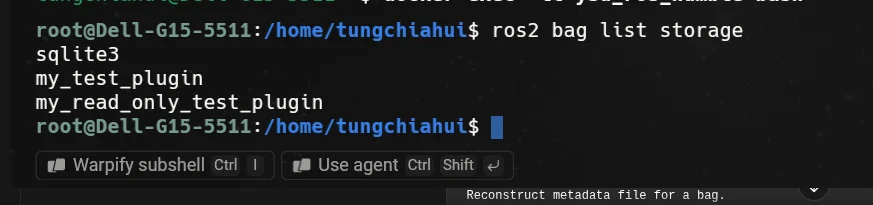
Humble 的 CLI 会根据系统实际注册的 writer 插件决定 -s/--storage 可以选择什么。ROS 2 Humble rosbag2 README
3.rosbag2中的QoS
前面已经知道,rosbag2 在录制和回放时并不是单纯地“读写文件”:
录制:Publisher → rosbag2 Recorder(Subscriber)

回放:rosbag2 Player(Publisher)→ Subscriber
因此,只要 rosbag2 参与 ROS 2 通信,就同样要遵守 ROS 2 的 QoS(服务质量,Quality of Service)规则。
ROS 2 的 QoS 策略很多,例如 History(历史策略)、Depth(队列深度)、Reliability(可靠性)、Durability(持久性)、Deadline(截止期限)、Liveliness(活跃性) 等。
对于 rosbag2 的录制和回放,首先最需要理解的是:
- Reliability(可靠性):
Reliable(可靠) 和Best Effort(尽力而为) - Durability(持久性):
Transient Local(本地瞬态) 和Volatile(易失性)
官方文档:
- ROS 2 Humble:Quality of Service settings
- ROS 2 Humble:Overriding QoS Policies for Recording and Playback
3.1.Request / Offered 模型
ROS 2 中,Publisher 和 Subscriber 的 QoS 并不是“必须完全相同”才能通信。
它采用的是 Request / Offered 模型:
Publisher
    ↓
Offered QoS(提供的服务质量)

Subscriber
    ↓
Requested QoS(请求的服务质量)
只有 Publisher 提供的 QoS 能满足 Subscriber 请求的 QoS,两者才能正常通信。
所以不能简单理解成:
Publisher QoS == Subscriber QoSInstead, it should be understood as:
Publisher 提供的能力
        ↓
能不能满足 Subscriber 的要求?
这个规则对普通 ROS 2 节点成立,对 rosbag2 也一样成立。
录制时:
原节点 Publisher
        ↓
rosbag2 Recorder Subscriber
回放时:
rosbag2 Player Publisher
        ↓
算法节点 Subscriber3.2.Reliability(可靠性)
Reliability 决定消息传输过程中,对“消息是否必须尽量送达”的要求。
Reliable(可靠) 可以理解为:
尽量保证消息送达
如果底层发现消息丢失,可以进行重传等处理
Best Effort(尽力而为) 可以理解为:
尽最大努力发送
如果某条消息丢失,不要求一定重传
更加关注最新的数据
很多高频传感器数据使用的 Sensor Data QoS Profile 会采用 Best Effort。对于这类数据,相比于等待旧数据重传,系统通常更关心最新的传感器数据。
Reliability 的兼容关系如下:
| Publisher Offered | Subscriber Requested | 是否兼容 |
|---|---|---|
| Best Effort | Best Effort | ✅ |
| Best Effort | Reliable | ❌ |
| Reliable | Best Effort | ✅ |
| Reliable | Reliable | ✅ |
最容易混淆的是下面两种情况:
Best Effort Publisher
        ↓
Reliable Subscriber

❌ 不兼容
原因是 Subscriber 要求“可靠传输”,但 Publisher 只提供 Best Effort,无法满足 Subscriber 的要求。
反过来:
Reliable Publisher
        ↓
Best Effort Subscriber

✅ 兼容
因为 Publisher 提供的能力已经能够满足 Subscriber 较低的要求。
因此,Reliable 并不是简单意义上的“比 Best Effort 更高级,所以任何时候都应该选 Reliable”。
QoS 的核心是:双方是否兼容,以及这种通信策略是否适合当前数据。
3.3.Durability(持久性)
Durability 主要决定:一个 Subscriber 后加入通信时,能不能收到 Publisher 之前已经发布过的数据。
Volatile(易失性) 可以理解为:
只接收建立通信之后的新消息
不保留之前已经发布的历史消息
For example:
Publisher:A  B  C

                Subscriber 在这里启动

Publisher:          D  E
如果 Subscriber 使用 Volatile,它通常只关心:
D E而不会要求得到之前的:
A B CTransient Local(本地瞬态) 则允许 Publisher 为后加入的 Subscriber 保留一定的历史样本。
It can be understood as:
Publisher
   │
   ├── 发布消息
   │
   └── 在本地保留历史样本
             ↓
       Late Joiner Subscriber
它的行为和 ROS 1 中 latched publisher 的概念有一定相似之处。
Durability 的兼容关系如下:
| Publisher Offered | Subscriber Requested | 是否兼容 |
|---|---|---|
| Volatile | Volatile | ✅ |
| Volatile | Transient Local | ❌ |
| Transient Local | Volatile | ✅ |
| Transient Local | Transient Local | ✅ |
Among them:
Volatile Publisher
        ↓
Transient Local Subscriber

❌ 不兼容
因为 Subscriber 要求能够获得 Transient Local 的历史数据能力,但 Publisher 并没有提供这种能力。
And:
Transient Local Publisher
        ↓
Volatile Subscriber

✅ 可以通信
但 Volatile Subscriber 并不会因为 Publisher 是 Transient Local,就自动要求得到建立通信之前的历史数据。
3.4./tf_static为什么特殊
/tf_static 是理解 Durability 很典型的例子。
静态 TF 的特点是:
变换关系基本不会变化
        ↓
没有必要像动态 /tf 一样持续高频发布
例如机器人中的某个固定传感器变换:
base_link
    ↓
laser_link
这个静态关系可能在系统启动时就已经发布。
Assumption:
10:00:00
Static TF Publisher 发布 /tf_static

10:00:20
rosbag2 Recorder 才启动
如果 Recorder 只能接收启动之后的新数据,而 /tf_static 后面又没有重新发布,那么这个 bag 就可能缺少关键的静态坐标变换。
因此 /tf_static 使用 Transient Local Durability,使后加入的 Subscriber 也有机会获得之前保留的静态 TF 数据。
这也是为什么录制 SLAM、定位和导航数据时,不能只确认“bag 里面有没有 /tf”,还需要关注 /tf_static 是否被正确录制。
3.5.rosbag2会自动适配QoS
理解 QoS 以后,也不要走到另一个极端:
是不是录每一个 Topic 都必须手动写 QoS?通常不是。
ROS 2 Humble 的 rosbag2 在录制时会根据发现到的 Publisher 尝试调整 Recorder 的 Requested QoS;在回放时,也会尝试保留原 Topic 原先 Offered 的 QoS。
因此大多数普通 Topic 不需要手动指定 QoS。
但是在一些需要明确控制行为的场景中,例如:
- 关键传感器 Topic
/tf_static- 同一个 Topic 存在多个 Publisher,并且 QoS 不完全一致
- 默认自动适配无法满足实际录制或回放需求
- 希望实验中的 QoS 行为固定、可复现
就可以使用 rosbag2 的 QoS Override。
3.6.查看Topic实际使用的QoS
不要只根据源码、Topic 名字或者经验猜测实际 QoS。
系统真正运行起来后,可以使用:
ros2 topic info -v /topic_name查看该 Topic 当前 Publisher 和 Subscriber 实际使用的 QoS。
例如重点观察:
Reliability
Durability
History
Depth
尤其在实车中,最终的 rosbag2 配置应该以实际运行时的 Topic 和 QoS为准。
3.7.rosbag2 QoS Override
rosbag2 可以通过 YAML 文件为特定 Topic 覆盖 QoS。
For example:
/tf_static:
  reliability: reliable
  durability: transient_local
如果某个传感器 Topic 实际使用 Best Effort,也可以按实际情况配置:
/sensor_points:
  reliability: best_effort
  durability: volatile
这里的 /sensor_points 只是示例。实际工程中应当先运行系统,再通过 ros2 topic info -v 确认真实 Topic 和 QoS。
录制时使用:
ros2 bag record \
  --qos-profile-overrides-path qos_overrides.yaml \
  /topic1 /topic2
此时 QoS Override 影响的是:
rosbag2 Recorder
        ↓
Subscription QoS
回放时使用:
ros2 bag play \
  --qos-profile-overrides-path qos_overrides.yaml \
  my_bag
此时 QoS Override 影响的是:
rosbag2 Player
        ↓
Publisher QoS
所以同一个参数在 record 和 play 中的作用对象并不相同。
最终可以把这一节的关系整理成:
录制

原 Publisher
    │ Offered QoS
    ↓
rosbag2 Recorder
    Requested QoS


回放

rosbag2 Player
    │ Offered QoS
    ↓
算法 Subscriber
Requested QoS理解这个模型以后,后面处理传感器数据、/tf_static 以及 rosbag2 的 QoS Override,就不再只是记配置参数,而是在判断:
Publisher 提供的 QoS,能不能满足 Subscriber 请求的 QoS。
4.rosbag2的话题选择
实际使用 rosbag2 时,首先要决定的就是:到底录哪些 Topic。
最直接的方式是显式指定 Topic:
ros2 bag record /topic1 /topic2 /topic3这种方式最明确,也最适合已经知道自己需要哪些数据的场景。
如果希望录制当前系统中的全部 Topic,可以使用:
ros2 bag record -aAmong them:
-a
--all
表示录制所有能够发现的 Topic。
默认情况下,rosbag2 在录制过程中还会继续进行 Topic Discovery。也就是说,即使某个 Topic 在启动 rosbag2 时还不存在,只要后面出现,Recorder 仍然可以发现它并开始录制。
如果不希望录制过程中继续发现新 Topic,可以使用:
ros2 bag record -a --no-discovery此时只会考虑 Recorder 启动时已经存在的 Topic。
需要注意,Humble 中 --use-sim-time 和 --no-discovery 不能同时使用,因为使用仿真时间时 Recorder 需要发现并订阅 /clock。
4.1.使用正则表达式选择Topic
除了显式列出 Topic 和使用 -a 以外,还可以使用:
-e
--regex
For example:
ros2 bag record -e ".*camera.*"它适合 Topic 数量比较多,并且命名有明显规律的系统。
4.2.排除不需要的Topic
如果希望先选择一大批 Topic,再排除其中一部分,可以使用:
-x
--exclude
For example:
ros2 bag record -a -x ".*debug.*"It can be understood as:
先选择一批 Topic
        ↓
再排除匹配 exclude 的 Topic
Humble 中,--exclude 需要和 --all 或 --regex 一起使用。显式列出 Topic 时不能同时使用 --exclude。
4.3.Hidden Topic和Unpublished Topic
--include-hidden-topics 用于把隐藏 Topic 也纳入发现和录制范围。隐藏 Topic 通常用于 ROS 2 内部或框架功能,一般不需要默认录制。
--include-unpublished-topics 则允许发现并为当前没有 Publisher 的 Topic 建立 Subscription。对于这种 Topic,如果没有额外提供 QoS Override,rosbag2 会使用默认 QoS 建立 Subscription。
4.4.Topic选择的基本原则
可以简单理解为:
临时调试 / 初步摸清系统
        ↓
-a 比较方便

长期录制 / 固定实验
        ↓
显式 Topic 或正则筛选更可控
-a 并不一定是错误的,但它可能把大量无关、高频或者调试 Topic 一起录下来。
Topic 越多,通常意味着:
DDS 接收量增加
        ↓
内存缓存压力增加
        ↓
磁盘写入量增加
        ↓
bag 体积增加
因此在正式实验中,更重要的不是“录得越多越好”,而是保证真正需要的数据被完整记录。
5.rosbag2中的时间
rosbag2 不只是保存消息内容,还必须为消息记录时间。时间决定了回放时消息之间的先后关系和间隔。
在普通系统中,Recorder 通常使用正常的 ROS/System 时间。
但是在 Gazebo 等仿真环境里,经常会使用 ROS Time,并由 /clock 提供仿真时间。
5.1.录制时使用仿真时间
Humble 中可以使用:
ros2 bag record --use-sim-time -a开启以后,Recorder 会订阅 /clock,并使用最新收到的仿真时间作为写入 bag 的时间戳。
这里有一个非常重要的行为:
在收到第一条
/clock之前,rosbag2 不会把消息写入 bag。
这是为了避免前面的消息以时间 0 写入,随后时间突然跳到正常仿真时间,导致 bag 的时间轴出现很大的跳变。
It can be understood as:
启动 Recorder
      ↓
等待 /clock
      ↓
收到第一个有效仿真时间
      ↓
开始正常写 bag
Therefore:
实机正常系统
    ↓
通常不需要 --use-sim-time

使用 /clock 的仿真系统
    ↓
需要考虑 --use-sim-time5.2.回放时发布/clock
回放 bag 时,可以让 Player 发布 /clock:
ros2 bag play my_bag --clockHumble 中,--clock 可以指定发布频率:
ros2 bag play my_bag --clock 40如果只写 --clock,Humble 默认使用 40 Hz。
这对于设置了:
use_sim_time = true的节点很重要,因为这些节点需要从 /clock 获取 ROS Time。
5.3.bag时间和消息Header不是一回事
很多 ROS 2 消息本身带有:
header.stamp但 rosbag2 自己也会记录用于保存和调度消息的 bag 时间。
所以不能简单把:
消息内部的 header.stampand:
rosbag2 的记录/回放时间认为是同一个概念。
6.rosbag2的分卷
如果长时间录制数据,一个 bag 内部的数据文件可能越来越大。
rosbag2 支持按照文件大小或者录制时间自动分卷。
6.1.按大小分卷
Humble 使用:
-b
--max-bag-size
单位是 byte。
For example:
ros2 bag record -a -b 1000000000当当前 bag 数据文件达到设定大小后,会切换到新的分片继续写入。参数为 0 时关闭按大小分卷。
6.2.按时间分卷
Humble 使用:
-d
--max-bag-duration
单位是秒。
For example:
ros2 bag record -a -d 900表示大约每录制 900 秒切换到新的分片。参数为 0 时关闭按时间分卷。
6.3.同时设置大小和时间
两个条件可以同时启用:
ros2 bag record -a \
  --max-bag-size 1000000000 \
  --max-bag-duration 900
At this point:
达到大小上限
      或
达到时间上限
      ↓
哪个先发生,就先触发分卷
一个 bag 目录中可能出现:
my_bag/
├── metadata.yaml
├── my_bag_0.db3
├── my_bag_1.db3
├── my_bag_2.db3
└── ...
这些文件仍然属于同一个逻辑上的 bag。
分卷除了控制单文件大小,也方便长时间录制、文件传输、数据归档和异常情况下的恢复。官方 rosbag2 文档也建议在使用压缩时考虑配合分卷。
7.rosbag2的压缩
传感器数据、图像、点云等 Topic 可能很快产生大量数据。
rosbag2 可以在录制过程中进行压缩,主要通过:
--compression-mode
--compression-format
配置。
7.1.Compression Mode
Humble 支持:
none
file
message
Among them:
none:不启用压缩;file:对 bag 数据文件进行压缩;message:按消息进行压缩。
7.2.Compression Format
Humble 官方 rosbag2 提供的压缩格式是:
zstdFor example:
ros2 bag record -a \
  --compression-mode file \
  --compression-format zstd
如果指定了 --compression-format,却没有设置有效的 --compression-mode,Humble 会认为参数组合无效。
7.3.压缩不是没有代价
压缩本质上是在:
磁盘占用
    ↕
CPU计算量
之间进行权衡。
大致可以理解成:
不压缩
  ↓
CPU 开销较低
磁盘写入量和文件体积较大

启用压缩
  ↓
文件体积可能下降
但需要额外 CPU 进行压缩
因此不能只因为“文件更小”就默认打开压缩,还应该观察 Recorder 是否掉消息、CPU 是否过载、磁盘是否成为瓶颈,以及最终 bag 是否能够稳定回放。
Humble 还提供:
--compression-queue-size
--compression-threads
用于控制压缩队列和并行线程。这类参数通常应该在确实遇到性能问题以后再调整。
8.rosbag2的存储配置
前面已经知道,rosbag2 的底层数据保存由 Storage Plugin 完成。
可以查看当前系统安装的 Storage Plugin:
ros2 bag list storage录制时可以通过:
-s
--storage
选择 storage id,例如:
ros2 bag record -a -s sqlite3如果不指定,rosbag2 会使用当前系统的默认 writer。
8.1.storage配置文件
Humble 支持:
--storage-config-file传入 Storage Plugin 自己的配置。
对于 SQLite3 Storage Plugin,配置结构可以包含:
read:
  pragmas: []

write:
  pragmas: []
这里的 pragma 是 SQLite 自己的数据库配置,例如可能涉及 journal mode、synchronous、cache size、page size 等。
这些参数会影响:
写入性能
内存占用
崩溃时的数据安全性
因此不应该在不了解 SQLite 行为时随意修改。
8.2.性能和数据安全之间的权衡
rosbag2 默认 SQLite 设置偏向录制性能。
这样有利于高吞吐写入,但如果 Recorder 或整个系统异常崩溃,当前正在写入的数据文件可能存在损坏风险。
如果已经启用分卷,风险通常主要集中在当前正在写入的分片,而不是已经正常关闭的旧分片。
Humble 还提供:
--storage-preset-profile官方文档提到可以使用:
resilient提高对异常崩溃造成损坏的抵抗能力。
但更高的数据安全性也可能带来一定的性能代价,所以 Storage 配置同样是在平衡:
写入性能
    ↕
异常情况下的数据完整性9.rosbag2的回放控制
最基本的回放命令是:
ros2 bag play my_bag除此以外,Humble 的 Player 还提供很多控制选项。
9.1.调整回放速度
Usage:
-r
--rate
For example:
ros2 bag play my_bag -r 0.5表示按照原始时间关系的一半速度回放。
ros2 bag play my_bag -r 2.0表示按照两倍速度回放。rate 必须大于 0。
9.2.只回放部分Topic
Usage:
--topicsFor example:
ros2 bag play my_bag \
  --topics /topic1 /topic2
如果不指定 --topics,默认回放 bag 中的全部 Topic。
9.3.Topic Remap
Player 支持:
-m
--remap
For example:
ros2 bag play my_bag \
  --remap /old_topic:=/new_topic
这样可以在不修改 bag 本身的情况下,把回放出来的 Topic 映射到新的名称。
9.4.延迟、起始位置与暂停
--delay 可以让 Player 启动后等待一段时间再开始回放:
ros2 bag play my_bag --delay 5--start-offset 可以从 bag 中间某个时间位置开始:
ros2 bag play my_bag --start-offset 30-p / --start-paused 可以让 Player 启动后先处于暂停状态。
9.5.循环播放
Usage:
-l
--loop
For example:
ros2 bag play my_bag --loop到达 bag 结尾后,会重新从头开始播放。
9.6.回放缓存
Humble 提供:
--read-ahead-queue-size控制 Player 预读到内存中的消息队列大小。
队列更大可能减少因为磁盘读取不足造成的播放延迟,但也会增加内存占用。默认情况下通常不需要修改。
9.7.等待Reliable消息确认
Humble 还提供:
--wait-for-all-acked用于在回放结束前等待 Reliable Publisher 发出的消息被 Subscriber 确认。
这个参数只对 Reliable QoS 有意义,适合某些短时间内快速发送大消息的场景。
9.8.通过Service控制Player
rosbag2 Player 还提供一组 ROS 2 Service,可以在运行期间控制播放状态,例如:
pause
resume
toggle_paused
play_next
burst
seek
get_rate
set_rate
is_paused
play
因此 Player 并不只是一个“从头到尾自动播放完”的命令,它也可以被其他程序动态控制。
总体上可以把回放过程理解成:
bag
 ↓
rosbag2 Player
 ├── 选择 Topic
 ├── 控制播放速度
 ├── 控制起始位置
 ├── Pause / Resume
 ├── Remap Topic
 ├── 发布 /clock
 └── 按 QoS 发布消息
           ↓
      ROS 2 节点
到这里,rosbag2 在实际使用中最常见的录制、回放和配置能力已经基本覆盖。
对于一般工程,优先复用官方提供的 ros2 bag record、ros2 bag play 等工具,再通过参数、配置文件和 Launch 进行组织即可,没有必要为了录包功能重新实现一套 Recorder 或 Player。
下面的 C++ Writer / Reader 示例主要用于理解 rosbag2_cpp 的程序接口和基本工作原理。
10.rosbag2 C++ Case Study and Framework Setup


add_executable(demo01_writer src/demo01_writer.cpp)
ament_target_dependencies(
  demo01_writer
  "rclcpp"
  "rosbag2_cpp"
  "geometry_msgs"
)

add_executable(demo02_reader src/demo02_reader.cpp)
ament_target_dependencies(
  demo02_reader
  "rclcpp"
  "rosbag2_cpp"
  "geometry_msgs"
)

install(TARGETS
  demo01_writer
  demo02_reader
DESTINATION lib/${PROJECT_NAME})11.rosbag2 C++ record data
/*
  需求:录制 turtle_teleop_key 节点发布的速度指令。
  步骤:
    1.包含头文件;
    2.初始化 ROS 客户端;
    3.定义节点类;
      3-1.创建写出对象指针;
      3-2.设置写出的目标文件;
      3-3.写出消息。
    4.调用 spin 函数,并传入对象指针;
    5.释放资源。

 */
// 1.包含头文件;
#include "rclcpp/rclcpp.hpp"
#include "rosbag2_cpp/writer.hpp"
#include "geometry_msgs/msg/twist.hpp"

using std::placeholders::_1;

// 3.定义节点类;
class SimpleBagRecorder : public rclcpp::Node
{
public:
  SimpleBagRecorder()
  : Node("simple_bag_recorder")
  {
    // 3-1.创建写出对象指针;
    writer_ = std::make_unique<rosbag2_cpp::Writer>();
    // 3-2.设置写出的目标文件;(目录为ws目录)
    writer_->open("src/cpp02_rosbag/my_bag");
    subscription_ = create_subscription<geometry_msgs::msg::Twist>(
      "/turtle1/cmd_vel", 10, std::bind(&SimpleBagRecorder::topic_callback, this, _1));
  }

private:
  void topic_callback(std::shared_ptr<rclcpp::SerializedMessage> msg) const
  {
    rclcpp::Time time_stamp = this->now();
    // 3-3.写出消息。
    RCLCPP_INFO(this->get_logger(),"数据写出... ...");
    writer_->write(msg, "/turtle1/cmd_vel", "geometry_msgs/msg/Twist", time_stamp);
  }

  rclcpp::Subscription<geometry_msgs::msg::Twist>::SharedPtr subscription_;
  std::unique_ptr<rosbag2_cpp::Writer> writer_;
};

int main(int argc, char * argv[])
{
  // 2.初始化 ROS 客户端;
  rclcpp::init(argc, argv);
  // 4.调用 spin 函数,并传入对象指针;
  rclcpp::spin(std::make_shared<SimpleBagRecorder>());
  // 5.释放资源。
  rclcpp::shutdown();
  return 0;
}
This is a relative directory; the directory location is the workspace directory.

Before writing data, you must first create a subscriber, and the subscriber must establish a callback function.

Callback function entry parameter; the message type uses the entry parameter of the write function.

Here, a slash should be used instead of a colon because the entry is of string type.


Create a turtle node.

Start the writer node

Run the little turtle
After running for a while, shut down all nodes.

Successfully generated the file
Verify whether the recording file is successfully created.
Before validation, first create a turtle node; there is no need to create a control node.
ros2 bag play src/cpp02_rosbag/my_bag
It can be seen that the turtle walked normally. Replay successful!

If one has already been generated my_bag, attempting to generate a new one will show that it cannot be overwritten.
Solution: my_bag can be set dynamically, by adding a timestamp or simply naming it by function.
12.rosbag2 C++ reading data
/*
  需求:读取 bag 文件数据。
  步骤:
    1.包含头文件;
    2.初始化 ROS 客户端;
    3.定义节点类;
      3-1.创建读取对象指针;
      3-2.设置读取的目标文件;
      3-3.读消息;
      3-4.关闭文件。
    4.调用 spin 函数,并传入对象指针;
    5.释放资源。

 */
 // 1.包含头文件;
 #include "rclcpp/rclcpp.hpp"
 #include "rosbag2_cpp/reader.hpp"
 #include "geometry_msgs/msg/twist.hpp"
 // 3.定义节点类;
class SimpleBagPlayer: public rclcpp::Node {
public:
    SimpleBagPlayer():Node("simple_bag_player"){
        // 3-1.创建读取对象指针;
        reader_ = std::make_unique<rosbag2_cpp::Reader>();
        // 3-2.设置读取的目标文件;
        reader_->open("src/cpp02_rosbag/my_bag");
        // 3-3.读消息;
        while (reader_->has_next())
        {
            auto twist = reader_->read_next<geometry_msgs::msg::Twist>();
            RCLCPP_INFO(this->get_logger(),"线速度:%.2f, 角速度: %.2f",twist.linear.x, twist.angular.z);
        }
        // 3-4.关闭文件。
        reader_->close();
    }
private:
    std::unique_ptr<rosbag2_cpp::Reader> reader_;

};

int main(int argc, char const *argv[]){
    // 2.初始化 ROS 客户端;
    rclcpp::init(argc,argv);
    // 4.调用 spin 函数,并传入对象指针;
    rclcpp::spin(std::make_shared<SimpleBagPlayer>());
    // 5.释放资源。
    rclcpp::shutdown();
    return 0;
}

Compile

This shows that several pieces of information can be read out. Eight pieces can be read out.

Exactly 8 items