3.3.5 Ignition Gazebo仿真环境创建
前面几节内容我们使用的是Ignition Gazebo内置的仿真环境,本节开始将介绍如何自行搭建仿真环境。本节案例将仿真一个长10m宽5m的矩形房间。该案例可以先启动Ignition Gazebo以拖拽的方式搭建仿真环境,然后再修改仿真环境对应的文件以调整细节。
1.创建sdf文件
首先请调用指令ign gazebo启动Ignition Gazebo,选择Empty仿真环境,然后添加立方体,每一个立方体都对应一堵墙。
上下左右立方体box、box_1、box_2、box_3对应的坐标分别为(5.0,0.0,0.5)、(-5.0,0.0,0.5)、(0.0,2.5,0.5)、(0.0,-2.5,0.5)。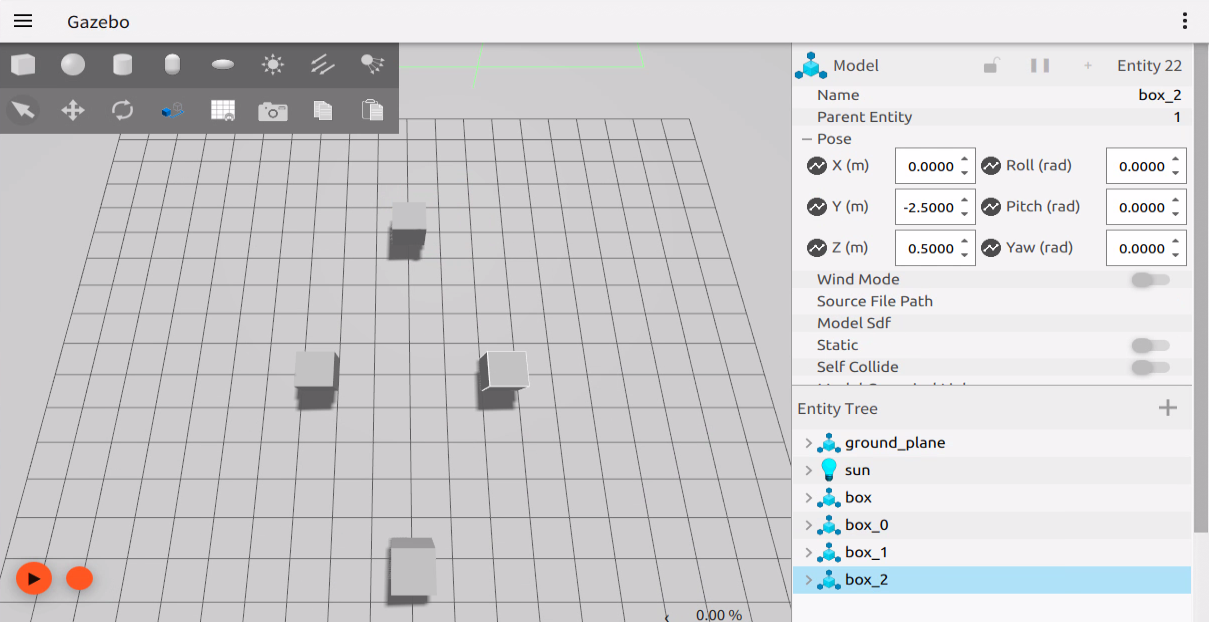 保存文件到功能包的world目录下,保存的文件名称需要以.sdf为后缀,此处文件名为house.sdf。
2.修改sdf文件
修改sdf文件,调整立方体的尺寸,实现墙体的合围。在sdf文件中,四个立方体分别对应了四个<model>标签,其name属性分别为box、box_1、box_2、box_3,将box和box_1中的<size>1 1 1</size>修改为<size>0.1 5 1</size>,将box_2和box_3中的<size>1 1 1</size>修改为<size>10 0.1 1</size>(注意:每个<model>标签下,都包含两个<size>标签,分别位于<collision>标签和<visual>标签下,两个<size>标签内容都需要修改)。
修改后与的house.sdf文件内容如下:
<sdf version='1.9'>
  <world name='empty'>
    <physics name='1ms' type='ignored'>
      <max_step_size>0.001</max_step_size>
      <real_time_factor>1</real_time_factor>
      <real_time_update_rate>1000</real_time_update_rate>
    </physics>
    <plugin name='gz::sim::systems::Physics' filename='ignition-gazebo-physics-system'/>
    <plugin name='gz::sim::systems::UserCommands' filename='ignition-gazebo-user-commands-system'/>
    <plugin name='gz::sim::systems::SceneBroadcaster' filename='ignition-gazebo-scene-broadcaster-system'/>
    <plugin name='gz::sim::systems::Contact' filename='ignition-gazebo-contact-system'/>
    <gravity>0 0 -9.8</gravity>
    <magnetic_field>6e-06 2.3e-05 -4.2e-05</magnetic_field>
    <atmosphere type='adiabatic'/>
    <scene>
      <ambient>0.4 0.4 0.4 1</ambient>
      <background>0.7 0.7 0.7 1</background>
      <shadows>true</shadows>
    </scene>
    <model name='ground_plane'>
      <static>true</static>
      <link name='link'>
        <collision name='collision'>
          <geometry>
            <plane>
              <normal>0 0 1</normal>
              <size>100 100</size>
            </plane>
          </geometry>
          <surface>
            <friction>
              <ode/>
            </friction>
            <bounce/>
            <contact/>
          </surface>
        </collision>
        <visual name='visual'>
          <geometry>
            <plane>
              <normal>0 0 1</normal>
              <size>100 100</size>
            </plane>
          </geometry>
          <material>
            <ambient>0.8 0.8 0.8 1</ambient>
            <diffuse>0.8 0.8 0.8 1</diffuse>
            <specular>0.8 0.8 0.8 1</specular>
          </material>
        </visual>
        <pose>0 0 0 0 -0 0</pose>
        <inertial>
          <pose>0 0 0 0 -0 0</pose>
          <mass>100</mass>
          <inertia>
            <ixx>1</ixx>
            <ixy>0</ixy>
            <ixz>0</ixz>
            <iyy>1</iyy>
            <iyz>0</iyz>
            <izz>1</izz>
          </inertia>
        </inertial>
        <enable_wind>false</enable_wind>
      </link>
      <pose>0 0 0 0 -0 0</pose>
      <self_collide>false</self_collide>
    </model>
    <model name='box'>
      <pose>5.0 0 0.5 -0 0 0</pose>
      <link name='box_link'>
        <inertial>
          <inertia>
            <ixx>16.666</ixx>
            <ixy>0</ixy>
            <ixz>0</ixz>
            <iyy>16.666</iyy>
            <iyz>0</iyz>
            <izz>16.666</izz>
          </inertia>
          <mass>100</mass>
          <pose>0 0 0 0 -0 0</pose>
        </inertial>
        <collision name='box_collision'>
          <geometry>
            <box>
              <size>0.1 5 1</size>
            </box>
          </geometry>
          <surface>
            <friction>
              <ode/>
            </friction>
            <bounce/>
            <contact/>
          </surface>
        </collision>
        <visual name='box_visual'>
          <geometry>
            <box>
              <size>0.1 5 1</size>
            </box>
          </geometry>
          <material>
            <ambient>0.3 0.3 0.3 1</ambient>
            <diffuse>0.7 0.7 0.7 1</diffuse>
            <specular>1 1 1 1</specular>
          </material>
        </visual>
        <pose>0 0 0 0 -0 0</pose>
        <enable_wind>false</enable_wind>
      </link>
      <static>false</static>
      <self_collide>false</self_collide>
    </model>
    <model name='box_0'>
      <pose>-5.0 -0 0.50000 -0 0 0</pose>
      <link name='box_link'>
        <inertial>
          <inertia>
            <ixx>16.666</ixx>
            <ixy>0</ixy>
            <ixz>0</ixz>
            <iyy>16.666</iyy>
            <iyz>0</iyz>
            <izz>16.666</izz>
          </inertia>
          <mass>100</mass>
          <pose>0 0 0 0 -0 0</pose>
        </inertial>
        <collision name='box_collision'>
          <geometry>
            <box>
              <size>0.1 5 1</size>
            </box>
          </geometry>
          <surface>
            <friction>
              <ode/>
            </friction>
            <bounce/>
            <contact/>
          </surface>
        </collision>
        <visual name='box_visual'>
          <geometry>
            <box>
              <size>0.1 5 1</size>
            </box>
          </geometry>
          <material>
            <ambient>0.3 0.3 0.3 1</ambient>
            <diffuse>0.7 0.7 0.7 1</diffuse>
            <specular>1 1 1 1</specular>
          </material>
        </visual>
        <pose>0 0 0 0 -0 0</pose>
        <enable_wind>false</enable_wind>
      </link>
      <static>false</static>
      <self_collide>false</self_collide>
    </model>
    <model name='box_1'>
      <pose>-0 -2.5 0.5 -0 -0 -0</pose>
      <link name='box_link'>
        <inertial>
          <inertia>
            <ixx>16.666</ixx>
            <ixy>0</ixy>
            <ixz>0</ixz>
            <iyy>16.666</iyy>
            <iyz>0</iyz>
            <izz>16.666</izz>
          </inertia>
          <mass>100</mass>
          <pose>0 0 0 0 -0 0</pose>
        </inertial>
        <collision name='box_collision'>
          <geometry>
            <box>
              <size>10 0.1 1</size>
            </box>
          </geometry>
          <surface>
            <friction>
              <ode/>
            </friction>
            <bounce/>
            <contact/>
          </surface>
        </collision>
        <visual name='box_visual'>
          <geometry>
            <box>
              <size>10 0.1 1</size>
            </box>
          </geometry>
          <material>
            <ambient>0.3 0.3 0.3 1</ambient>
            <diffuse>0.7 0.7 0.7 1</diffuse>
            <specular>1 1 1 1</specular>
          </material>
        </visual>
        <pose>0 0 0 0 -0 0</pose>
        <enable_wind>false</enable_wind>
      </link>
      <static>false</static>
      <self_collide>false</self_collide>
    </model>
    <model name='box_2'>
      <pose>-0 2.5 0.5 0 -0 -0</pose>
      <link name='box_link'>
        <inertial>
          <inertia>
            <ixx>16.666</ixx>
            <ixy>0</ixy>
            <ixz>0</ixz>
            <iyy>16.666</iyy>
            <iyz>0</iyz>
            <izz>16.666</izz>
          </inertia>
          <mass>100</mass>
          <pose>0 0 0 0 -0 0</pose>
        </inertial>
        <collision name='box_collision'>
          <geometry>
            <box>
              <size>10 0.1 1</size>
            </box>
          </geometry>
          <surface>
            <friction>
              <ode/>
            </friction>
            <bounce/>
            <contact/>
          </surface>
        </collision>
        <visual name='box_visual'>
          <geometry>
            <box>
              <size>10 0.1 1</size>
            </box>
          </geometry>
          <material>
            <ambient>0.3 0.3 0.3 1</ambient>
            <diffuse>0.7 0.7 0.7 1</diffuse>
            <specular>1 1 1 1</specular>
          </material>
        </visual>
        <pose>0 0 0 0 -0 0</pose>
        <enable_wind>false</enable_wind>
      </link>
      <static>false</static>
      <self_collide>false</self_collide>
    </model>
    <light name='sun' type='directional'>
      <pose>0 0 10 0 -0 0</pose>
      <cast_shadows>true</cast_shadows>
      <intensity>1</intensity>
      <direction>-0.5 0.1 -0.9</direction>
      <diffuse>0.8 0.8 0.8 1</diffuse>
      <specular>0.2 0.2 0.2 1</specular>
      <attenuation>
        <range>1000</range>
        <linear>0.01</linear>
        <constant>0.90000000000000002</constant>
        <quadratic>0.001</quadratic>
      </attenuation>
      <spot>
        <inner_angle>0</inner_angle>
        <outer_angle>0</outer_angle>
        <falloff>0</falloff>
      </spot>
    </light>
  </world>
</sdf>
3.编写launch文件
在launch目录下新建launch文件gazebo_sim_world.launch.py,并输入如下内容:
import os

from ament_index_python.packages import get_package_share_directory

from launch import LaunchDescription
from launch.actions import IncludeLaunchDescription
from launch.launch_description_sources import PythonLaunchDescriptionSource


def generate_launch_description():

    this_pkg = get_package_share_directory('demo_gazebo_sim')
    pkg_ros_gz_sim = get_package_share_directory('ros_gz_sim')
    world_file = os.path.join(this_pkg,"world","house.sdf")

    gz_sim = IncludeLaunchDescription(
        PythonLaunchDescriptionSource(
            os.path.join(pkg_ros_gz_sim, 'launch', 'gz_sim.launch.py')),
        launch_arguments={
            'gz_args': '-r ' + world_file
        }.items(),
    )
    return LaunchDescription([
        gz_sim
    ])
4.构建
终端中进入当前工作空间,编译功能包:
colcon build --packages-select demo_gazebo_sim
5.执行
终端中进入当前工作空间,调用如下指令执行launch文件:
. install/setup.bash
ros2 launch demo_gazebo_sim gazebo_sim_world.launch.py
运行结果如下图所示。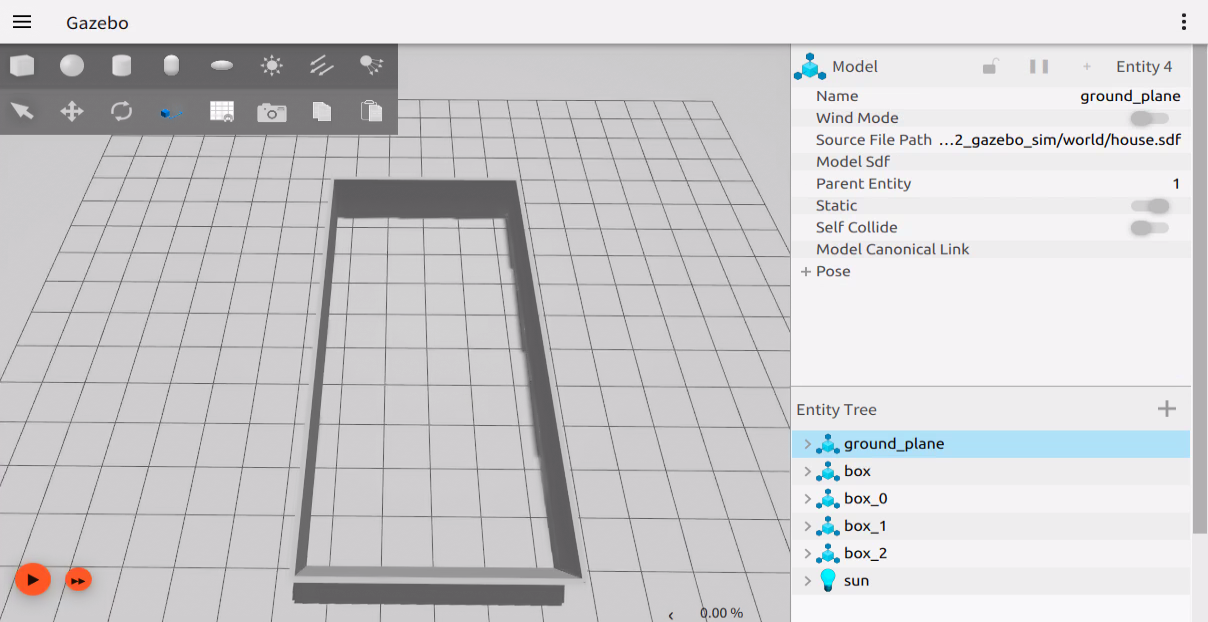 也可以根据个人喜好,继续设计房间模型。