3.3.6 Ignition Gazebo添加模型
在Ignition Gazebo官网提供了许多仿真模型,可以自行下载并使用以优化仿真环境,使其更多样、美观且真实。
1.资源下载
仿真Ignitio Gazebo的官方模型链接:app.ignitionrobotics.org/fuel/models,自行选择仿真模型点击进入详情页面,然后点击下载按钮即可将模型资源保存到本地。
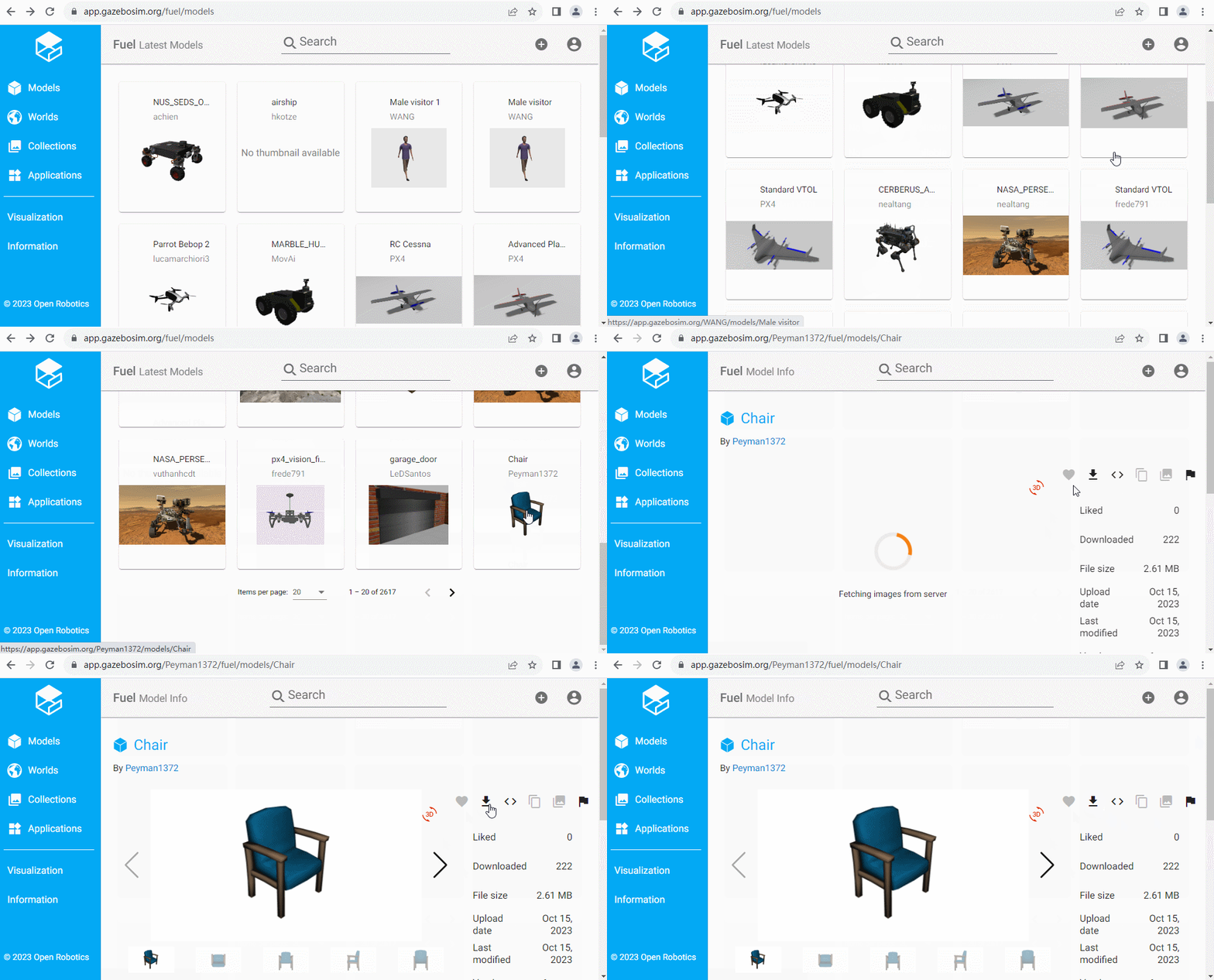
在用户目录下新建ign_models目录,将下载的资源解压缩到该目录以作备用。
2.资源配置
为了可以让Ignition Gazebo识别到模型资源,下一步还需要修改用户目录下的 .bashrc 文件,添加如下代码:
export IGN_GAZEBO_RESOURCE_PATH=~/ign_models
3.模型添加
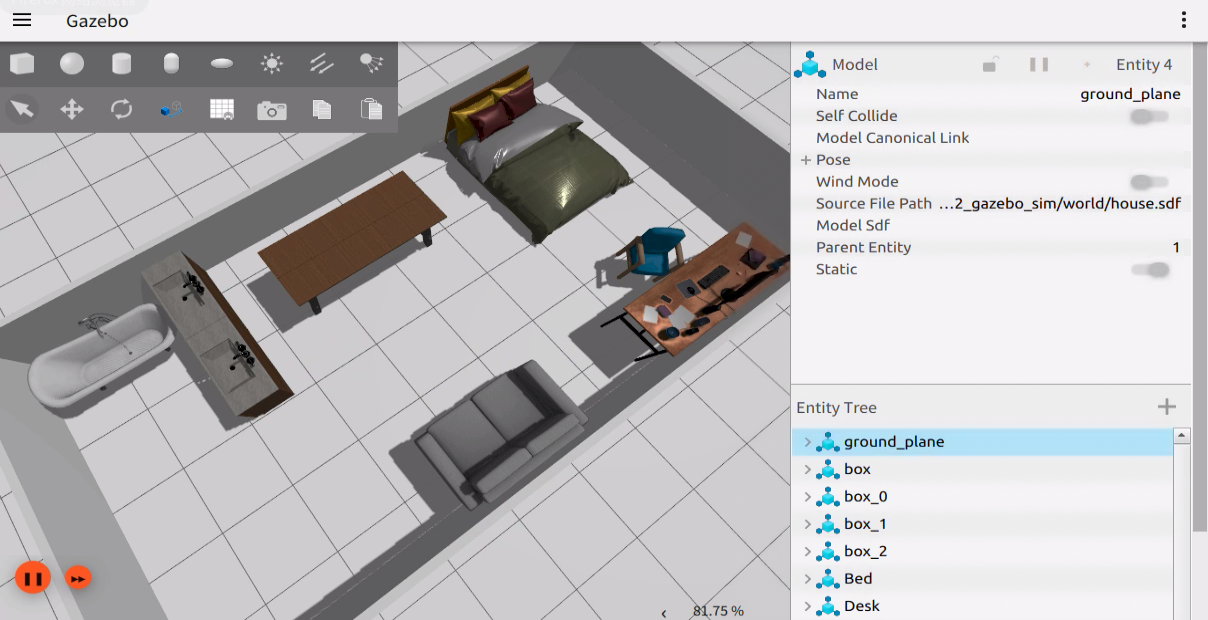
终端下进入功能包demo_gazebo_sim的world目录,使用指令ign gazebo house.sdf 启动仿真环境,点击窗口右上的折叠按钮,搜索Resource Spawner并打开,点击Local resources并选择模型拖拽至仿真环境中。将修改后的内容保存至house.sdf文件。
house.sdf文件示例内容如下:
<sdf version='1.9'>
  <world name='empty'>
    <physics name='1ms' type='ignored'>
      <max_step_size>0.001</max_step_size>
      <real_time_factor>1</real_time_factor>
      <real_time_update_rate>1000</real_time_update_rate>
    </physics>
    <plugin name='gz::sim::systems::Physics' filename='ignition-gazebo-physics-system'/>
    <plugin name='gz::sim::systems::UserCommands' filename='ignition-gazebo-user-commands-system'/>
    <plugin name='gz::sim::systems::SceneBroadcaster' filename='ignition-gazebo-scene-broadcaster-system'/>
    <plugin name='gz::sim::systems::Contact' filename='ignition-gazebo-contact-system'/>
    <gravity>0 0 -9.8</gravity>
    <magnetic_field>6e-06 2.3e-05 -4.2e-05</magnetic_field>
    <atmosphere type='adiabatic'/>
    <scene>
      <ambient>0.4 0.4 0.4 1</ambient>
      <background>0.7 0.7 0.7 1</background>
      <shadows>true</shadows>
    </scene>
    <model name='ground_plane'>
      <static>true</static>
      <link name='link'>
        <collision name='collision'>
          <geometry>
            <plane>
              <normal>0 0 1</normal>
              <size>100 100</size>
            </plane>
          </geometry>
          <surface>
            <friction>
              <ode/>
            </friction>
            <bounce/>
            <contact/>
          </surface>
        </collision>
        <visual name='visual'>
          <geometry>
            <plane>
              <normal>0 0 1</normal>
              <size>100 100</size>
            </plane>
          </geometry>
          <material>
            <ambient>0.8 0.8 0.8 1</ambient>
            <diffuse>0.8 0.8 0.8 1</diffuse>
            <specular>0.8 0.8 0.8 1</specular>
          </material>
        </visual>
        <pose>0 0 0 0 -0 0</pose>
        <inertial>
          <pose>0 0 0 0 -0 0</pose>
          <mass>100</mass>
          <inertia>
            <ixx>1</ixx>
            <ixy>0</ixy>
            <ixz>0</ixz>
            <iyy>1</iyy>
            <iyz>0</iyz>
            <izz>1</izz>
          </inertia>
        </inertial>
        <enable_wind>false</enable_wind>
      </link>
      <pose>0 0 0 0 -0 0</pose>
      <self_collide>false</self_collide>
    </model>
    <model name='box'>
      <pose>5.02632 -2e-06 0.500002 -0 4.4e-05 4.6e-05</pose>
      <link name='box_link'>
        <inertial>
          <inertia>
            <ixx>16.666</ixx>
            <ixy>0</ixy>
            <ixz>0</ixz>
            <iyy>16.666</iyy>
            <iyz>0</iyz>
            <izz>16.666</izz>
          </inertia>
          <mass>100</mass>
          <pose>0 0 0 0 -0 0</pose>
        </inertial>
        <collision name='box_collision'>
          <geometry>
            <box>
              <size>0.1 5 1</size>
            </box>
          </geometry>
          <surface>
            <friction>
              <ode/>
            </friction>
            <bounce/>
            <contact/>
          </surface>
        </collision>
        <visual name='box_visual'>
          <geometry>
            <box>
              <size>0.1 5 1</size>
            </box>
          </geometry>
          <material>
            <ambient>0.3 0.3 0.3 1</ambient>
            <diffuse>0.7 0.7 0.7 1</diffuse>
            <specular>1 1 1 1</specular>
          </material>
        </visual>
        <pose>0 0 0 0 -0 0</pose>
        <enable_wind>false</enable_wind>
      </link>
      <static>false</static>
      <self_collide>false</self_collide>
    </model>
    <model name='box_0'>
      <pose>-5.01336 -0.00029 0.500002 0 -4.2e-05 -0.005335</pose>
      <link name='box_link'>
        <inertial>
          <inertia>
            <ixx>16.666</ixx>
            <ixy>0</ixy>
            <ixz>0</ixz>
            <iyy>16.666</iyy>
            <iyz>0</iyz>
            <izz>16.666</izz>
          </inertia>
          <mass>100</mass>
          <pose>0 0 0 0 -0 0</pose>
        </inertial>
        <collision name='box_collision'>
          <geometry>
            <box>
              <size>0.1 5 1</size>
            </box>
          </geometry>
          <surface>
            <friction>
              <ode/>
            </friction>
            <bounce/>
            <contact/>
          </surface>
        </collision>
        <visual name='box_visual'>
          <geometry>
            <box>
              <size>0.1 5 1</size>
            </box>
          </geometry>
          <material>
            <ambient>0.3 0.3 0.3 1</ambient>
            <diffuse>0.7 0.7 0.7 1</diffuse>
            <specular>1 1 1 1</specular>
          </material>
        </visual>
        <pose>0 0 0 0 -0 0</pose>
        <enable_wind>false</enable_wind>
      </link>
      <static>false</static>
      <self_collide>false</self_collide>
    </model>
    <model name='box_1'>
      <pose>-0 -2.5 0.5 1e-06 0 0</pose>
      <link name='box_link'>
        <inertial>
          <inertia>
            <ixx>16.666</ixx>
            <ixy>0</ixy>
            <ixz>0</ixz>
            <iyy>16.666</iyy>
            <iyz>0</iyz>
            <izz>16.666</izz>
          </inertia>
          <mass>100</mass>
          <pose>0 0 0 0 -0 0</pose>
        </inertial>
        <collision name='box_collision'>
          <geometry>
            <box>
              <size>10 0.1 1</size>
            </box>
          </geometry>
          <surface>
            <friction>
              <ode/>
            </friction>
            <bounce/>
            <contact/>
          </surface>
        </collision>
        <visual name='box_visual'>
          <geometry>
            <box>
              <size>10 0.1 1</size>
            </box>
          </geometry>
          <material>
            <ambient>0.3 0.3 0.3 1</ambient>
            <diffuse>0.7 0.7 0.7 1</diffuse>
            <specular>1 1 1 1</specular>
          </material>
        </visual>
        <pose>0 0 0 0 -0 0</pose>
        <enable_wind>false</enable_wind>
      </link>
      <static>false</static>
      <self_collide>false</self_collide>
    </model>
    <model name='box_2'>
      <pose>-0.000154 2.52488 0.500821 -0.018068 -0 -0.003156</pose>
      <link name='box_link'>
        <inertial>
          <inertia>
            <ixx>16.666</ixx>
            <ixy>0</ixy>
            <ixz>0</ixz>
            <iyy>16.666</iyy>
            <iyz>0</iyz>
            <izz>16.666</izz>
          </inertia>
          <mass>100</mass>
          <pose>0 0 0 0 -0 0</pose>
        </inertial>
        <collision name='box_collision'>
          <geometry>
            <box>
              <size>10 0.1 1</size>
            </box>
          </geometry>
          <surface>
            <friction>
              <ode/>
            </friction>
            <bounce/>
            <contact/>
          </surface>
        </collision>
        <visual name='box_visual'>
          <geometry>
            <box>
              <size>10 0.1 1</size>
            </box>
          </geometry>
          <material>
            <ambient>0.3 0.3 0.3 1</ambient>
            <diffuse>0.7 0.7 0.7 1</diffuse>
            <specular>1 1 1 1</specular>
          </material>
        </visual>
        <pose>0 0 0 0 -0 0</pose>
        <enable_wind>false</enable_wind>
      </link>
      <static>false</static>
      <self_collide>false</self_collide>
    </model>
    <include>
      <uri>file://Bed</uri>
      <name>Bed</name>
      <pose>2.82155 1.18752 0 0 -0 0</pose>
    </include>
    <include>
      <uri>file://Office Desk</uri>
      <name>Desk</name>
      <pose>2.78306 -1.97796 0 0 -0 1.57</pose>
    </include>
    <include>
      <uri>file://Bathtub</uri>
      <name>Bathtub</name>
      <pose>-3.87509 1.82783 0 0 -0 0</pose>
    </include>
    <include>
      <uri>file://Vanity</uri>
      <name>Vanity</name>
      <pose>-2.5974 1.85613 -0.010992 0.021648 0 -1.57</pose>
    </include>
    <include>
      <uri>file://Vanity</uri>
      <name>Vanity_1</name>
      <pose>-2.5974 0.634325 -0.010992 0.021648 0 -1.57</pose>
    </include>
    <include>
      <uri>file://Dining Table</uri>
      <name>DiningTable</name>
      <pose>-0.374337 1.33602 0 0 0 -1.57</pose>
    </include>
    <include>
      <uri>file://Chair</uri>
      <name>Chair</name>
      <pose>2.79762 -1.26474 -0 -0 0 -2.3062</pose>
    </include>
    <include>
      <uri>file://Sofa</uri>
      <name>Sofa</name>
      <pose>-0.546136 -1.92328 0.000119 -0 0 1.57</pose>
    </include>
    <light name='sun' type='directional'>
      <pose>0 0 10 0 -0 0</pose>
      <cast_shadows>true</cast_shadows>
      <intensity>1</intensity>
      <direction>-0.5 0.1 -0.9</direction>
      <diffuse>0.8 0.8 0.8 1</diffuse>
      <specular>0.2 0.2 0.2 1</specular>
      <attenuation>
        <range>1000</range>
        <linear>0.01</linear>
        <constant>0.90000000000000002</constant>
        <quadratic>0.001</quadratic>
      </attenuation>
      <spot>
        <inner_angle>0</inner_angle>
        <outer_angle>0</outer_angle>
        <falloff>0</falloff>
      </spot>
    </light>
  </world>
</sdf>
4.构建
终端中进入当前工作空间,编译功能包:
colcon build --packages-select demo_gazebo_sim
5.执行
终端中进入当前工作空间,调用如下指令执行launch文件:
. install/setup.bash
ros2 launch demo_gazebo_sim gazebo_sim_world.launch.py
运行结果如下图所示。